[Help] disk has the same identifiers

USB RAID storage for photographers, music producers, movie collectors
Post Reply
User avatar
S1m0n
Posts: 1
Joined: 20 Apr 2025, 09:37
Great Britain

[Help] disk has the same identifiers

Post by S1m0n »

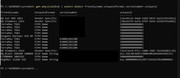
Having a few issues with my d4-320 windows reports that my disks have the same idetifiers basically my d4320 and d4300 have the same uniqeids and my d4-320 sees all my drives with same serial see picture. I cant for teh love of god solve this and my drives keep disconnecting because of it

i attach a pucture, can anyone advise or help ?

Image
User avatar
crisisacting
Silver Member
Posts: 499
Joined: 20 Jan 2022, 16:42

Re: [Help] disk has the same identifiers

Post by crisisacting »

It might require a firmware update to resolve that same serial number identifier issue, like the D5/D8-hybrid unless did @ viewtopic.php?t=6748

Hopefully a TerraMaster support employee can provide more insight.
User avatar
TMLila
TM Product Manager
Posts: 90
Joined: 30 Apr 2024, 16:27
China

Re: [Help] disk has the same identifiers

Post by TMLila »

S1m0n wrote: 20 Apr 2025, 09:41 Having a few issues with my d4-320 windows reports that my disks have the same idetifiers basically my d4320 and d4300 have the same uniqeids and my d4-320 sees all my drives with same serial see picture. I cant for teh love of god solve this and my drives keep disconnecting because of it

i attach a pucture, can anyone advise or help ?


Image
Hello! We recommend that you first check your computer's disk management to see if the disk symbols are assigned correctly. Or you can try to backup your data before upgrading.
Note: Your D4-320 supports upgrading, but the D4-300 cannot be upgraded! For more information, see: viewtopic.php?t=7111
User avatar
aaronbekir
Posts: 8
Joined: 16 Jun 2021, 01:22
Great Britain

Re: [Help] disk has the same identifiers

Post by aaronbekir »

Quick question on this firmware update, do i have to use the drives that are in there currently? (that have the same identifier) as I too have this issue, or can i use a spare HDD laying around and put it in the D6-320 one bay at a time, that i don't mind mucking around with.

I have 6x8tb drives that i can't realistically backup somewhere due to how large they are, but want to fix this issue, as it is causing slow boot times.

Thanks in advance, so glad i found someone with the same issue, as it has only just started happening and it has been driving me crazy.
User avatar
TMzethar
TM Support
Posts: 2819
Joined: 27 Oct 2020, 16:43

Re: [Help] disk has the same identifiers

Post by TMzethar »

aaronbekir wrote: 27 Apr 2025, 09:39
It is recommended to use spare, idle, or empty disks to update the firmware for each slot, thereby preventing data loss on the current disk due to accidental operations.
To contact our team, please send email to following addresses, remember to replace (at) with @:
Technical team: support(at)terra-master.com (for technical support)
Service team: service(at)terra-master.com (for purchasing, return, replacement, RMA service)
User avatar
annajoy
Posts: 2
Joined: 29 Apr 2025, 10:37
United States of America

Re: [Help] disk has the same identifiers

Post by annajoy »

How about using SATA instead of USB? If your TerraMaster supports SATA passthrough, using that instead of USB will avoid this limitation entirely.
User avatar
crisisacting
Silver Member
Posts: 499
Joined: 20 Jan 2022, 16:42

Re: [Help] disk has the same identifiers

Post by crisisacting »

annajoy wrote: 29 Apr 2025, 10:39 How about using SATA instead of USB? If your TerraMaster supports SATA passthrough, using that instead of USB will avoid this limitation entirely.
That's not possible as the solutions used internally by these TDAS devices explicitly convert from USB to SATA.
User avatar
aaronbekir
Posts: 8
Joined: 16 Jun 2021, 01:22
Great Britain

Re: [Help] disk has the same identifiers

Post by aaronbekir »

TMzethar wrote: 27 Apr 2025, 11:41
aaronbekir wrote: 27 Apr 2025, 09:39
It is recommended to use spare, idle, or empty disks to update the firmware for each slot, thereby preventing data loss on the current disk due to accidental operations.
This worked for me BTW, disks are now fine and not causing boot problems. Now if only i could stop the indicator lights blinking when the disks aren't in use!
Post Reply

Return to “USB Series”