

Hi All,
I just bought an used F4-220 and it doesn't boot at all, there is no beep sound no nothing, all HDD LED are red and the LAN LED is off. I assume it is caused because of a corrupted bios image. I do have the means to write the bios directly to the SPI memory but it turned out that it is not that easy to find a bios image. So, can any of help with providing an bios image?
BTW: I already tried to install a new bootable USB and it didn't change anything. Also, tried to reset the bios by removing the battery over night also no change.
Thanks in advance!
F4-220 Bios image


Re: F4-220 Bios image
Try to start it without any drives, and without RAM - maybe you will hear some post code.
Its an old device and EOL:
viewtopic.php?t=6910
Did it stop working, or have you bought it defect?
Last time it was sold new was back in August 2020., so if you bought it now, return it where you bought it and dont bother with it.
It has to be dirty cheep, less than 50€, or else its a waste of money.
You can try the F2-220 BIOS, because the raiser-card does not matter, its the same board:
https://forum.terra-master.com/cn/viewt ... s&start=10
Its an old device and EOL:
viewtopic.php?t=6910
Did it stop working, or have you bought it defect?
Last time it was sold new was back in August 2020., so if you bought it now, return it where you bought it and dont bother with it.
It has to be dirty cheep, less than 50€, or else its a waste of money.
You can try the F2-220 BIOS, because the raiser-card does not matter, its the same board:
https://forum.terra-master.com/cn/viewt ... s&start=10
Re: F4-220 Bios image
Here is a BIOS dump for F2-220 from 2022:
https://app.box.com/s/9bg2gx3on68nliacv8lbmtu3by008i1h
It uses the same board, with the Celeron J1800
BIOS Date: 08/16/2016 17:25:09 Ver: GBTM1208 version 5.6.5.
ME 1.1.4.1145
ME region offset: 1000h
BIOS region offset: 300000h
Region access settings:
BIOS: FFh FFh ME: FFh FFh
GbE: FFh FFh
BIOS access table:
Read Write
Desc Yes Yes
BIOS Yes Yes
ME Yes Yes
GbE Yes Yes
PDR Yes Yes
Flash chips in VSCC table:
C22016 (Macronix MX25U16)
EF4016 (Winbond W25Q32)
EF3016 (Winbond W25X32)
EF6017 (Winbond W25Q64)
202016 (Micron M25P32)
EF4017 (Winbond W25Q64)
1F4800 (Atmel AT25DF641)
Try to program it on to the EEPROM,
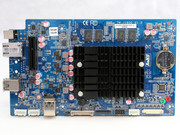
F2 board
F4 board
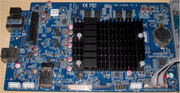
They are the same board, just the raiser card is different, 2 vs 4 slots.
https://app.box.com/s/9bg2gx3on68nliacv8lbmtu3by008i1h
It uses the same board, with the Celeron J1800
BIOS Date: 08/16/2016 17:25:09 Ver: GBTM1208 version 5.6.5.
ME 1.1.4.1145
ME region offset: 1000h
BIOS region offset: 300000h
Region access settings:
BIOS: FFh FFh ME: FFh FFh
GbE: FFh FFh
BIOS access table:
Read Write
Desc Yes Yes
BIOS Yes Yes
ME Yes Yes
GbE Yes Yes
PDR Yes Yes
Flash chips in VSCC table:
C22016 (Macronix MX25U16)
EF4016 (Winbond W25Q32)
EF3016 (Winbond W25X32)
EF6017 (Winbond W25Q64)
202016 (Micron M25P32)
EF4017 (Winbond W25Q64)
1F4800 (Atmel AT25DF641)
Try to program it on to the EEPROM,
F2 board
F4 board
They are the same board, just the raiser card is different, 2 vs 4 slots.
Re: F4-220 Bios image
Thanks Valnjes!
Yeah, I bought it as defect but cheap, 30 Euros. I do repair stuff for hobby so I just wanted to have a new project .
.
There is no sign of life though, it is completely silent.
So, I will first try with the F2 BIOS and see if it helps. Thanks a lot for sharing the image.
I also was able to find out that it is exactly the same board as Lenovo C40-05, so maybe that BIOS I will try it as a backup, but lets see.
Yeah, I bought it as defect but cheap, 30 Euros. I do repair stuff for hobby so I just wanted to have a new project
.There is no sign of life though, it is completely silent.
So, I will first try with the F2 BIOS and see if it helps. Thanks a lot for sharing the image.
I also was able to find out that it is exactly the same board as Lenovo C40-05, so maybe that BIOS I will try it as a backup, but lets see.
Re: F4-220 Bios image
Update:
Flashed the bios image - no changes.
Then I saw this post: viewtopic.php?t=6422
I followed the steps and added one resistor in parallel of the capacitor.
First I added 150 Ohm it booted once ( I heard the beep) and that was it, I was not able to boot it again.
Then I added 110 Ohm - was not booting
Then I added 90 Ohm - was not booting
Then I added 74 Ohm and it booted couple of times and that was it, after that I was not able to boot it again.
Last step I changed the capacitor with a new one and with the 74 Ohm in parallel was booting almost always I need to test further but it seems to be ok. Will provide an update after a while.
Flashed the bios image - no changes.
Then I saw this post: viewtopic.php?t=6422
I followed the steps and added one resistor in parallel of the capacitor.
First I added 150 Ohm it booted once ( I heard the beep) and that was it, I was not able to boot it again.
Then I added 110 Ohm - was not booting
Then I added 90 Ohm - was not booting
Then I added 74 Ohm and it booted couple of times and that was it, after that I was not able to boot it again.
Last step I changed the capacitor with a new one and with the 74 Ohm in parallel was booting almost always
I need to test further but it seems to be ok. Will provide an update after a while.

Re: F4-220 Bios image
This link is dead, do you happen to have the file and could share it again?
Valnjes wrote: ↑29 Jan 2025, 22:51 Here is a BIOS dump for F2-220 from 2022:
https://app.box.com/s/9bg2gx3on68nliacv8lbmtu3by008i1h
It uses the same board, with the Celeron J1800
BIOS Date: 08/16/2016 17:25:09 Ver: GBTM1208 version 5.6.5.
ME 1.1.4.1145
ME region offset: 1000h
BIOS region offset: 300000h
Region access settings:
BIOS: FFh FFh ME: FFh FFh
GbE: FFh FFh
BIOS access table:
Read Write
Desc Yes Yes
BIOS Yes Yes
ME Yes Yes
GbE Yes Yes
PDR Yes Yes
Flash chips in VSCC table:
C22016 (Macronix MX25U16)
EF4016 (Winbond W25Q32)
EF3016 (Winbond W25X32)
EF6017 (Winbond W25Q64)
202016 (Micron M25P32)
EF4017 (Winbond W25Q64)
1F4800 (Atmel AT25DF641)
Try to program it on to the EEPROM,
F2 board
F4 board
They are the same board, just the raiser card is different, 2 vs 4 slots.