Hi,
I've looked through the forum but couldn't find a solve to my issue.
I bought a USB Wifi dongle to plug into my F4-210:
"RTL8812AU USB 3.0 Dual Band 1200Mbps 802.11ac Wireless USB Adapter With Antenna"
But when I attempt to connect to my network I get the error: "No Wifi Network Found"
Detailed use case:
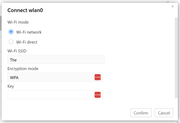
I log in via Ethernet, I use the control panel, select network, click wifi, click my wifi name, type in the key, and error. I'm clicking " Wifi Network" not wifi Direct. It does say WPA under encryption mode, but I'm using WPA2, it doesn't let me change it. Also my SSID only shows the first 3 characters, not the full SSID. The SSID is titled "The LAN Before Time", but only shows "The".
My NAS has worked great for over a year while connected by ethernet. But I needed to move it to a new room in the house and the wire can't reach now!
Any help is appreciated
[Help] F4-210 wifi connectivity issue
-
crisisacting

- Silver Member
- Posts: 531
- Joined: 20 Jan 2022, 16:42
Re: [Help] F4-210 wifi connectivity issue
Try rebooting your TNAS with the WiFi adapter; it likely requires it to be present during initialization for it to be an available connection.
-
EnchanterTheTim

- Posts: 8
- Joined: 03 May 2023, 11:29

Re: [Help] F4-210 wifi connectivity issue
Hi,crisisacting wrote: ↑29 Apr 2025, 03:02 Try rebooting your TNAS with the WiFi adapter; it likely requires it to be present during initialization for it to be an available connection.
Thanks for the response. I have rebooted a few times. It detects the wifi signals and I can select mine. But it just doesn't connect.
I tried again just now to check, still no dice.
Thank you!

Re: [Help] F4-210 wifi connectivity issue
Are you saying you can only choose WPA, or that you chose WPA from between WPA and WPA2?
In addition to different encryption modes, you can also try different frequency bands.(2.4G/5.8G)
In addition to different encryption modes, you can also try different frequency bands.(2.4G/5.8G)
To contact our team, please send email to following addresses, remember to replace (at) with @:
Technical team: support(at)terra-master.com (for technical support)
Service team: service(at)terra-master.com (for purchasing, return, replacement, RMA service)
Technical team: support(at)terra-master.com (for technical support)
Service team: service(at)terra-master.com (for purchasing, return, replacement, RMA service)
-
EnchanterTheTim
- Posts: 8
- Joined: 03 May 2023, 11:29
Re: [Help] F4-210 wifi connectivity issue
Hi, thanks for the reply.
I'm unable to chose WPA2, there is no ability to select anything other than WPA under encryption type.
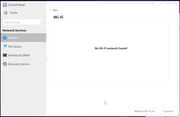
I'm adding two images to see. The red dots are Last Pass offering a suggested password, but they have no influence on what is typed or submitted. I tried on another browser as well, no luck.
The router i'm using is a Nokia Beacon 2. I have an asus router I may try out too.
But at this point I may just abandon Terramaster and switch to Synology. The UX/Customer Service/Instruction Manulal/ Tutorials has been awful up to this point.
Re: [Help] F4-210 wifi connectivity issue
Please confirm again the chip used in your USB WiFi dongle. If possible, please provide the purchase link.
To contact our team, please send email to following addresses, remember to replace (at) with @:
Technical team: support(at)terra-master.com (for technical support)
Service team: service(at)terra-master.com (for purchasing, return, replacement, RMA service)
Technical team: support(at)terra-master.com (for technical support)
Service team: service(at)terra-master.com (for purchasing, return, replacement, RMA service)


Re: [Help] F4-210 wifi connectivity issue
If the encryption type cannot select anything other than WPA, you can set the encryption type of WiFi to WPA in the Nokia Beacon 2 router. After making it consistent with the supported encryption type of WiFi, try to connect. If it still doesn't work, you can try your ASUS router. Of course, the encryption type of wifi is still set to WPA. It is best to migrate to the final place you need to put it after the nas and the router are connected at a short distance. I hope this is helpful to you.
To contact our team, please send email to following addresses. "(at)" = "@"
Technical team: support(at)terra-master.com
Service team: service(at)terra-master.com
Technical team: support(at)terra-master.com
Service team: service(at)terra-master.com
Re: [Help] F4-210 wifi connectivity issue
We are very sorry for causing you a bad experience. Please provide us with the specific version of the NAS TOS system, and we will provide it to the laboratory for reconfirmation.
To contact our team, please send email to following addresses. "(at)" = "@"
Technical team: support(at)terra-master.com
Service team: service(at)terra-master.com
Technical team: support(at)terra-master.com
Service team: service(at)terra-master.com
-
EnchanterTheTim
- Posts: 8
- Joined: 03 May 2023, 11:29
Re: [Help] F4-210 wifi connectivity issue
Hi, I searched around for one and only found it on Ebay. thought on second inspection it says RTL8812AU, it ends with a U not an A. Would that affect it? here's the link:
https://www.ebay.ca/itm/193510741187
-
EnchanterTheTim
- Posts: 8
- Joined: 03 May 2023, 11:29
Re: [Help] F4-210 wifi connectivity issue
I set the Encryption type on the Nokia Beacon 2 to WPA, but i still get the same error.OrionXie wrote: ↑30 Apr 2025, 15:34If the encryption type cannot select anything other than WPA, you can set the encryption type of WiFi to WPA in the Nokia Beacon 2 router. After making it consistent with the supported encryption type of WiFi, try to connect. If it still doesn't work, you can try your ASUS router. Of course, the encryption type of wifi is still set to WPA. It is best to migrate to the final place you need to put it after the nas and the router are connected at a short distance. I hope this is helpful to you.
I will try the Asus router when I get the chance later today.