

Hi,
Due issue on old TPLINK cameras 640x480, I decided to buy a new camera TAPO C520WS v2 for recording video and images events so:
1) I set up successfully the camera in ONVIF in 2K
2) Now I can see the LIVE preview rather on on old TPLINK camera was not visible
3) Recording in mp4 works well but when I try to open in mobile apps the video is not visible all green screen despite when viewing on PC it's ok
3) PTZ applet is visible within the Surveillance app but it's not working if I click on the arrows nothing happens
4) ONVIF events are not working at all, the TAPO app works but Surveillance didn't create any snapshots and neither record in the LOG
So, do you have any issue on this kind of cameras, or in general do you have an issues on ONVIF integrations more than video playback only?
Thanks
No PTZ working and ONVIF events on TAPO cameras

Re: No PTZ working and ONVIF events on TAPO cameras
If the video plays normally on the PC but not on the mobile device, this may be an issue with the mobile 's video player. You can try a different video player.
Is the PTZ unable to move in any direction? In reality, PTZ control is achieved by writing commands. It's possible that the camera is not responding. Regarding event detection, you can go to the camera's backend control panel to check if the relevant options are enabled. You can also export the logs to observe related events.
Additionally, we have not actually tested this brand of camera, so there may be some compatibility issues. If you have any specific issues, you can always provide feedback to us.
Is the PTZ unable to move in any direction? In reality, PTZ control is achieved by writing commands. It's possible that the camera is not responding. Regarding event detection, you can go to the camera's backend control panel to check if the relevant options are enabled. You can also export the logs to observe related events.
Additionally, we have not actually tested this brand of camera, so there may be some compatibility issues. If you have any specific issues, you can always provide feedback to us.
To contact our team, please send email to following addresses, remember to replace (at) with @:
Technical team: support(at)terra-master.com (for technical support)
Service team: service(at)terra-master.com (for purchasing, return, replacement, RMA service)
Technical team: support(at)terra-master.com (for technical support)
Service team: service(at)terra-master.com (for purchasing, return, replacement, RMA service)
Re: No PTZ working and ONVIF events on TAPO cameras
Hi,
I did several tests today configuring camera source and Terramaster Surveillance, unfortunately every video format (2K, 1080p or 720p) works fine in live viewing within the Terramaster Surveillance app, but all the recorded .mp4 file are unplayable both on PC and mobile. I previously said that was working on PC but I did a mistake. It's really strange due live it's fine on live viewing.
PTZ it's still not working too and neither log events, it looks like camera is not sending event or viceversa Terramaster Surveillance is not collecting correctly.
Anyway is there any log or .conf file I can review for debugging the issue?
I did several tests today configuring camera source and Terramaster Surveillance, unfortunately every video format (2K, 1080p or 720p) works fine in live viewing within the Terramaster Surveillance app, but all the recorded .mp4 file are unplayable both on PC and mobile. I previously said that was working on PC but I did a mistake. It's really strange due live it's fine on live viewing.
PTZ it's still not working too and neither log events, it looks like camera is not sending event or viceversa Terramaster Surveillance is not collecting correctly.
Anyway is there any log or .conf file I can review for debugging the issue?
Re: No PTZ working and ONVIF events on TAPO cameras
Hi,
I did two tests:
1) Recording from SURVEILLANCE app -> BAD FILE
2) Recording from VLC app -> OK
So I open with VLC both the files, discovering that SURVEILLANCE is not able to record camera input correctly, it use wrong framerates 16.xx vs 25, .. rather the VLC it's fine.
LIVE stream RTSP captured by VLC
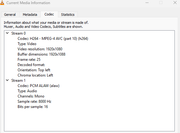
Info on TERRAMASTER generated file
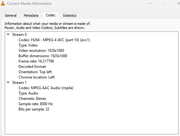
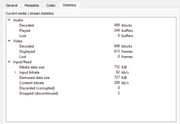
Info on VLC, same camera stream, generated file
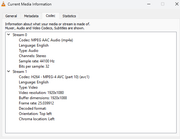
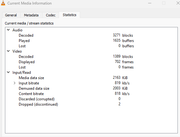
I did two tests:
1) Recording from SURVEILLANCE app -> BAD FILE
2) Recording from VLC app -> OK
So I open with VLC both the files, discovering that SURVEILLANCE is not able to record camera input correctly, it use wrong framerates 16.xx vs 25, .. rather the VLC it's fine.
LIVE stream RTSP captured by VLC
Info on TERRAMASTER generated file
Info on VLC, same camera stream, generated file
Re: No PTZ working and ONVIF events on TAPO cameras
Are the recorded videos you read from the Surveillance Manager app complete? Recorded videos are typically segmented by time. For instance, only when the recording duration reaches 30 minutes can it form a complete video file.
Additionally, what player are you using? You may try different players. You can also try Jellyfin on your NAS.
Additionally, what player are you using? You may try different players. You can also try Jellyfin on your NAS.
To contact our team, please send email to following addresses, remember to replace (at) with @:
Technical team: support(at)terra-master.com (for technical support)
Service team: service(at)terra-master.com (for purchasing, return, replacement, RMA service)
Technical team: support(at)terra-master.com (for technical support)
Service team: service(at)terra-master.com (for purchasing, return, replacement, RMA service)
Re: No PTZ working and ONVIF events on TAPO cameras
Hi,
I can wait the Surveillance app to complete the segment or either activate and deactive the camera manually, in any case the video created is not playable, if I download from PC VLC or Windows Media Player or mobile with Android. Video itself is not correct contains lot of garbage, green screens or pixelated. But I can live view correctly the camera from the Surveillance app, only the recording is wrong.
Is it possible that it's related to the camera codec?
I can wait the Surveillance app to complete the segment or either activate and deactive the camera manually, in any case the video created is not playable, if I download from PC VLC or Windows Media Player or mobile with Android. Video itself is not correct contains lot of garbage, green screens or pixelated. But I can live view correctly the camera from the Surveillance app, only the recording is wrong.
Is it possible that it's related to the camera codec?


Re: No PTZ working and ONVIF events on TAPO cameras
Hello, would you be able to send the problematic video file (which has playback issues) to our technical support email address? This will help us more accurately pinpoint the problem. Thank you!
To contact our team, please send email to following addresses, remember to replace (at) with @:
Support team: support(at)terra-master.com (for technical support only)
Support team: support(at)terra-master.com (for technical support only)
Re: No PTZ working and ONVIF events on TAPO cameras
Yes, I will di thank you
Re: No PTZ working and ONVIF events on TAPO cameras
Hi,
As suggested I sent a video example to the TERRAMASTER support on Apr. 28th, but till now no answer. From May 1st I decided to set-up a background FFMPEG task on my NAS TOS 6 recording live camera stream to 15 minutes duration files. Till now is working fine.
The FFMPEG command is like this:
ffmpeg -hide_banner -y -loglevel error -rtsp_transport tcp -use_wallclock_as_timestamps 1 -i rtsp://[username]:[password]@[IP]/stream1 -vcodec copy -acodec copy -f segment -reset_timestamps 1 -segment_time 900 -segment_format mkv -segment_atclocktime 1 -strftime 1 %Y%m%dT%H%M%S.mkv
Hope can help someone to fix the APP.

Re: No PTZ working and ONVIF events on TAPO cameras
Thank you for your feedback. We will check your relevant emails and we will also record the background running FFMPEG tasks.
To contact our team, please send email to following addresses, remember to replace (at) with @
Technical team: support(at)terra-master.com(for technical support)
Service team: service(at)terra-master.com(for purchasing, return, replacement, RMA service)
Technical team: support(at)terra-master.com(for technical support)
Service team: service(at)terra-master.com(for purchasing, return, replacement, RMA service)