[Help] D4-320 Can't Initialize Disks

USB RAID storage for photographers, music producers, movie collectors
Post Reply
User avatar
djstewy
Posts: 1
Joined: 11 Apr 2025, 11:05
United States of America

[Help] D4-320 Can't Initialize Disks

Post by djstewy »

Hi All

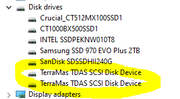
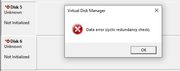
Just bought a new D4-320 along with two brand new WD Red PLUS 8 TB drives and mounted them in the DAS and connected to them to my Win 11 box. Device manager detects two generic TerraMAS TDAS SCSI Disk Devices in control panel, but when I go to initialize either of them in Disk Management it throws out a "Data error (cyclic redundancy check) error message and won't let me format/add the drives.

I moved the DAS over to my Win 10 box and I have the same issue, doesn't matter if I have one or both drives inserted into the DAS. Power cycling, rebooting, moving drive bays, checking for updated drivers does nothing. I highly doubt it's an issue with the drives since they are brand new out of box and both have the same issue with the D4-320.

Has anyone else ran into this when adding brand new drives? Any help would be appreciated!

Image

Image
User avatar
TMzethar
TM Support
Posts: 2819
Joined: 27 Oct 2020, 16:43

Re: [Help] D4-320 Can't Initialize Disks

Post by TMzethar »

If your Win10/Win11 has extra SATA ports, you can try connecting HDD to your PC to see if there is a similar issue, to check the HDD's health status and compatibility problems.

If you have other HDDs, you can try swapping them to test.

You can also try moving the HDD to different slots to observe the situation.
To contact our team, please send email to following addresses, remember to replace (at) with @:
Technical team: support(at)terra-master.com (for technical support)
Service team: service(at)terra-master.com (for purchasing, return, replacement, RMA service)
Post Reply

Return to “USB Series”