

Hi all,
I'm trying to get Photoprism up and running in a docker container, but it seems that either something has gone wrong with mounting the folders or something is going wrong with the user permissions to even view the mounted host directories.
I'm running it on an F4-424 pro.
The app runs fine, I can manually upload files just fine, but I am unable to find the host folders through the application.
This is the yml file I'm using
services:
photoprism:
image: photoprism/photoprism:latest
stop_grace_period: 10s
depends_on:
- mariadb
security_opt:
- seccomp:unconfined
- apparmor:unconfined
ports:
- "2342:2342"
environment:
PHOTOPRISM_ADMIN_USER: "SimeonDeSmet"
PHOTOPRISM_ADMIN_PASSWORD: "PLACEHOLDER"
PHOTOPRISM_AUTH_MODE: "password"
PHOTOPRISM_SITE_URL: "http://localhost:2342/"
PHOTOPRISM_DISABLE_TLS: "false"
PHOTOPRISM_DEFAULT_TLS: "true"
PHOTOPRISM_ORIGINALS_LIMIT: 5000
PHOTOPRISM_HTTP_COMPRESSION: "gzip"
PHOTOPRISM_LOG_LEVEL: "info"
PHOTOPRISM_READONLY: "false"
PHOTOPRISM_EXPERIMENTAL: "false"
PHOTOPRISM_DISABLE_CHOWN: "false"
PHOTOPRISM_DISABLE_WEBDAV: "false"
PHOTOPRISM_DISABLE_SETTINGS: "false"
PHOTOPRISM_DISABLE_TENSORFLOW: "false"
PHOTOPRISM_DISABLE_FACES: "false"
PHOTOPRISM_DISABLE_CLASSIFICATION: "false"
PHOTOPRISM_DISABLE_VECTORS: "false"
PHOTOPRISM_DISABLE_RAW: "false"
PHOTOPRISM_RAW_PRESETS: "false"
PHOTOPRISM_SIDECAR_YAML: "true"
PHOTOPRISM_BACKUP_ALBUMS: "true"
PHOTOPRISM_BACKUP_DATABASE: "true"
PHOTOPRISM_BACKUP_SCHEDULE: "daily"
PHOTOPRISM_INDEX_SCHEDULE: ""
PHOTOPRISM_AUTO_INDEX: 300
PHOTOPRISM_AUTO_IMPORT: -1
PHOTOPRISM_DETECT_NSFW: "false"
PHOTOPRISM_UPLOAD_NSFW: "true"
PHOTOPRISM_DATABASE_DRIVER: "mysql"
PHOTOPRISM_DATABASE_SERVER: "mariadb:3306"
PHOTOPRISM_DATABASE_NAME: "photoprism"
PHOTOPRISM_DATABASE_USER: "photoprism"
PHOTOPRISM_DATABASE_PASSWORD: "PLACEHOLDER"
PHOTOPRISM_SITE_CAPTION: "AI-Powered Photos App"
PHOTOPRISM_SITE_DESCRIPTION: ""
PHOTOPRISM_SITE_AUTHOR: ""
working_dir: "/photoprism"
volumes:
- "/Volume1/Photos/Shared Photos:/Photoprism/originals"
- "./storage:/photoprism/storage"
- "/Volume1/homes/SimeonDeSmet/Photos:/Photoprism/originals/SimeonDeSmet"
mariadb:
image: mariadb:11
restart: unless-stopped
stop_grace_period: 5s
security_opt:
- seccomp:unconfined
- apparmor:unconfined
command: --innodb-buffer-pool-size=512M --transaction-isolation=READ-COMMITTED --character-set-server=utf8mb4 --collation-server=utf8mb4_unicode_ci --max-connections=512 --innodb-rollback-on-timeout=OFF --innodb-lock-wait-timeout=120
volumes:
- "./database:/var/lib/mysql"
environment:
MARIADB_AUTO_UPGRADE: "1"
MARIADB_INITDB_SKIP_TZINFO: "1"
MARIADB_DATABASE: "photoprism"
MARIADB_USER: "photoprism"
MARIADB_PASSWORD: "PLACEHOLDER"
MARIADB_ROOT_PASSWORD: "PLACEHOLDER"
[Help] Docker container not able to find mounted volumes [SOLVED]

Re: [Help] Docker container not able to find mounted volumes
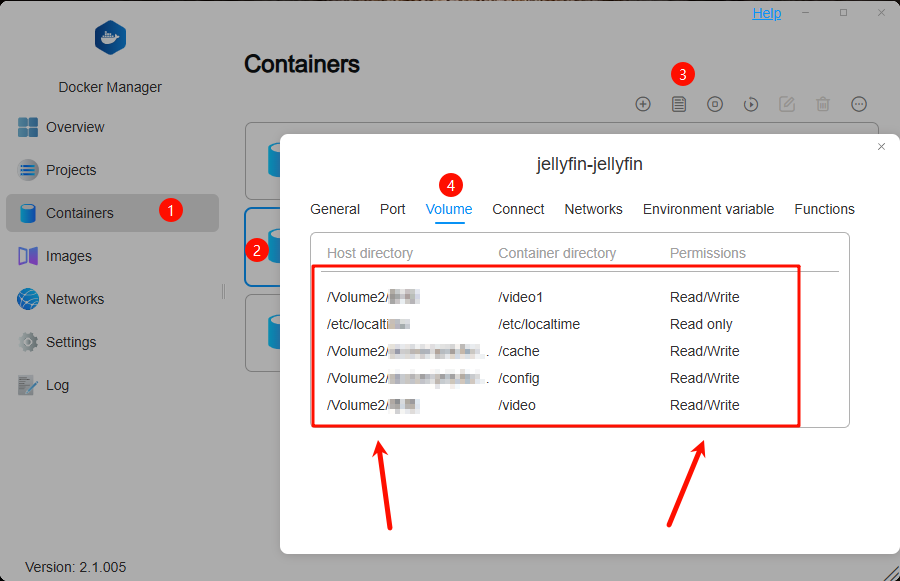
You can check in Docker to ensure that the mounted folder is correct and verify if the appropriate read/write permissions have been assigned.
To contact our team, please send email to following addresses, remember to replace (at) with @:
Technical team: support(at)terra-master.com(for technical support)
Service team: service(at)terra-master.com(for purchasing, return, replacement, RMA service)
Technical team: support(at)terra-master.com(for technical support)
Service team: service(at)terra-master.com(for purchasing, return, replacement, RMA service)
Re: [Help] Docker container not able to find mounted volumes
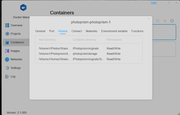
Thanks for the reply! I checked and that seems to be just fine?


Re: [Help] Docker container not able to find mounted volumes
Please check the mount path of the data volume corresponding to the screenshot inside the container. Please note that the folder on the host machine will not be directly visible inside the container; instead, it is mapped through the form of data volume mounting.

To contact our team, please send email to following addresses, remember to replace (at) with @
Technical team: support(at)terra-master.com (for technical support)
Service team: service(at)terra-master.com (for purchasing, return, replacement, RMA service)
Technical team: support(at)terra-master.com (for technical support)
Service team: service(at)terra-master.com (for purchasing, return, replacement, RMA service)
Re: [Help] Docker container not able to find mounted volumes [SOLVED]
Hi there,
I seem to have solved thee mystery,
- "/Volume1/Photos/Shared Photos:/Photoprism/originals"
should have been
- "/Photos/Shared Photos:/photoprism/originals"
Thanks! We can consider this solved
I seem to have solved thee mystery,
- "/Volume1/Photos/Shared Photos:/Photoprism/originals"
should have been
- "/Photos/Shared Photos:/photoprism/originals"
Thanks! We can consider this solved
Re: [Help] Docker container not able to find mounted volumes
I'm really glad to have been able to help you. If you have any further questions later, please feel free to consult.
To contact our team, please send email to following addresses, remember to replace (at) with @
Technical team: support(at)terra-master.com (for technical support)
Service team: service(at)terra-master.com (for purchasing, return, replacement, RMA service)
Technical team: support(at)terra-master.com (for technical support)
Service team: service(at)terra-master.com (for purchasing, return, replacement, RMA service)