

F4-423 running TOS 6.0.650, recently installed.
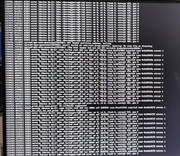
The HDMI is currently outputting the following:
[77957.######] BTRFS error (device dm-2): bdev /dev/mapper/vg0-lv0 errs: errs: wr0, rd 0, flush 0, corrupt 241, gen 0
The ###### represents a 6 digit number that is different every time, the Corrupt 241 generally increases by one but occasionally jumps to i.e 249 then 275 single digits to 284 then a jump to 336. The monitor i full of a this string top to bottom with 241 at the top and 462 on the bottom. I do not know what the frequency is of new lines being added.
I was previously running TOS 5. It kept having issues where it would slow to a crawl then eventually crashed and my data was lost. I learned from that and am currently running an updated back up. if it wasn't for that "corrupt ###" i wouldn't be concerned. But I am, any recommendations?
Thanks, M
The corruption may count may be going up as a result of my backup. My latest backup, utilizing TFM backup version 1.0.124 was "Partial Success (805/812)"
[Help] BTRFS Error

Re: [Help] BTRFS Error
Based on your description, if there have been filesystem anomalies all along, the performance or health of the drive is quite concerning.
I recommend prioritizing the backup of your data.
You can also gather a system report and send it to our technical support email for inspection.
(Please include the link to this forum post.)
I recommend prioritizing the backup of your data.
You can also gather a system report and send it to our technical support email for inspection.
(Please include the link to this forum post.)
To contact our team, please send email to following addresses, remember to replace (at) with @:
Technical team: support(at)terra-master.com (for technical support)
Service team: service(at)terra-master.com (for purchasing, return, replacement, RMA service)
Technical team: support(at)terra-master.com (for technical support)
Service team: service(at)terra-master.com (for purchasing, return, replacement, RMA service)
Re: [Help] BTRFS Error
I assume this means to use the debug mode as described in this thread? If so, i have just enabled it and will send logs after they have had some time to develop. May force another backup today to see if that will give it something to report. If that is not what your were referring to please point me in the correct direction.
Thanks for your help.
viewtopic.php?t=6446
Thanks for your help.
viewtopic.php?t=6446


Re: [Help] BTRFS Error
No - click on the "Support and Help" icon. You can generate a system report there.
F5-221 TOS7.0.1278 - 4x4TB (Ironwolf) Traid
F2-424 TOS7.0.1278 - 2x500GB nvme (P3) Traid, 2x6TB HDD (HGST) Traid
F2-221 TOS7.0.1278 - 1x3TB Ext4, 1x4TB Btrfs
F2-425+ TOS7.0.1278 - 2x500GB nvme (P3) Traid, 2x6TB HDD (EXOS) Traid
F2-424 TOS7.0.1278 - 2x500GB nvme (P3) Traid, 2x6TB HDD (HGST) Traid
F2-221 TOS7.0.1278 - 1x3TB Ext4, 1x4TB Btrfs
F2-425+ TOS7.0.1278 - 2x500GB nvme (P3) Traid, 2x6TB HDD (EXOS) Traid
Re: [Help] BTRFS Error
Thanks for directing me to the correct spot. Adding the below image as new lines are beginning to appear.

Re: [Help] BTRFS Error
Based on the error feedback in the image you provided, I suspect that the hard drive may be faulty. You can first use the SMART tool to check if there is an issue with the hard drive. If the hard drive is fine, the problem may be caused by a failure in the Btrfs file system, which can occur due to unexpected power loss or similar incidents. If your hard drive is not the issue, please visit our official website, contact our online support, and schedule a remote session with an engineer. Be sure to include the link to this post.
To contact our team, please send email to following addresses, remember to replace (at) with @:
Technical team: support(at)terra-master.com(for technical support)
Service team: service(at)terra-master.com(for purchasing, return, replacement, RMA service)
Technical team: support(at)terra-master.com(for technical support)
Service team: service(at)terra-master.com(for purchasing, return, replacement, RMA service)