But I couldn't keep well enough alone. I've been reading these forums off and on since last year, and specifically following the updates to TOS 6.0. When the official release was announced I took it upon myself to start the upgrade.
One of the first steps in the processes I followed was to check and verify that the internal USB drive was an 8GB drive as later 5.0 updates and ultimately 6.0 would not fit on smaller USB drives. I verified that I had 8GB disks in both. So off to a good start.
I was stuck on TOS 5.0-023 so I had to follow the steps to get it updated to something higher than 5.0.024 so that the 6.0 update would run. Updating to 5.0.24 and then 5.0.147 went without issue.
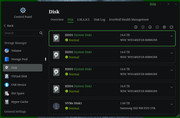
So then I upgraded to TOS 6.0 and even that went off without a hitch. Until I rebooted. Now on NAS 1 all four of my HDDs are listed as System Disks, and on NAS two the first two of four HDDs are now listed as System Disks. Based on further reading, it appears to me that TOS 6.0 is now installed on the HDDs and not the internal USB drive. I also have two nvme 1TB disks in each NAS and the OS probably should have been installed there as a better choice. Right?
I followed the steps given and used the "reset to factory defaults" and installed the updates using the downloaded files using the UI's Control Panel upgrade app.
What was the point of checking the size of the USB Drive only to have TOS installed on top of my existing RAID drives? I was never given any options to choose disks to install to.
I may have the above TOS version numbers off, but here are the steps I followed... viewtopic.php?t=6984
I did have to upgrade to a higher version of TOS 5 before updating to TOS 6.
What have I done wrong and how do I fix this? TIA.