CLAMAV - Update 1.4.002

Discussion of applications not mentioned above.
Post Reply
User avatar
Gremlin
Gold Member
Posts: 1627
Joined: 02 Dec 2022, 22:31
Great Britain

CLAMAV - Update 1.4.002

Post by Gremlin »

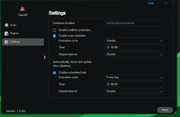
Says: "Solved the issue of enable realtime protection failure."

WRONG!

Image


Post shutdown/start-up situation. Nothing has changed.
F5-221 TOS7.0.0777 - 4x4TB (Ironwolf) Traid
F2-424 TOS7.0.0777 - 2x500GB nvme (P3) Traid, 2x6TB HDD (HGST) Traid
F2-221 TOS7.0.0777 - 1x3TB Ext4, 1x4TB Btrfs
F2-425+ TOS7.0.0777 - 2x500GB nvme (P3) Traid, 2x6TB HDD (EXOS) Traid
User avatar
ColaChen
TM Support
Posts: 164
Joined: 11 Aug 2023, 18:15
China

Re: CLAMAV - Update 1.4.002

Post by ColaChen »

Hello, could you please provide a detailed description of the results you expect to see when real-time protection is enabled on your system?
User avatar
Gremlin
Gold Member
Posts: 1627
Joined: 02 Dec 2022, 22:31
Great Britain

Re: CLAMAV - Update 1.4.002

Post by Gremlin »

ColaChen wrote: 19 Mar 2025, 00:45
Is that a serious question?
If I enable an option (and apply it) I expect that option to still be enabled when I next restart the device.
As it stands, in the dialogue, Real time protection is not enabled.
If it is not enabled, it is disabled.
I want it enabled when the device starts.
Is that clear enough?

While we are at it:
It would be nice to see a log of
a) Db Updates performed (I have it set to update daily)
b) Scans performed (with or without finding anything.

At the moment ClamAV on Tos is some nebulous artifact we are supposed to believe in.
F5-221 TOS7.0.0777 - 4x4TB (Ironwolf) Traid
F2-424 TOS7.0.0777 - 2x500GB nvme (P3) Traid, 2x6TB HDD (HGST) Traid
F2-221 TOS7.0.0777 - 1x3TB Ext4, 1x4TB Btrfs
F2-425+ TOS7.0.0777 - 2x500GB nvme (P3) Traid, 2x6TB HDD (EXOS) Traid
User avatar
TMzethar
TM Support
Posts: 2819
Joined: 27 Oct 2020, 16:43

Re: CLAMAV - Update 1.4.002

Post by TMzethar »

Sorry for the inconvenience caused; we have noticed this issue and added it to our list of fixes.
To contact our team, please send email to following addresses, remember to replace (at) with @:
Technical team: support(at)terra-master.com (for technical support)
Service team: service(at)terra-master.com (for purchasing, return, replacement, RMA service)
Post Reply

Return to “Others”