TOS 6.0.650 (X86) is Released for Update

Official news about TOS, mobile app, PC app updates or beta releases.
User avatar
nale88
Posts: 9
Joined: 08 May 2024, 04:24
Bosnia & Herzegovina

Re: TOS 6.0.650 (X86) is Released for Update

Post by nale88 »

Hi!
I've updated from last 6.0.xxx version to 6.0.650 and my server (F2-423) has been barely usable.

Just after reinstall I've had the drives synchronisation (which lasted over a day), and afterward my CPU usage is constantly high - I couldn't even connect to it for about 24h.

The main process that is using the CPU is "smbrichacl". I've checked if the UID is set correctly (like suggested here), and all is looking OK. Just after the reboot, the smbrichacl processes start popping (one each few minutes) and at begining each is using ~25% of CPU. This in turn makes the rsyslogd and systemd CPU spikes (18 - 20% of CPU).

I've rebooted the unit some 25 mins ago, and I'm currently sitting with 6 smbrichacl processes.

`/var/log/messages`:

Code: Select all

Mar 13 22:01:39 TNAS smbrichacl: create_security_token - group id : 997,group name : allusers,id to sid : S-1-22-2-997
Mar 13 22:01:39 TNAS smbrichacl: create_security_token - group id : 1001,group name : jellyfin,id to sid : S-1-22-2-1001
Mar 13 22:01:39 TNAS smbrichacl: create_security_token - group id : 997,group name : allusers,id to sid : S-1-22-2-997
Mar 13 22:01:39 TNAS smbd[18859]: cp: error writing '/tmp/TOS_CONFIG/zlog/zlog_telnet.conf': No space left on device
Mar 13 22:01:39 TNAS smbrichacl: create_security_token - group id : 1001,group name : jellyfin,id to sid : S-1-22-2-1001
Mar 13 22:01:39 TNAS smbrichacl: create_security_token - group id : 997,group name : allusers,id to sid : S-1-22-2-997
Mar 13 22:01:39 TNAS smbrichacl: create_security_token - group id : 1003,group name : emina,id to sid : S-1-22-2-1003
Mar 13 22:01:39 TNAS smbrichacl: create_security_token - group id : 997,group name : allusers,id to sid : S-1-22-2-997
Mar 13 22:01:39 TNAS smbrichacl: create_security_token - group id : 1001,group name : jellyfin,id to sid : S-1-22-2-1001
`/var/log/syslog`:

Code: Select all

Mar 13 22:11:17 TNAS smbrichacl: create_security_token - group id : 997,group name : allusers,id to sid : S-1-22-2-997
Mar 13 22:11:17 TNAS smbrichacl: create_security_token - group id : 1001,group name : jellyfin,id to sid : S-1-22-2-1001
Mar 13 22:11:17 TNAS smbrichacl: create_security_token - group id : 997,group name : allusers,id to sid : S-1-22-2-997
Mar 13 22:11:17 TNAS smbrichacl: create_security_token - group id : 1001,group name : jellyfin,id to sid : S-1-22-2-1001
Mar 13 22:11:17 TNAS smbrichacl: create_security_token - group id : 997,group name : allusers,id to sid : S-1-22-2-997
Mar 13 22:11:17 TNAS smbrichacl: create_security_token - group id : 1001,group name : jellyfin,id to sid : S-1-22-2-1001
Mar 13 22:11:17 TNAS smbrichacl: create_security_token - group id : 997,group name : allusers,id to sid : S-1-22-2-997
Mar 13 22:11:17 TNAS smbrichacl: create_security_token - group id : 1001,group name : jellyfin,id to sid : S-1-22-2-1001
Mar 13 22:11:17 TNAS smbrichacl: create_security_token - group id : 997,group name : allusers,id to sid : S-1-22-2-997
I have disabled the SMB service and Jellyfin, but no change.

The drive is so sluggish, I'm unable to read the PDF from it (when SMB is enabled). The Windows Explorer freezes on accessing it.

Does anybody have any idea what to do apart from reinstalling the unit from ground up?
F2-423 2x4TB
User avatar
jpeckinp
Posts: 39
Joined: 22 Mar 2024, 05:30
United States of America

Re: TOS 6.0.650 (X86) is Released for Update

Post by jpeckinp »

I have the UPS issue also. I enable the UPS hit apply and I get the UPS is not connected. I have a Tripplite Smart1500lcdt which is on the compatible list. If I unplug the UPS I do get an alert that it has disconnected. Unfortunately if I go away from the power settings page even if I click save it doesn't save the enable setting.
Current System:
F4-424 Pro
40TB storage.
TOS- 7.0.0746
User avatar
sergio
Posts: 16
Joined: 20 Feb 2025, 17:45
Germany

Re: TOS 6.0.650 (X86) is Released for Update

Post by sergio »

hi, you have the same model f2-423 and 6.0.650?
User avatar
TMzethar
TM Support
Posts: 2818
Joined: 27 Oct 2020, 16:43

Re: TOS 6.0.650 (X86) is Released for Update

Post by TMzethar »

nale88 wrote: 14 Mar 2025, 05:17
It seems you have recently modified the permissions of many files. This is the process for modifying SMB ACL permissions, and it is recommended that you wait for it to complete.
To contact our team, please send email to following addresses, remember to replace (at) with @:
Technical team: support(at)terra-master.com (for technical support)
Service team: service(at)terra-master.com (for purchasing, return, replacement, RMA service)
User avatar
nale88
Posts: 9
Joined: 08 May 2024, 04:24
Bosnia & Herzegovina

Re: TOS 6.0.650 (X86) is Released for Update

Post by nale88 »

Hi TMzethar!
I guess you're right! After 18h this has finished, now just the syslog is using about 15% of CPU, but the overall the system feels OK. I'll reenable the services to see if all will go well!

Thank you!
F2-423 2x4TB
User avatar
StephenNaylor
Posts: 41
Joined: 07 May 2023, 00:33

Re: TOS 6.0.650 (X86) is Released for Update

Post by StephenNaylor »

F5-422. Updated to Version 6.0.650 yesterday

I use User Groups to manage access to my shared folders. I've noted (and also in previous versions), that if I go into the permissions of a Share and have the "Users" view displayed that ToS keeps giving (i.e. ticking) Read/Write access to the first user in the users list. As far as I can tell this seems to be happening for all shares. If I remove the permission, the user shows as having no permissions on the Share, even if they are a member of a group that gives them access to that Share.

This stray tick is the only tick on that screen as all my permissions are set by user group.

I also note that the stray permission keeps coming back.
User avatar
Claus
Posts: 2
Joined: 24 Sep 2024, 00:22
Germany

Re: TOS 6.0.650 (X86) is Released for Update

Post by Claus »

Hello all.
My Hardware:
F4-424 Max and 4 Ironwolf with 22 TB (88TB). 40 GB RAM and hypercache with 2 TB WD in balanced mode.
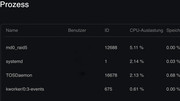
Since the last four TOS 6 versions, I've noticed that after every reboot, the md0-raid5 process experiences high disk activity. This lasts about 3-4 hours. CPU utilization is around 5%+. This is annoying and useless for a controlled timer. Sorry for my English.
Regards
C


Image
User avatar
nale88
Posts: 9
Joined: 08 May 2024, 04:24
Bosnia & Herzegovina

Re: TOS 6.0.650 (X86) is Released for Update

Post by nale88 »

Something weird is happening with this version.

This morning, upon login to the frontend, all my apps have been disabled - including the Log, Docker Engine, Portainer etc. After enabling them one by one, the `smbrichacl` popped up again, now with 10 processes and running sluggishly.

I was logged to frontend maybe some 10 mins before that via phone, and all was OK.

EDIT: Now I have 36 `smbrichacl` active...
F2-423 2x4TB
User avatar
magnus4ever
Posts: 21
Joined: 15 Jan 2025, 00:44
Germany

Re: TOS 6.0.650 (X86) is Released for Update

Post by magnus4ever »

I'm experiencing some odd behaviour as well:

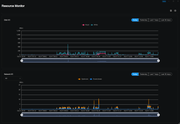
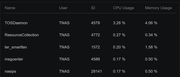
I,ve updated two days ago and everything was running as before until today morning my F4-424 startet disc write activity (not read, just write) in parallel with constant network activity. I have no idea whats causing this, I even deinstalled every single app that i had on the NAS, but no avail.
Image

Image
User avatar
StephenNaylor
Posts: 41
Joined: 07 May 2023, 00:33

Re: TOS 6.0.650 (X86) is Released for Update

Post by StephenNaylor »

I'm currently copying some video files to my F5-422.

On the media Index page, it says that the media index last ran 15/03/2023 at 16:51:21.

On the notifications page I am getting notifications around every 20 minutes that Media Indexing is complete with a small number of video files being added each time. These are all dated after the date that the media index page says that media indexing was last run.

So, the media Index page is not showing the date / time of the last run of the Media indexing. I think it may be showing the last scheduled run.

It feels like the Media indexing running whilst I am in the middle of copying the video files to the NAS is excessive. I assume that it is constantly running the indexing and that it probably takes around 20 minutes to run each time, then immediately starts again. I assume that the heavy disk activity that this is causing is slowing down the upload of files to the server.
Post Reply

Return to “Update Notice”