[Help] Disk activity / High Swap usage

CPU, memory, fan, process, services status, system log, tempreture
Post Reply
User avatar
TheOpsMgr
Posts: 6
Joined: 31 Oct 2022, 23:14
Great Britain

[Help] Disk activity / High Swap usage

Post by TheOpsMgr »

Hi all,

Recently (ie last few months or so) my F4-423 TOS version 5.1.95-00372 has been having periods of very noisy disk activity that then seem to go on for hours. A reboot will "fix" the problem

Looking at the Glances control panel it doesn't really show anything "wrong" other than the Swap showing as red at 93.4%.

I'm not really a Linux person, so can anyone give me any insight as to what's going on here?
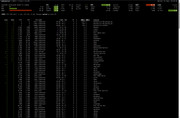


Image
User avatar
Gremlin
Gold Member
Posts: 1625
Joined: 02 Dec 2022, 22:31
Great Britain

Re: [Help] Disk activity / High Swap usage

Post by Gremlin »

You could consider an update to Tos5.1.145 which is latest tos5.1 version and/or subsequently to Tos6.
F5-221 TOS7.0.0777 - 4x4TB (Ironwolf) Traid
F2-424 TOS7.0.0777 - 2x500GB nvme (P3) Traid, 2x6TB HDD (HGST) Traid
F2-221 TOS7.0.0777 - 1x3TB Ext4, 1x4TB Btrfs
F2-425+ TOS7.0.0777 - 2x500GB nvme (P3) Traid, 2x6TB HDD (EXOS) Traid
User avatar
TheOpsMgr
Posts: 6
Joined: 31 Oct 2022, 23:14
Great Britain

Re: [Help] Disk activity / High Swap usage

Post by TheOpsMgr »

Hmmmm, interresting that doing an update check on the device doesn't notify me about .145.

I'll do it manually then.

If I go to 6 is that still a disk wipe?
User avatar
crisisacting
Silver Member
Posts: 499
Joined: 20 Jan 2022, 16:42

Re: [Help] Disk activity / High Swap usage

Post by crisisacting »

TheOpsMgr wrote: 13 Mar 2025, 01:55 Hmmmm, interesting that doing an update check on the device doesn't notify me about .145.
Your system partition is likely 2 GB, which is a limitation to upgrading & likely the reason that it's not being notified about a newer 5.1.× version.
TheOpsMgr wrote: 13 Mar 2025, 01:55If I go to TOS 6.×, is that still a disk wipe?
Yes.

You'll need to build a or update your initboot USB drive to TOS 6.× & as it requires an 8 GB system partition, either a fresh drive to install it onto or if you'll be reusing the drives that you currently have in it, you'll need to secure erase the drives on another PC to use them for a fresh installation (if you don't have an active backup, backup the data prior onto another medium to later restore it).
Post Reply

Return to “System Resources”