

TMeric wrote:May I know the version number of your TNAS Mobile and the version of TOS? Are you logging in via the local IP or using the TNAS ID?AES wrote: I still couldn't log in, I don't know how you do it.
Competitors don't have any problems with this.
TNAS mobile does not see NAS
TNAS mobile does not see NAS
TerraMaster F8, TerraMaster F2-425, Syno 218+
Re: TNAS mobile does not see NAS
TOS 6.0.610
TNAS mobile 3.3.057 iPhone 15
In one local network. The NAS IP address opens perfectly in the iPhone browser, i.e. it is accessible.
The application does not see the NAS by just the IP address, not by IP:port.
Also in the application interface, in the menu there are hieroglyphs, although everything should be in Russian or English.
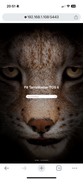
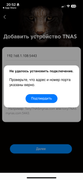
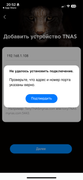
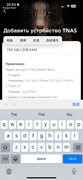
TNAS mobile 3.3.057 iPhone 15
In one local network. The NAS IP address opens perfectly in the iPhone browser, i.e. it is accessible.
The application does not see the NAS by just the IP address, not by IP:port.
Also in the application interface, in the menu there are hieroglyphs, although everything should be in Russian or English.
TerraMaster F8, TerraMaster F2-425, Syno 218+

Re: TNAS mobile does not see NAS
Hello, thank you for contacting TerraMaster!AES wrote: ↑11 Feb 2025, 02:16 TOS 6.0.610
TNAS mobile 3.3.057 iPhone 15
In one local network. The NAS IP address opens perfectly in the iPhone browser, i.e. it is accessible.
The application does not see the NAS by just the IP address, not by IP:port.
Also in the application interface, in the menu there are hieroglyphs, although everything should be in Russian or English.
Please confirm the following two points:
1.Please check if your phone and NAS device are connected to the same local network.
2.Please ensure that the TNAS mobile app has been granted network access permissions in your phone settings.
Regarding the language display issue, this may be caused by your phone's input method settings, as the display interface is not part of the app's built-in pages.
To contact our team, please send email to following addresses, remember to replace (at) with @:
Technical team: support(at)terra-master.com(for technical support)
Service team: service(at)terra-master.com(for purchasing, return, replacement, RMA service)
Technical team: support(at)terra-master.com(for technical support)
Service team: service(at)terra-master.com(for purchasing, return, replacement, RMA service)
Re: TNAS mobile does not see NAS
Yes, it turns out that access to the local network must be provided and for TNAS 3 it was not enabled. But for TNAS it was. Either the application did not request it, or I pressed something wrong during installation.
Not a single fully translated application just does not show me hieroglyphs, the problem is definitely in the application.
I managed to log in, and there are hieroglyphs in all the menus like "Copy", "Paste".
Not a single fully translated application just does not show me hieroglyphs, the problem is definitely in the application.
I managed to log in, and there are hieroglyphs in all the menus like "Copy", "Paste".
TerraMaster F8, TerraMaster F2-425, Syno 218+
Re: TNAS mobile does not see NAS
During the installation of the App, the system will explicitly prompt you to grant network permissions, which you may have overlooked.AES wrote: ↑11 Feb 2025, 10:36 Yes, it turns out that access to the local network must be provided and for TNAS 3 it was not enabled. But for TNAS it was. Either the application did not request it, or I pressed something wrong during installation.
Not a single fully translated application just does not show me hieroglyphs, the problem is definitely in the application.
I managed to log in, and there are hieroglyphs in all the menus like "Copy", "Paste".
Additionally, after testing, I did not encounter a similar issue on my phone. I recommend checking your phone's input method settings to see if it might be related.
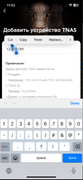
To contact our team, please send email to following addresses, remember to replace (at) with @:
Technical team: support(at)terra-master.com(for technical support)
Service team: service(at)terra-master.com(for purchasing, return, replacement, RMA service)
Technical team: support(at)terra-master.com(for technical support)
Service team: service(at)terra-master.com(for purchasing, return, replacement, RMA service)

Re: TNAS mobile does not see NAS
Can TNAS Mobile 3 remotely wake up a TerraMaster NAS?


Re: TNAS mobile does not see NAS
Yes it can, but it may depend on your settings.
F5-221 TOS7.0.1278 - 4x4TB (Ironwolf) Traid
F2-424 TOS7.0.1278 - 2x500GB nvme (P3) Traid, 2x6TB HDD (HGST) Traid
F2-221 TOS7.0.1278 - 1x3TB Ext4, 1x4TB Btrfs
F2-425+ TOS7.0.1278 - 2x500GB nvme (P3) Traid, 2x6TB HDD (EXOS) Traid
F2-424 TOS7.0.1278 - 2x500GB nvme (P3) Traid, 2x6TB HDD (HGST) Traid
F2-221 TOS7.0.1278 - 1x3TB Ext4, 1x4TB Btrfs
F2-425+ TOS7.0.1278 - 2x500GB nvme (P3) Traid, 2x6TB HDD (EXOS) Traid


Re: TNAS mobile does not see NAS
Can I use the TNAS Mobile 3 app to install the TOS system on my NAS directly?

Re: TNAS mobile does not see NAS
Yes. TNAS Mobile 3 supports installing TOS6 on NAS devices (only for newer models or compatible models that have been updated with the TOS6-specific Initboot).
To contact our team, please send email to following addresses, remember to replace (at) with @:
Technical team: support(at)terra-master.com (for technical support)
Service team: service(at)terra-master.com (for purchasing, return, replacement, RMA service)
Technical team: support(at)terra-master.com (for technical support)
Service team: service(at)terra-master.com (for purchasing, return, replacement, RMA service)
Re: TNAS mobile does not see NAS
I'm trying to use the TNAS Mobile 3 app on my Android 9 phone, but it doesn't seem to work. The app either crashes or fails to connect to my TNAS device. Is there a compatibility issue with Android 9? Are there any specific settings or updates I need to make it work?