
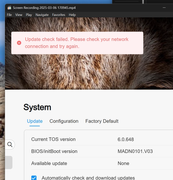
What TOS version are you currently using? Could you provide a screenshot of the anomaly you mentioned?
TOS 6.0.648 (X86) is Released for Update
Re: TOS 6.0.648 (X86) is Released for Update
To contact our team, please send email to following addresses, remember to replace (at) with @:
Technical team: support(at)terra-master.com (for technical support)
Service team: service(at)terra-master.com (for purchasing, return, replacement, RMA service)
Technical team: support(at)terra-master.com (for technical support)
Service team: service(at)terra-master.com (for purchasing, return, replacement, RMA service)


Re: TOS 6.0.648 (X86) is Released for Update
6.0.648
Can't really get a screenshot since it flashes quickly.
Can't really get a screenshot since it flashes quickly.
Current System:
F4-424 Pro
40TB storage.
TOS- 7.0.0746
F4-424 Pro
40TB storage.
TOS- 7.0.0746


Re: TOS 6.0.648 (X86) is Released for Update
Well I finally got frustrated enough to reinstall TOS (using Factory Reset from the UI). But the one thing I need this NAS to do properly, join a domain, still didn't work. Will it ever?
On the plus side, re-installing did get rid of the incorrectly reported file system corruption issue (I had also run btrfs check to confirm my disks really were OK and they were).
So ... I tried to do "Restore Configuration" on top of the reinstalled TOS. The user interface suggests this to "save time reconfiguration" or some such words. This is laughable.
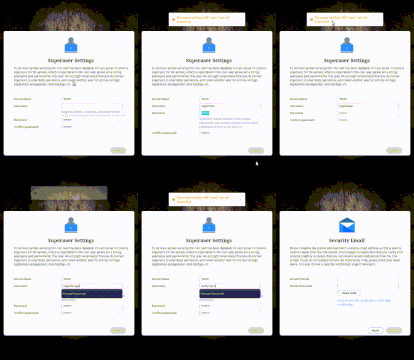
The web interface would not longer start. I could get in via SSH, and found some log output that suggested a problem with the file nginx-worker-user.conf. And this may be a clue as to at least some of my problems. When I first setup the TNAS, I chose the username superuser, because for some reason we are not allowed to use root. Now with this new version, apparently anything with the word "super" is not allowed (and yet more arbitrary restrictions on characters that may be used in a password!). So this time I had choose yet another different username. But the configuration backup I took before all this referred to the username "superuser" rendering it completely useless. Yet again, I cannot find any reference to this behaviour in any release notes.
Now I try to reinstall using the 2nd method, i.e. taking all the drives out, letting it start, then putting them back in. This gets me back in and I can start rebuilding my configuration manually.
I have managed to do all of this, except I had 6 actively used docker containers that are now completely missing from the user interface, and command line docker tool. I was under the impression these should be considered data, and should have been safe through resetting TOS. A couple of virtualbox vms survived just fine and just needed to be added back in the user interface. Can anyone confirm, should docker containers survive a reinstall of TOS? Or is this some effect or the root username conflict.
Doing a "find" command from a shell and I can locate what looks like it might be some kind of docker data (in "/varun/subvols/8vEbTxkKvwa/@syssnapshot/system-snapshot"), but the snapshots app has an empty snapshot list too. I am not too experienced with the ins and outs of docker and where and how it stores stuff to be able to dig deeper and see if ive really lost these containers for good.
Thanks in advance for any hope anyone might be able to offer me!
On the plus side, re-installing did get rid of the incorrectly reported file system corruption issue (I had also run btrfs check to confirm my disks really were OK and they were).
So ... I tried to do "Restore Configuration" on top of the reinstalled TOS. The user interface suggests this to "save time reconfiguration" or some such words. This is laughable.
The web interface would not longer start. I could get in via SSH, and found some log output that suggested a problem with the file nginx-worker-user.conf. And this may be a clue as to at least some of my problems. When I first setup the TNAS, I chose the username superuser, because for some reason we are not allowed to use root. Now with this new version, apparently anything with the word "super" is not allowed (and yet more arbitrary restrictions on characters that may be used in a password!). So this time I had choose yet another different username. But the configuration backup I took before all this referred to the username "superuser" rendering it completely useless. Yet again, I cannot find any reference to this behaviour in any release notes.
Now I try to reinstall using the 2nd method, i.e. taking all the drives out, letting it start, then putting them back in. This gets me back in and I can start rebuilding my configuration manually.
I have managed to do all of this, except I had 6 actively used docker containers that are now completely missing from the user interface, and command line docker tool. I was under the impression these should be considered data, and should have been safe through resetting TOS. A couple of virtualbox vms survived just fine and just needed to be added back in the user interface. Can anyone confirm, should docker containers survive a reinstall of TOS? Or is this some effect or the root username conflict.
Doing a "find" command from a shell and I can locate what looks like it might be some kind of docker data (in "/varun/subvols/8vEbTxkKvwa/@syssnapshot/system-snapshot"), but the snapshots app has an empty snapshot list too. I am not too experienced with the ins and outs of docker and where and how it stores stuff to be able to dig deeper and see if ive really lost these containers for good.
Thanks in advance for any hope anyone might be able to offer me!

Re: TOS 6.0.648 (X86) is Released for Update
imo just not true. I use a variation of "super" all the time.
Are you just trying to make your own life difficult on purpose? I have installed/reinstalled TOS (both 5 and 6) and never experienced the situations you seem to find yourself in. Perhaps you should slow down, take a deep breath and do it the TNAS way - whatever you might wish, it's not Linux. (It's not even Unix for that matter) TNAS is only based on a version of linux. Don't try to out-think the developers. Some things they have done sometimes appear to be ridiculous, at face value, but they have their reasons. Get used to it and stop complaining. If you think something could be better, by all means suggest a sensible solution in the appropriate section of the forum.
F5-221 TOS7.0.1278 - 4x4TB (Ironwolf) Traid
F2-424 TOS7.0.1278 - 2x500GB nvme (P3) Traid, 2x6TB HDD (HGST) Traid
F2-221 TOS7.0.1278 - 1x3TB Ext4, 1x4TB Btrfs
F2-425+ TOS7.0.1278 - 2x500GB nvme (P3) Traid, 2x6TB HDD (EXOS) Traid
F2-424 TOS7.0.1278 - 2x500GB nvme (P3) Traid, 2x6TB HDD (HGST) Traid
F2-221 TOS7.0.1278 - 1x3TB Ext4, 1x4TB Btrfs
F2-425+ TOS7.0.1278 - 2x500GB nvme (P3) Traid, 2x6TB HDD (EXOS) Traid
Re: TOS 6.0.648 (X86) is Released for Update
I have too used "super" up to the point of resetting to Factory default after updating to this version.The wording in the orange warning popup was slightly different to when I tried "root" for kicks, but I am 95% certain that in both case it actively prevented it being used, not just a warning.
Am I trying to make my own life difficult on purpose? No, this started when all I did was click the update button. That was it. What exactly was I suppose to do when things broke after that? What is TNAS way here? Don't update?
Am I trying to make my own life difficult on purpose? No, this started when all I did was click the update button. That was it. What exactly was I suppose to do when things broke after that? What is TNAS way here? Don't update?
Re: TOS 6.0.648 (X86) is Released for Update
Sorry for the inconvenience. For security reasons, usernames containing 'root' and 'super' cannot be set.tanktarta wrote: ↑07 Mar 2025, 00:48 I have too used "super" up to the point of resetting to Factory default after updating to this version.The wording in the orange warning popup was slightly different to when I tried "root" for kicks, but I am 95% certain that in both case it actively prevented it being used, not just a warning.
Am I trying to make my own life difficult on purpose? No, this started when all I did was click the update button. That was it. What exactly was I suppose to do when things broke after that? What is TNAS way here? Don't update?
To contact our team, please send email to following addresses, remember to replace (at) with @:
Technical team: support(at)terra-master.com (for technical support)
Service team: service(at)terra-master.com (for purchasing, return, replacement, RMA service)
Technical team: support(at)terra-master.com (for technical support)
Service team: service(at)terra-master.com (for purchasing, return, replacement, RMA service)
-
Peterlll06

- Posts: 17
- Joined: 18 Feb 2025, 12:12

Re: TOS 6.0.648 (X86) is Released for Update
It has been updated to the latest version and is currently running well 
Re: TOS 6.0.648 (X86) is Released for Update
Great, thanks for official confirmation. Are you able to speculate on other possible effects on users who already have the administrator name "superuser" before this requirement was added?