

Target Users:
Users currently running TOS 6.0.500 or later versions.
Note: If your TOS version does not meet the requirements, please first check the update conditions for TOS 6.0.530.
Here, we sincerely thank users Mike2882, DekkaR, fcs001fcs, R1cheh, jhnbrg, Ranger21, kai, mmalchuk, StephenNaylor, benom, BerniBoy, Lau6311, dodusman58, True1Santony, rfbjr, and others, for their sharing and feedback. It is your support that has enabled us to quickly identify and resolve some issues.
This version:
Update Notes
Bugs fixed:
1. Fixed the issue that uploading abnormal certificates might cause the system to fail to start properly after reboot.
2. Fixed the issue that some domains (including the 2025 AD domain) could not be joined normally.
3. Fixed the issue that firewall, resource monitoring, and file management pages displayed abnormally.
4. Fixed some issues with file sharing functionality in Photos.
5. Fixed some issues with ISO shared folders.
6. Fixed the issue that some files might appear gray after transferring via SMB on macOS.
7. Fixed the issue that the beeper did not continuously emit warning sounds during SSD cache errors.
8. Fixed the issue that recently accessed application icons showed blank after volume deletion.
9. Fixed the issue that update packages could not be automatically downloaded.
10. Fixed some issues with remote folder.
11. Fixed some issues with SPC-related functions.
12. Fixed some issues with storage pool and volume.
13. Fixed some issues with virtual disks.
14. Fixed some issues with media index.
15. Fixed some issues with file manager.
16. Fixed some issues with the App Center.
17. Fixed some issues with system configuration.
18. Fixed some issues with notifications.
19. Fixed some issues with disk.
20. Fixed some issues with network.
What is new:
1.Optimized the email delivery mechanism.
2.Optimized the UPS connection mechanism.
3.Optimized the DDNS update policy.
Important Information:
1.Updating the system theoretically will not affect the data on your hard drives, but for safety, please make sure to back up your data in advance.
2.Before updating, ensure that your primary volume (usually volume1) has at least 3GB of available space. Insufficient storage space may cause the update to fail.
3.After the update, the IP address of your TNAS may change. Please use the TNAS PC desktop client to search for and reconnect to the device.
Update Procedure:
1.Go to TOS > Control Panel > General Settings > System > Update, and click "Check for updates."
2.Follow the prompts to update the system.
3.After the system update is complete, you may need to refresh your browser.
4.The TNAS IP address may change after the update. If you cannot connect to your TNAS using the previous IP address, use the TNAS PC client to search for the new IP address.
Other Software Downloads:
Download TNAS PC 5.2.003 for Windows OS:
https://download3.terra-master.com/Apps ... .2.021.exe
Download TNAS PC 5.1.202 for macOS (x86 and ARM architecture):
https://download3.terra-master.com/Apps ... .1.202.pkg
Download TNAS PC 5.1.202 for macOS (ARM architecture):
https://download3.terra-master.com/Apps ... .1.202.pkg
Download TNAS Mobile 3.3.027 for Android:
https://download2.terra-master.com/TNAS ... .3.027.apk
TNAS Mobile for iOS: Download from the iOS App Store.
TOS 6.0.648 (X86) is Released for Update
TOS 6.0.648 (X86) is Released for Update
To contact our team, please send email to following addresses, remember to replace (at) with @
Technical team: support(at)terra-master.com (for technical support)
Service team: service(at)terra-master.com (for purchasing, return, replacement)
Technical team: support(at)terra-master.com (for technical support)
Service team: service(at)terra-master.com (for purchasing, return, replacement)


Re: TOS 6.0.648 (X86) is Released for Update
Installed on my F2-221 without issues. Everything seems to be working normally.
-
FredMutter

- Posts: 94
- Joined: 17 Jan 2025, 20:11

Re: TOS 6.0.648 (X86) is Released for Update
installed on F2-424
>6. Fixed the issue that some files might appear gray after transferring via SMB on macOS.
I tested it and it works again: thanks (I removed the workaround that you published last week before testing)
>6. Fixed the issue that some files might appear gray after transferring via SMB on macOS.
I tested it and it works again: thanks (I removed the workaround that you published last week before testing)
Model: F2-424 with TOS 7.0.1105 - currently changing every month  - Bios V08
you can discuss with me in French, German and English
- Bios V08you can discuss with me in French, German and English
-
FredMutter
- Posts: 94
- Joined: 17 Jan 2025, 20:11
Re: TOS 6.0.648 (X86) is Released for Update
Just for your information, this is not a new bug—it has always been this way.
When using the Control Panel quick search, searching for “DDNS” or “TNAS.Online” does not return any results, even though these entries exist in the Remote Connection dialog.
Even though I’m using the French version, I believe the issue also affects the English version.
There may be other dialogs that are missing text indexing as well.
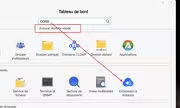
When using the Control Panel quick search, searching for “DDNS” or “TNAS.Online” does not return any results, even though these entries exist in the Remote Connection dialog.
Even though I’m using the French version, I believe the issue also affects the English version.
There may be other dialogs that are missing text indexing as well.
Model: F2-424 with TOS 7.0.1105 - currently changing every month - Bios V08
you can discuss with me in French, German and English
- Bios V08you can discuss with me in French, German and English


Re: TOS 6.0.648 (X86) is Released for Update
Updated fine on my f2-223, nice to have email notifications working again.


Re: TOS 6.0.648 (X86) is Released for Update
Updated from 6.0.610. Now if i enable media indexing i get a red error message: Failed to create index and no indexing happens.
-
WhitePastor

- Posts: 3
- Joined: 26 Feb 2025, 00:37

Re: TOS 6.0.648 (X86) is Released for Update
F2-423
Works fine, I see some improvements in icons
Works fine, I see some improvements in icons
Lol Signatures still exist,
TERRAMASTER F2-423, 12 GB Ram
2X 8TB Segate Iron Wolf ST8000VNZ04/N004 (RAID1)
2x Western Digital 500GB WD Red SN700 NVMe (RAID1 for Caching)
Maybe I will put something meaningful here later
TERRAMASTER F2-423, 12 GB Ram
2X 8TB Segate Iron Wolf ST8000VNZ04/N004 (RAID1)
2x Western Digital 500GB WD Red SN700 NVMe (RAID1 for Caching)
Maybe I will put something meaningful here later

Re: TOS 6.0.648 (X86) is Released for Update
Do any of these fixes relate to external drives changing names? i.e. USB_SDF2 will switch with USB_SDG1 after a power cycle.
Current System:
F4-424 Pro
40TB storage.
TOS- 7.0.0746
F4-424 Pro
40TB storage.
TOS- 7.0.0746


Re: TOS 6.0.648 (X86) is Released for Update
TM F2-223
TOS 6.0.648
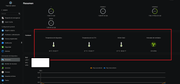
3. Fixed the issue that firewall, resource monitoring, and file management pages displayed abnormally.
- After update 6.0.648, the display in the resource monitor has not been fixed.
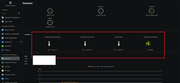
- But it has to be like this:
TOS 6.0.648
3. Fixed the issue that firewall, resource monitoring, and file management pages displayed abnormally.
- After update 6.0.648, the display in the resource monitor has not been fixed.
- But it has to be like this:

Re: TOS 6.0.648 (X86) is Released for Update
Hello, please navigate to Desktop > Support & Help > Issue Feedback, describe the problem you're experiencing, then generate and download a report. Please send this report to our official email address, and we will analyze the issue to provide a resolution.