How to Collect Relevant Logs When TNAS Crashes?

TOS system configuration
Post Reply
User avatar
TMnight
TM Support
Posts: 181
Joined: 30 Sep 2022, 16:40

How to Collect Relevant Logs When TNAS Crashes?

Post by TMnight »

Applicable Versions:
TOS 5.0.xxx, TOS 5.1.xxx ,TOS6

Applicable Models:
TNAS models (except F2-210, F4-210)

Fault Symptoms:
When the TNAS crashes, causing the web page to be inaccessible and the PC unable to find the device, the system report on the TOS web page lacks related logs after rebooting, making it difficult to analyze the cause of the exception.

Fault Reason:
When the TNAS device crashes and reboots, some system-related logs are cleared. To address this, other log collection methods are required to analyze the exception.

Steps for TOS5 Operation:

Step 1: Use tools like Putty to log in to the NAS command line terminal.
Link to guide: https://forum.terra-master.com/cn/viewt ... =87&t=1511

Step 2: Modify the log storage location
2.1. Execute the command: vi /etc/syslog.conf to enter the configuration file editing interface.
Image

2.2. Press the "i" key to enter edit mode, use the arrow keys to move the cursor to /var/log/messages, and delete /var/log, as shown below:
Image

2.3. Press the "ESC" key to exit edit mode, then press "Shift" + ":" together, after the colon “:”, enter "wq", and press "Enter" to save the configuration and exit.

2.4. Execute the command vi /etc/init.d/S01logging to enter the configuration file editing interface.

2.5. Press the "i" key to enter edit mode, use the arrow keys to move the cursor to printf "Starting logging: ", as shown below:
Image

2.6. Press "Enter", when the cursor jumps to the next line, press "Tab" to align the cursor, and then enter:

shell

mv /messages /messages_$(date +"%Y_%m_%d_%H_%M_%s")

as shown below:

Image

2.7. Press the "ESC" key to exit edit mode, then press "Shift" + ":" together, after the colon “:”, enter "wq", and press "Enter" to save the configuration and exit.

Step 3: Check if the log configuration is successful
3.1. After the configuration is successful, restart the NAS, log in via SSH, enter cd /, and then enter ls.
Image

3.2. If "messages" appears, it means the configuration is successfully completed.

Step 4: Log output and sending
4.1. If the system fails, restart the TNAS device and log in to the NAS backend using SSH, execute the command:

shell

mv /messages* /Volume1/public

4.2. Log in to TNAS through SMB or the web, and copy all the "messages" logs in the "public" directory to your computer.

4.3. Send the logs via email to support(at)terra-master.com.

4.4. After receiving the log information, we will analyze the cause and reply to you as soon as possible.

Steps for TOS6 Operation:

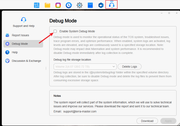
1. Log in to the TOS WEB console. In the top navigation bar, select "Support & Help > Debug Mode", then check the box for "Enable System Debug Mode".
Image

2. When a system failure occurs, restart your TNAS device. After rebooting, go back to "Support & Help > Debug Mode" and click to download the log file.

3. Send the log file via email to support(at)terra-master.com. We will analyze the issue and respond to you as soon as we receive the log file.
To contact our team, please send email to following addresses, remember to replace (at) with @:
Technical team: support(at)terra-master.com(for technical support)
Service team: service(at)terra-master.com(for purchasing, return, replacement, RMA service)
User avatar
CathyW
Posts: 26
Joined: 18 Feb 2025, 14:16
United States of America

Re: How to Collect Logs from TNAS

Post by CathyW »

I have installed TOS 6 in my F4-424 , how to collect logs from TNAS with a easier way ?
User avatar
TMzethar
TM Support
Posts: 2815
Joined: 27 Oct 2020, 16:43

Re: How to Collect Logs from TNAS

Post by TMzethar »

CathyW wrote: 21 Feb 2025, 12:13
In TOS6, when troubleshooting similar problems, you can use Debug mode and no longer need to do it as described above.
To contact our team, please send email to following addresses, remember to replace (at) with @:
Technical team: support(at)terra-master.com (for technical support)
Service team: service(at)terra-master.com (for purchasing, return, replacement, RMA service)
User avatar
FredMutter
Posts: 89
Joined: 17 Jan 2025, 20:11
France

Re: How to Collect Logs from TNAS

Post by FredMutter »

TMzethar wrote: 21 Feb 2025, 15:49 In TOS6, when troubleshooting similar problems, you can use Debug mode and no longer need to do it as described above.
then you should edit the first post with a notice how to do with TOS6 (and how to enter the debug mode)
Model: F2-424 with TOS 7.0.0777 Bios V08
you can discuss with me in French, German and English
User avatar
CathyW
Posts: 26
Joined: 18 Feb 2025, 14:16
United States of America

Re: How to Collect Logs from TNAS

Post by CathyW »

TMzethar wrote: 21 Feb 2025, 15:49
Thank you ! Can I have a detailed steps to tell me how to get the log by debug mode ?
User avatar
TMzethar
TM Support
Posts: 2815
Joined: 27 Oct 2020, 16:43

Re: How to Collect Logs from TNAS

Post by TMzethar »

CathyW wrote: 21 Feb 2025, 16:38
The steps for collecting Debug logs for TOS6 have been added to the end of this post.
To contact our team, please send email to following addresses, remember to replace (at) with @:
Technical team: support(at)terra-master.com (for technical support)
Service team: service(at)terra-master.com (for purchasing, return, replacement, RMA service)
User avatar
CathyW
Posts: 26
Joined: 18 Feb 2025, 14:16
United States of America

Re: How to Collect Logs from TNAS

Post by CathyW »

Thank you ! I tried the debug model , it provides an exceptionally user-friendly interface that empowers even less experienced users to diagnose issues .
With its robust logging and real-time system analysis, offering deep insights into performance metrics and potential bottlenecks.
I really like my TerraMaster NAS , as it excels remarkably in delivering a user-friendly experience. ;) ;)
User avatar
Peterlll06
Posts: 17
Joined: 18 Feb 2025, 12:12
Netherlands

Re: How to Collect Logs from TNAS

Post by Peterlll06 »

The debug mode of TOS6 is really convenient. Easily collect logs in a few steps. I sent the logs to support, and they quickly analyzed the problem.
User avatar
Frostbyte
Posts: 27
Joined: 19 Feb 2025, 17:36
United States of America

Re: How to Collect Logs from TNAS

Post by Frostbyte »

Marking this down for future reference.
Post Reply

Return to “System Configuration”