Centralized Backup 3.0.090 - Restore

Centralized Backup is a professional disaster recovery tool specially developed for business users.
Post Reply
User avatar
LastmanStanding
Posts: 2
Joined: 18 Feb 2025, 08:03
Germany

Centralized Backup 3.0.090 - Restore

Post by LastmanStanding »

I tried Centralized Backup.
Backing up a laptop over LAN (290GB of 470GB used space, including UEFI and recovery partitions) took about 22 minutes via 2.5Gbit/s, which is acceptable.

The backup file appears as 476GB in Windows Explorer but only occupies 280GB on the volume.
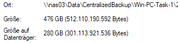
Image

Either compression is applied, which would explain the consistently high load (up to 100%) on the F4-424 Pro (i3, 8 cores, 16GB RAM) during backup, or unused space from the backed-up drive does not take up space on the BTRFS filesystem. As a result, the NAS is almost fully utilized during a backup, making it difficult to use as a file server simultaneously.

The real issue surfaced when attempting to boot the laptop using the recovery media created with the Centralized Agent:

The generated ISO is not recognized as a bootable medium under UEFI.
Booting from the created USB stick was possible, but there was no network connection.
What good is a backup if a full restore isn't possible? Apparently, network drivers need to be manually copied onto the boot stick and installed after booting the agent from USB.

Is this backup solution still in a beta stage?
Has anyone successfully performed a full restore on their device?
User avatar
TMzethar
TM Support
Posts: 2815
Joined: 27 Oct 2020, 16:43

Re: Centralized Backup 3.0.090 - Restore

Post by TMzethar »

The Centralized Backup client provides two recovery methods: only create an ISO containing the recovery tool, or create a USB flash drive with an ISO containing Windows PE and the recovery tool.

What specific operation steps did you refer to when you mentioned "The generated ISO is not recognized as a bootable medium under UEFI"? Did you use a self - made UEFI Windows PE, and it failed to recognize the ISO file? Are other ISO files available? Or you can try other Windows PE tools.

Regarding network drivers, the USB bootable disk created by the Centralized Backup client contains basic/generic network drivers. If you are using a laptop or the network device of your PC is not compatible with the basic/generic drivers, then you have to find and download the drivers provided by the computer or network device manufacturer, and then manually add the driver files to the Windows PE.
To contact our team, please send email to following addresses, remember to replace (at) with @:
Technical team: support(at)terra-master.com (for technical support)
Service team: service(at)terra-master.com (for purchasing, return, replacement, RMA service)
Post Reply

Return to “Centralized Backup”