

I have a NAS F2-221 with software 5.1.145 how can I update it to version 6.xx?
TNKS
How do I update NAS F2-221?


Re: How do I update NAS F2-221?
Hi! Based on the model information you provided, for the 221 model, it is necessary to consider the device's SN code, hard disk partition format, and built-in USB capacity to determine whether the NAS can use TOS6.
Please generate and download the log report in TOS > Technical Support > Problem Report, and send it to the technical support email address. We will help you make a judgment.
-
ironozzyman

- Posts: 5
- Joined: 08 Feb 2025, 10:53

Re: How do I update NAS F2-221?
Any solutions? wanting to upgrade mine to 6.

Re: How do I update NAS F2-221?
Hi,due to the different motherboard types.You also need to consider the device's SN code, hard disk partition format, and built-in USB capacity to determine whether the NAS can use TOS6.
Please generate and download the log report in TOS > Technical Support > Problem Report, and send it to the technical support email address. We will help you make a judgment.Thanks!


Re: How do I update NAS F2-221?
 SO, just so we know, how large a USB is required for TOS6
 Seems to me, someone @TM needs to generate a guide sheet(s) to get all the "required" info in one place and, maybe, post it on the support site for the respective models.
{Often, info on this forum gets 'lost' due to users posting (often) unnecessary questions/info on the topic and/or just the volume of information. Then there are the trolls that post far too frequently advertising their own brands of stupidity {/rant_off}}
F5-221 TOS7.0.1278 - 4x4TB (Ironwolf) Traid
F2-424 TOS7.0.1278 - 2x500GB nvme (P3) Traid, 2x6TB HDD (HGST) Traid
F2-221 TOS7.0.1278 - 1x3TB Ext4, 1x4TB Btrfs
F2-425+ TOS7.0.1278 - 2x500GB nvme (P3) Traid, 2x6TB HDD (EXOS) Traid
F2-424 TOS7.0.1278 - 2x500GB nvme (P3) Traid, 2x6TB HDD (HGST) Traid
F2-221 TOS7.0.1278 - 1x3TB Ext4, 1x4TB Btrfs
F2-425+ TOS7.0.1278 - 2x500GB nvme (P3) Traid, 2x6TB HDD (EXOS) Traid

Re: How do I update NAS F2-221?
Thank you for your suggestion! We will specifically write an article about the important considerations for upgrading the 221 and 220 systems to TOS6. In the meantime, you can refer to the following links for more information:
1.Check if the BIOS meets the requirements: viewtopic.php?t=6809
2.System upgrade path: viewtopic.php?t=6984
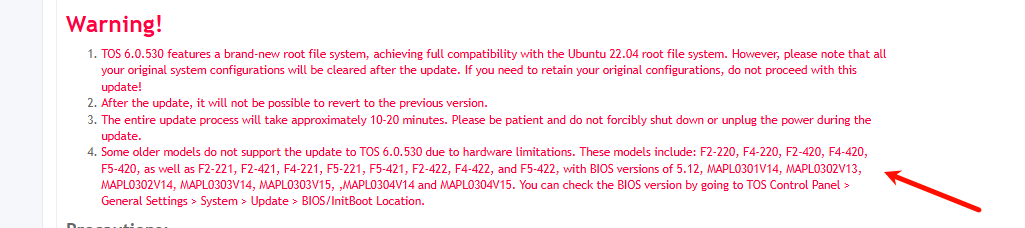
1.Check if the BIOS meets the requirements: viewtopic.php?t=6809
2.System upgrade path: viewtopic.php?t=6984
To contact our team, please send email to following addresses, remember to replace (at) with @:
Technical team: support(at)terra-master.com(for technical support)
Service team: service(at)terra-master.com(for purchasing, return, replacement, RMA service)
Technical team: support(at)terra-master.com(for technical support)
Service team: service(at)terra-master.com(for purchasing, return, replacement, RMA service)