CPU load in Resource Monitor should be an absolute number

CPU, memory, fan, process, services status, system log, tempreture
Locked
User avatar
obvious
Posts: 11
Joined: 16 Jan 2025, 19:45
Spain

CPU load in Resource Monitor should be an absolute number

Post by obvious »

Hello TerraMaster:

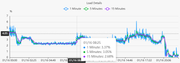
In TOS 6.0.610 the load is represented as a percentage but it is not.
Image

The CPU load is an absolute value. Maybe you can fix this.

Thank you!
Regards.
User avatar
GevinKe
TM Product Manager
Posts: 251
Joined: 08 Dec 2023, 10:27
China

Re: CPU load in Resource Monitor should be an absolute number

Post by GevinKe »

obvious wrote: 17 Jan 2025, 04:55 Hello TerraMaster:

In TOS 6.0.610 the load is represented as a percentage but it is not.

Image

The CPU load is an absolute value. Maybe you can fix this.

Thank you!
Regards.
Thank you for your suggestion. I will forward this request to the product team for evaluation.
To contact our team, please send email to following addresses, remember to replace (at) with @:

Technical team: support(at)terra-master.com(for technical support)
Service team: service(at)terra-master.com(for purchasing, return, replacement, RMA service)
User avatar
Gremlin
Gold Member
Posts: 1627
Joined: 02 Dec 2022, 22:31
Great Britain

Re: CPU load in Resource Monitor should be an absolute number

Post by Gremlin »

obvious wrote: 17 Jan 2025, 04:55 In TOS 6.0.610 the load is represented as a percentage but it is not.

The CPU load is an absolute value.
Is it really an absolute value? I think it depends on what source you read. Single core fully used == 1 ? is that what you mean? Many (many) sources will discuss cpu load in percentage terms as, it seems, this is much easier for the lay-person to understand. That gets complicated when the o/s starts reporting > 100% for multiple core cpu (today's norm). It would be nice if everyone could agree on a simplified expression. eg 100% is all cores fully utilised; 50% might be 50% of cores fully utilised or all cores to the respective amount. (But mutal agreement is highly unlikely......)
F5-221 TOS7.0.0777 - 4x4TB (Ironwolf) Traid
F2-424 TOS7.0.0777 - 2x500GB nvme (P3) Traid, 2x6TB HDD (HGST) Traid
F2-221 TOS7.0.0777 - 1x3TB Ext4, 1x4TB Btrfs
F2-425+ TOS7.0.0777 - 2x500GB nvme (P3) Traid, 2x6TB HDD (EXOS) Traid
User avatar
obvious
Posts: 11
Joined: 16 Jan 2025, 19:45
Spain

Re: CPU load in Resource Monitor should be an absolute number

Post by obvious »

Yes, it is.

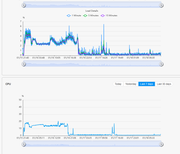
LOAD and %CPU usage are different metrics. Take this picture of my F4MAX as an example:

Image

While rebuilding the array, CPU usage was about 15% while load was about 3. Also note that, although they look similar, they do not draw exactly the same graph.

Best regards!
User avatar
Gremlin
Gold Member
Posts: 1627
Joined: 02 Dec 2022, 22:31
Great Britain

Re: CPU load in Resource Monitor should be an absolute number

Post by Gremlin »

F5-221 TOS7.0.0777 - 4x4TB (Ironwolf) Traid
F2-424 TOS7.0.0777 - 2x500GB nvme (P3) Traid, 2x6TB HDD (HGST) Traid
F2-221 TOS7.0.0777 - 1x3TB Ext4, 1x4TB Btrfs
F2-425+ TOS7.0.0777 - 2x500GB nvme (P3) Traid, 2x6TB HDD (EXOS) Traid
User avatar
obvious
Posts: 11
Joined: 16 Jan 2025, 19:45
Spain

Re: CPU load in Resource Monitor should be an absolute number

Post by obvious »

Sorry mate, at this moment I don't have time to discuss with you about that. Please google "absolute vs relative" by yourself.
Have a nice day.
User avatar
TMroy
TM Support
Posts: 3060
Joined: 10 Mar 2020, 14:04
China

Re: CPU load in Resource Monitor should be an absolute number

Post by TMroy »

I understand the meaning of "absolute versus relative," but honestly, I'm not clear on what your specific requirement is. CPU usage and system load are two different metrics. CPU usage is a single indicator, whereas system load is a composite metric that takes into account CPU usage, memory usage, disk I/O, network I/O, and other factors, and then calculates it using a weighted approach.
To contact our team, please send email to following addresses, remember to replace (at) with @:
Support team: support(at)terra-master.com (for technical support only)
Service team: service(at)terra-master.com (for purchasing, return, replacement, RMA service)
User avatar
obvious
Posts: 11
Joined: 16 Jan 2025, 19:45
Spain

Re: CPU load in Resource Monitor should be an absolute number

Post by obvious »

Don't get me wrong, my last reply was directed at Gremlin because the link about the absolute value (as modulus) have nothing to do with the topic.

I'm sure you know the difference between absolute and relative, and I don't mean to be rude either.

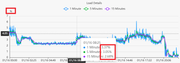
What I said in my first post is that the load is an absolute value but in the graph it is represented as a percentage, which I guess is an easy cosmetic issue to fix.

Image

Best regards!
User avatar
GevinKe
TM Product Manager
Posts: 251
Joined: 08 Dec 2023, 10:27
China

Re: CPU load in Resource Monitor should be an absolute number

Post by GevinKe »

obvious wrote: 24 Jan 2025, 17:05 Don't get me wrong, my last reply was directed at Gremlin because the link about the absolute value (as modulus) have nothing to do with the topic.

I'm sure you know the difference between absolute and relative, and I don't mean to be rude either.

What I said in my first post is that the load is an absolute value but in the graph it is represented as a percentage, which I guess is an easy cosmetic issue to fix.

Image

Best regards!
System load, as a composite indicator, may be more appropriately represented as a percentage.
To contact our team, please send email to following addresses, remember to replace (at) with @:

Technical team: support(at)terra-master.com(for technical support)
Service team: service(at)terra-master.com(for purchasing, return, replacement, RMA service)
User avatar
obvious
Posts: 11
Joined: 16 Jan 2025, 19:45
Spain

Re: CPU load in Resource Monitor should be an absolute number

Post by obvious »

I don't feel like continuing the discussion, but the load average is a well-known linux metric. If it has a new meaning in TOS (as a composite metric), it should be well documented so that it can be interpreted correctly.

In any case, the graph coincides with the standard one.

Kind regards.
Locked

Return to “System Resources”
