
I was actually wondering if I could copy the bios/bootloader from the 423 but as it's a 2bay it maybe that it will only recognise 2 bays when used on the 221, You mention an installation preventive measure that's in place?
Also, I don't see that much of a difference in the hardware the processors are not that far apart in their capabilities.
TOS 6.0.530 Official Version Released
-
crisisacting

- Silver Member
- Posts: 531
- Joined: 20 Jan 2022, 16:42
Re: TOS 6.0.530 Official Version Released
The TVI1509X motherboard in your new TNAS is the same across all F× versions of the 423 series; it's just the backplane that's different.Tricky wrote: ↑24 Jan 2025, 19:58 I was actually wondering if I could copy the bios/bootloader from the 423 but as it's a 2-bay it maybe that it will only recognise 2 bays when used on the 221, You mention an installation preventive measure that's in place?
Also, I don't see that much of a difference in the hardware the processors are not that far apart in their capabilities.
The initboot USB is the same across the whole 423 series devices @ viewtopic.php?t=6433
Technically, you could swap just the TVI1509X motherboard into the chassis of the F5-221 to get 5 drives on your 423 & move the 221 motherboard into the F2-423 chassis to downgrade that to 2 drives.
You might need to edit the System Product field to correspond to the correct model through EFI shell: https://forum.terra-master.com/cn/viewt ... =91&t=3119
Again, do this at your own risk; no guarantees offered.
The installation preventive measure is either within TOS 6.× itself or on their update server(s); it's checking the UEFI/BIOS revision and not offering your 221 the newer update because of its 5.12 release.
Re: TOS 6.0.530 Official Version Released
Thanks for the comprehensive answer, it's definitely food for thought. 

Re: TOS 6.0.530 Official Version Released
That's got me thinking too.
I was going to update my F5-221, but not sure I want to go to a version that is not fully stable (it is still young).
Maybe I will go to 5 and stay there.
Hmmmmmm, or shall I go to 6.0.229, and if I get stuck go back to 5.
I was going to update my F5-221, but not sure I want to go to a version that is not fully stable (it is still young).
Maybe I will go to 5 and stay there.
Hmmmmmm, or shall I go to 6.0.229, and if I get stuck go back to 5.
Bikers know why dogs stick their head out the window.
TNAS F5-221
TOS 4.2.39-2203011626
3X WD RED PLUS 3TB (RAID5)
2X WD Green 2TB (RAID1)
1X WD 4TB USB
TNAS F5-221
TOS 4.2.39-2203011626
3X WD RED PLUS 3TB (RAID5)
2X WD Green 2TB (RAID1)
1X WD 4TB USB

Re: TOS 6.0.530 Official Version Released
If you are not sure about Tos6 stay at 5.1.145. Not sure you can easily get to 6.0.229 now (official files may have been removed) and, besides, it's only buggy Beta at best  . I'm still pondering an update on my F5-221.
. I'm still pondering an update on my F5-221.F5-221 TOS7.0.1278 - 4x4TB (Ironwolf) Traid
F2-424 TOS7.0.1278 - 2x500GB nvme (P3) Traid, 2x6TB HDD (HGST) Traid
F2-221 TOS7.0.1278 - 1x3TB Ext4, 1x4TB Btrfs
F2-425+ TOS7.0.1278 - 2x500GB nvme (P3) Traid, 2x6TB HDD (EXOS) Traid
F2-424 TOS7.0.1278 - 2x500GB nvme (P3) Traid, 2x6TB HDD (HGST) Traid
F2-221 TOS7.0.1278 - 1x3TB Ext4, 1x4TB Btrfs
F2-425+ TOS7.0.1278 - 2x500GB nvme (P3) Traid, 2x6TB HDD (EXOS) Traid


Re: TOS 6.0.530 Official Version Released
So I have a new F2-424 that has 5.1.145 and I'd like to upload TOS_X642.0_Update_6.0.530_00148_2410300306.bz2
I select the file to do the manual update, click Apply, it gives me the warning about new root file system, I click Confirm and then absolutely nothing else happens.
I have tried resetting it to factory defaults, but same issue.
Anyone else come across similar ?
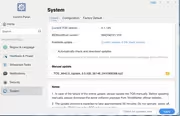
I select the file to do the manual update, click Apply, it gives me the warning about new root file system, I click Confirm and then absolutely nothing else happens.
I have tried resetting it to factory defaults, but same issue.
Anyone else come across similar ?
Re: TOS 6.0.530 Official Version Released
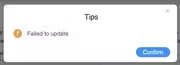
Well, a few more resets and it now will get to 94% on uploading the package and gives a "Failed to Update" message
-
sianderson

- Silver Member
- Posts: 453
- Joined: 02 Aug 2020, 03:42

Re: TOS 6.0.530 Official Version Released
this might be a silly question, but what hard drives are you using?
for my sins my F2-210 was using a Seagate Baracuda just fine (i know its not on the recommended list but i bought the drive before i was aware of a compatibility list), so i bought another one for the F2-423 as i thought i would stick to what i knew, this wasnt a very good idea and was causing lots of issues where reading data just died every few seconds and then pick up again (which might be a similar issue to why it cant update), replaced with a WD Red Plus and the difference was night and day, the Baracuda is quite happy in the F2-210 so i havent lost out and know the drive is working as it should, but does show that the F2-423 is quite picky about the drives you use
F2-424 TOS 7.0.1298
F2-423 TOS 7.0.1298
F2-210 TOS 4.2.44
D4-320
C/O
F4-424 TOS 6.0.794
F2-423 TOS 7.0.1298
F2-210 TOS 4.2.44
D4-320
C/O
F4-424 TOS 6.0.794
Re: TOS 6.0.530 Official Version Released
Currently I have 2 x WD 1TB NVMe drives installed. I have some ironwolf drives on order. What's also odd is that if I try to use the 5.1.145 installer file from Terramaster download area and select that when rebuilding after a factory reset, it fails too. if I do an install from the internet, it works fine.
(EDIT) That was whacky. I had powered it down for a while, after turning it back on it got to 50% on the update, seemed to stick there for about 5 minutes and then the login timed out.
Just out of interest (and no idea if this is what made it work) I decided to try updating from my MacBook Pro instead if iMac and bizarrely it worked ! Go figure !
(EDIT) That was whacky. I had powered it down for a while, after turning it back on it got to 50% on the update, seemed to stick there for about 5 minutes and then the login timed out.
Just out of interest (and no idea if this is what made it work) I decided to try updating from my MacBook Pro instead if iMac and bizarrely it worked ! Go figure !
-
sianderson
- Silver Member
- Posts: 453
- Joined: 02 Aug 2020, 03:42
Re: TOS 6.0.530 Official Version Released
i honestly dont know, i use windows never had a failed update so far
never had a failed update so farF2-424 TOS 7.0.1298
F2-423 TOS 7.0.1298
F2-210 TOS 4.2.44
D4-320
C/O
F4-424 TOS 6.0.794
F2-423 TOS 7.0.1298
F2-210 TOS 4.2.44
D4-320
C/O
F4-424 TOS 6.0.794