

Update: Successful, the P2P assistance confirmed to use the original (compressed) package, it took 15 minutes to complete the upgrade.
And now trying to get the TOS OS page... Doing...
(Thanks to TerraMaster for this seemingly good upgrade, and online/Forum assistance)...
Upgrading F2-223 to TOS6
Re: Upgrading F2-223 yto TOS6
F2-223, TOS 6.0.648, 2x8T N300 HDD Vol 1 & 3 (Singles)
1x1T Kingston NVME SSD Vol 2 (Single)
1x256G Hynix NVME SSD Hyper Cache (Balance Mode, 238G)
32G RAM
1x1T Kingston NVME SSD Vol 2 (Single)
1x256G Hynix NVME SSD Hyper Cache (Balance Mode, 238G)
32G RAM


Re: Upgrading F2-223 yto TOS6
The upgrade package is NOT a zip file. It should have a suffix of .bz2
This can be downloaded from the link in the previously referenced update instructions. For simplicity I have copied the link here:
https://download3.terra-master.com/TOS% ... 300306.bz2
Save this file on a pc or similar - you do not have to 'extract' anything. Login to TNAS and go to the Control Panel > System and 'Select Update Package' {browse to stored .bz2 file} and the click 'Apply'
{ Where did you download the mentioned 'zip' file from }
The web site seems so slow last few days... didn't see your 'update' but will leave this here for posterity.
This can be downloaded from the link in the previously referenced update instructions. For simplicity I have copied the link here:
https://download3.terra-master.com/TOS% ... 300306.bz2
Save this file on a pc or similar - you do not have to 'extract' anything. Login to TNAS and go to the Control Panel > System and 'Select Update Package' {browse to stored .bz2 file} and the click 'Apply'
{
Where did you download the mentioned 'zip' file from }The web site seems so slow last few days... didn't see your 'update' but will leave this here for posterity.
F5-221 TOS7.0.1278 - 4x4TB (Ironwolf) Traid
F2-424 TOS7.0.1278 - 2x500GB nvme (P3) Traid, 2x6TB HDD (HGST) Traid
F2-221 TOS7.0.1278 - 1x3TB Ext4, 1x4TB Btrfs
F2-425+ TOS7.0.1278 - 2x500GB nvme (P3) Traid, 2x6TB HDD (EXOS) Traid
F2-424 TOS7.0.1278 - 2x500GB nvme (P3) Traid, 2x6TB HDD (HGST) Traid
F2-221 TOS7.0.1278 - 1x3TB Ext4, 1x4TB Btrfs
F2-425+ TOS7.0.1278 - 2x500GB nvme (P3) Traid, 2x6TB HDD (EXOS) Traid
Re: Upgrading F2-223 yto TOS6
Feedback: After the successful upgrade from TOS 5.1.145 to TOS 6.0.530
Summary: The upgrade process was not extremely difficult, but possibly took an hours. Obstacles/opportunities are (mainly myself as a simple inexperience user)
1. Upgrade procedure was not CONCISE. Simple have said: "download package and "follow" to execute..." Should have said: upload ORIGINAL downloaded package without unzipping (or doing anything) and execute"
2. It is good that I can reconfigure from the beginning (again). My earlier mistake was overlooked as the superuser to continue in the process e.g. creating users, file directories, etc..
3. Good that after the upgrade download, the TNAS PC indicated to have found a TNAS DEVICE, but could not locate it. Took long time, trial and error efforts (confused with "new" IP addresses.)
4. During creating the superuser, "NEXT" button was NOT highlighted, many attempts failed. After dinner, every step was "auto smooth" (wondering why), and continued.
5. Now, could not access any apps, only seeing empty page. Guessing need to s/d anti-virus firewall (it was reactivated after a certain temporary set period. Tomorrow try again to download apps when possible.)
Summary: The upgrade process was not extremely difficult, but possibly took an hours. Obstacles/opportunities are (mainly myself as a simple inexperience user)
1. Upgrade procedure was not CONCISE. Simple have said: "download package and "follow" to execute..." Should have said: upload ORIGINAL downloaded package without unzipping (or doing anything) and execute"
2. It is good that I can reconfigure from the beginning (again). My earlier mistake was overlooked as the superuser to continue in the process e.g. creating users, file directories, etc..
3. Good that after the upgrade download, the TNAS PC indicated to have found a TNAS DEVICE, but could not locate it. Took long time, trial and error efforts (confused with "new" IP addresses.)
4. During creating the superuser, "NEXT" button was NOT highlighted, many attempts failed. After dinner, every step was "auto smooth" (wondering why), and continued.
5. Now, could not access any apps, only seeing empty page. Guessing need to s/d anti-virus firewall (it was reactivated after a certain temporary set period. Tomorrow try again to download apps when possible.)
F2-223, TOS 6.0.648, 2x8T N300 HDD Vol 1 & 3 (Singles)
1x1T Kingston NVME SSD Vol 2 (Single)
1x256G Hynix NVME SSD Hyper Cache (Balance Mode, 238G)
32G RAM
1x1T Kingston NVME SSD Vol 2 (Single)
1x256G Hynix NVME SSD Hyper Cache (Balance Mode, 238G)
32G RAM
Re: Upgrading F2-223 yto TOS6
Now at 6.0.530 (from 5.1.145, F2-223). Nightmare is jest beginning. Problems:
1. with multiple IP changing, finally can get in Tnas Desktop. But all top horizontal buttons (e.g. control panel, etc.) are NOT responding. Only the RHS vertical buttons are responding.
2. Especially the Applications page is EMPTY, nothing to be downloading.
3. Downloaded tos 6.0.610 upgrade package with her good assistance from P2P. But nowhere I can activate the upgrade package as the desktop top buttons are totally not responding.
PLEASE any help, appreciating much....
(After a successful upgrade 6.0.530 yesterday, things were responding. But today almost everything "frozen". Very very frustrating. Tnas mobile 3.3.038 version is working now, can open files, navigate smoothly.)
1. with multiple IP changing, finally can get in Tnas Desktop. But all top horizontal buttons (e.g. control panel, etc.) are NOT responding. Only the RHS vertical buttons are responding.
2. Especially the Applications page is EMPTY, nothing to be downloading.
3. Downloaded tos 6.0.610 upgrade package with her good assistance from P2P. But nowhere I can activate the upgrade package as the desktop top buttons are totally not responding.
PLEASE any help, appreciating much....
(After a successful upgrade 6.0.530 yesterday, things were responding. But today almost everything "frozen". Very very frustrating. Tnas mobile 3.3.038 version is working now, can open files, navigate smoothly.)
F2-223, TOS 6.0.648, 2x8T N300 HDD Vol 1 & 3 (Singles)
1x1T Kingston NVME SSD Vol 2 (Single)
1x256G Hynix NVME SSD Hyper Cache (Balance Mode, 238G)
32G RAM
1x1T Kingston NVME SSD Vol 2 (Single)
1x256G Hynix NVME SSD Hyper Cache (Balance Mode, 238G)
32G RAM


Re: Upgrading F2-223 yto TOS6
Have you tried restarting the NAS? If not, you can try rebooting it. If restarting doesn't solve the problem, you can try reinstalling the system. Here's how: Power down the NAS, unplug the hard drive, power on the NAS and insert the hard drive again after hearing the startup sound, then find the device on TNAS PC to initialize and install the system. If none of these methods work, please contact the after-sales team to schedule an engineer to assist you remotely.Lau6311 wrote: ↑20 Jan 2025, 19:20 Now at 6.0.530 (from 5.1.145, F2-223). Nightmare is jest beginning. Problems:
1. with multiple IP changing, finally can get in Tnas Desktop. But all top horizontal buttons (e.g. control panel, etc.) are NOT responding. Only the RHS vertical buttons are responding.
2. Especially the Applications page is EMPTY, nothing to be downloading.
3. Downloaded tos 6.0.610 upgrade package with her good assistance from P2P. But nowhere I can activate the upgrade package as the desktop top buttons are totally not responding.
PLEASE any help, appreciating much....
(After a successful upgrade 6.0.530 yesterday, things were responding. But today almost everything "frozen". Very very frustrating. Tnas mobile 3.3.038 version is working now, can open files, navigate smoothly.)
To contact our team, please send email to following addresses, remember to replace (at) with @:
Support team: support(at)terra-master.com (for technical support only)
Support team: support(at)terra-master.com (for technical support only)
Re: Upgrading F2-223 yto TOS6
Thank you for providing support. Earlier I did reboot a few times, didn't work. (Tnas unit has two ethernet connections.)
Today, attempting to troubleshoot and can say found the problem: (Original setup) Additional ethernet connection! Tnas to 1G switch & to 2.5G PC.
(Because looking at unit both ethernet connections, bottom port (unit to switch) showed normal IP (192.168.xx.xx), but the other (top) port showed strange IP 154.xx.xx..., so best way is to try pulling it out. And it works.
By removing the Tnas top 2.5G ethernet cable (to PC) and reboot, unit responded smoothly as expected, and Tnas PC app all buttons are responding and working. But later still wanting to have unit 2.5G to PC 2.5G connection for fast files transfer speed.
Hoping this feedback helps.
F2-223, TOS 6.0.648, 2x8T N300 HDD Vol 1 & 3 (Singles)
1x1T Kingston NVME SSD Vol 2 (Single)
1x256G Hynix NVME SSD Hyper Cache (Balance Mode, 238G)
32G RAM
1x1T Kingston NVME SSD Vol 2 (Single)
1x256G Hynix NVME SSD Hyper Cache (Balance Mode, 238G)
32G RAM
Re: Upgrading F2-223 yto TOS6
Upgraded from tos 6.0.530 direct to 6.0.610, successful and smooth, using the manual download to PC and select package for installation. For those who don't get upgrade package by auto mode, can request from online help, very helpful, took minutes.
(This usual upgrade page in Tm server showing software packages is a joke: very outdated and not helpful.)
Current problems still exist:
1. No Recommended Application packages are available, empty blank page. (Internet system is working, Basic Tnas system is "working", Tnas Mobile is working with unit, security isolation mode not yet enable (will enable will waiting from Tm solution)
2. "Enable Tnas Online Remote Access" button CANNOT be activated (can activate but auto disable when initiating "Apply" button)
But System Log showed UPnP Discovery Service Enabled Successfully.
3. "Enable UPnP Discovery Service" cannot be activated (can activate but auto disable when initiating "Apply" button)
But System Log showed Windows Discovery Service Enabled Successfully.
Please help. Very Much Thank You!
(This usual upgrade page in Tm server showing software packages is a joke: very outdated and not helpful.)
Current problems still exist:
1. No Recommended Application packages are available, empty blank page. (Internet system is working, Basic Tnas system is "working", Tnas Mobile is working with unit, security isolation mode not yet enable (will enable will waiting from Tm solution)
2. "Enable Tnas Online Remote Access" button CANNOT be activated (can activate but auto disable when initiating "Apply" button)
But System Log showed UPnP Discovery Service Enabled Successfully.
3. "Enable UPnP Discovery Service" cannot be activated (can activate but auto disable when initiating "Apply" button)
But System Log showed Windows Discovery Service Enabled Successfully.
Please help. Very Much Thank You!
F2-223, TOS 6.0.648, 2x8T N300 HDD Vol 1 & 3 (Singles)
1x1T Kingston NVME SSD Vol 2 (Single)
1x256G Hynix NVME SSD Hyper Cache (Balance Mode, 238G)
32G RAM
1x1T Kingston NVME SSD Vol 2 (Single)
1x256G Hynix NVME SSD Hyper Cache (Balance Mode, 238G)
32G RAM
Re: Upgrading F2-223 yto TOS6
Verified F2-223 top ethernet port does NOT work with tos 6.0.530 and 6.0.610.
Now as usual connecting unit bottom ethernet port to switch (having green blinking lights) -> router, can load Tnas PC for normal use, all functions are responding.
But pulled unit bottom ethernet cable to connect to top port, Tnas PC app HANGED, all buttons not responding.
Reconnecting unit bottom port, system works. But adding PC ethernet cable to unit top port (both cable in place), same -> Tnas PC app hanged. Immediately pulled only the PC cable, unit Tnas PC app is restoring to working order.
Before, using tos 5.0.145, both ethernet cables with unit and PC, unit and Tnas PC app are working fine.
Other users have similar problem?
Now as usual connecting unit bottom ethernet port to switch (having green blinking lights) -> router, can load Tnas PC for normal use, all functions are responding.
But pulled unit bottom ethernet cable to connect to top port, Tnas PC app HANGED, all buttons not responding.
Reconnecting unit bottom port, system works. But adding PC ethernet cable to unit top port (both cable in place), same -> Tnas PC app hanged. Immediately pulled only the PC cable, unit Tnas PC app is restoring to working order.
Before, using tos 5.0.145, both ethernet cables with unit and PC, unit and Tnas PC app are working fine.
Other users have similar problem?
F2-223, TOS 6.0.648, 2x8T N300 HDD Vol 1 & 3 (Singles)
1x1T Kingston NVME SSD Vol 2 (Single)
1x256G Hynix NVME SSD Hyper Cache (Balance Mode, 238G)
32G RAM
1x1T Kingston NVME SSD Vol 2 (Single)
1x256G Hynix NVME SSD Hyper Cache (Balance Mode, 238G)
32G RAM

Re: Upgrading F2-223 yto TOS6
No other similar cases have been found, either in the laboratory or in the feedback from customers who own this model.Lau6311 wrote: ↑21 Jan 2025, 13:30 Verified F2-223 top ethernet port does NOT work with tos 6.0.530 and 6.0.610.
Now as usual connecting unit bottom ethernet port to switch (having green blinking lights) -> router, can load Tnas PC for normal use, all functions are responding.
But pulled unit bottom ethernet cable to connect to top port, Tnas PC app HANGED, all buttons not responding.
Reconnecting unit bottom port, system works. But adding PC ethernet cable to unit top port (both cable in place), same -> Tnas PC app hanged. Immediately pulled only the PC cable, unit Tnas PC app is restoring to working order.
Before, using tos 5.0.145, both ethernet cables with unit and PC, unit and Tnas PC app are working fine.
Other users have similar problem?
Is your other interface set up manually or is it DHCP? You can check or try to edit it when you connect using the second port.
If you end up not being able to connect with either DHCP or a manually setup static IP, we may have had an unfortunate timing issue with the port. You can try booting the NAS without any HDD/SSD installed (which will then enter the boot system on the USB) to see if the boot system also fails to complete searches and open web pages through the first port.
If the boot system also fails to work through it, please contact the after-sales service.
Turn off the NAS and plug in the HDD/SSD again to get the TOS up and running again.
To contact our team, please send email to following addresses, remember to replace (at) with @:
Technical team: support(at)terra-master.com (for technical support)
Service team: service(at)terra-master.com (for purchasing, return, replacement, RMA service)
Technical team: support(at)terra-master.com (for technical support)
Service team: service(at)terra-master.com (for purchasing, return, replacement, RMA service)
Re: Upgrading F2-223 yto TOS6
Thank you for assisting. Will sort out the ethernet ports condition soon. Did reboot test but same problem, will troubleshooting later. Thanks.
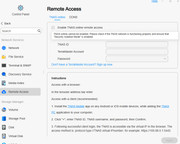
Will work with P2P online support now for a more urgent problem: Tnas PC app CANNOT access Applications for use, App page is empty,
warning message: "Application failed to load"
Unit settings: Security Isolation Mode ON or OFF has no effect. (Strangely, the highlighted message is conflicting -> enable security isolation mode for remote access!)
Other info:
Remote Access is not enable (Enable Tnas online remote access Button is NOT enabled, when activate Apply button, it resorted to NOT enable)
Ethernet connection (LAN 1, only used bottom port) indicated "WAN" is disconnected. UNIT IP is correct and all Tnas PC are functioning.
Will update after troubleshooting. Cheers.
F2-223, TOS 6.0.648, 2x8T N300 HDD Vol 1 & 3 (Singles)
1x1T Kingston NVME SSD Vol 2 (Single)
1x256G Hynix NVME SSD Hyper Cache (Balance Mode, 238G)
32G RAM
1x1T Kingston NVME SSD Vol 2 (Single)
1x256G Hynix NVME SSD Hyper Cache (Balance Mode, 238G)
32G RAM