

Suddenly my F6-424 Max stopped working remotely no changes to anything.
I have done all troubleshooting steps
Rebooted the box and also turned it off
Rebooted the router and switch and also turned it off
Replaced ethernet cable with a new one and switch to a different port
Issue persist
Once again WAN Disconnected
-
TMpzhen
Re: Once again WAN Disconnected
Is your TOS system network parameter DNS set correctly? If you have tried many methods but still cannot connect to the wide area network, we can schedule a time with you to provide remote service.
-
CraftyClown

- Posts: 47
- Joined: 03 Jan 2023, 17:13

Re: Once again WAN Disconnected
I am having exactly the same problem on one of my three Terramaster NASes! My F4-423
They are all running TOS 6.0.577
There is a WAN connection for a few seconds when I boot up and then it drops and doesn't return.
I have also swapped out cables, tried both ports, manually changed IP address, changed ports on the router, multiple device reboots. Nothing resolves the issue!
They are all running TOS 6.0.577
There is a WAN connection for a few seconds when I boot up and then it drops and doesn't return.
I have also swapped out cables, tried both ports, manually changed IP address, changed ports on the router, multiple device reboots. Nothing resolves the issue!

Re: Once again WAN Disconnected
Can you still log in to the TOS page? If you can, you can refer to the following instructions: viewtopic.php?t=5939
To contact our team, please send email to following addresses, remember to replace (at) with @
Technical team: support(at)terra-master.com (for technical support)
Service team: service(at)terra-master.com (for purchasing, return, replacement, RMA service)
Technical team: support(at)terra-master.com (for technical support)
Service team: service(at)terra-master.com (for purchasing, return, replacement, RMA service)
-
CraftyClown
- Posts: 47
- Joined: 03 Jan 2023, 17:13
Re: Once again WAN Disconnected
My network paramaters are set correctly. I'm certain this isn't a settings issue, as mentioned above I have tried different ports, different cables and different settings and this device stays disconnected from the WAN. My other two NASes are working fineTMwuu wrote: ↑15 Jan 2025, 12:06Can you still log in to the TOS page? If you can, you can refer to the following instructions: viewtopic.php?t=5939
As you can see from the screen grabs below, even with DHCP assignment the WAN is unavailable
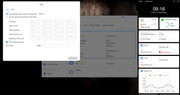
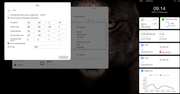
Re: Once again WAN Disconnected
Have you enabled the Security Isolation Mode? If this function is enabled, TNAS will not be able to connect to the Internet.
To contact our team, please send email to following addresses, remember to replace (at) with @
Technical team: support(at)terra-master.com (for technical support)
Service team: service(at)terra-master.com (for purchasing, return, replacement, RMA service)
Technical team: support(at)terra-master.com (for technical support)
Service team: service(at)terra-master.com (for purchasing, return, replacement, RMA service)
-
CraftyClown
- Posts: 47
- Joined: 03 Jan 2023, 17:13
Re: Once again WAN Disconnected
There is definitely something wrong with the networking settings here! If I reboot the device when the IP address is being assigned from the DHCP not only is the WAN not connecting, but it also shows the old manual address on the dashboard! Can someone look into this asap please as without WAN this device isn't usable for me! I can't download apps and I can't connect remotely
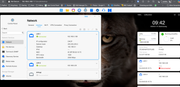
-
CraftyClown
- Posts: 47
- Joined: 03 Jan 2023, 17:13
Re: Once again WAN Disconnected
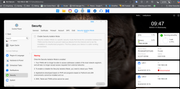
Re: Once again WAN Disconnected
Please contact the online customer service on the official website to make an appointment for a remote inspection by an engineer. (When contacting customer service, please provide the communication process on the forum.)
To contact our team, please send email to following addresses, remember to replace (at) with @
Technical team: support(at)terra-master.com (for technical support)
Service team: service(at)terra-master.com (for purchasing, return, replacement, RMA service)
Technical team: support(at)terra-master.com (for technical support)
Service team: service(at)terra-master.com (for purchasing, return, replacement, RMA service)
-
CraftyClown
- Posts: 47
- Joined: 03 Jan 2023, 17:13
Re: Once again WAN Disconnected
Thank you. Do you mean via chat on the website?