

The current version of docker for this machine can only pull images via terminal commands.
Invalid certificate when pulling docker images
Re: Invalid certificate when pulling docker images
To contact our team, please send email to following addresses, remember to replace (at) with @
Technical team: support(at)terra-master.com (for technical support)
Service team: service(at)terra-master.com (for purchasing, return, replacement)
Technical team: support(at)terra-master.com (for technical support)
Service team: service(at)terra-master.com (for purchasing, return, replacement)
-
moyomoyuno

- Posts: 7
- Joined: 19 Feb 2021, 16:41

Re: Invalid certificate when pulling docker images
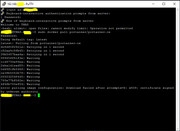
The error is through via terminal commands.
"error pulling image configuration: download failed after attempts=6: x509: certificate signed by unknown authority"
This error is after doing: docker pull portainer/portainer-ce, for example

Re: Invalid certificate when pulling docker images
What is the version of the system you have installed? And what is the version of the Docker application? There was an issue with certificate errors when downloading Docker images that was addressed recently. You can try updating to the latest version.
To contact our team, please send email to following addresses, remember to replace (at) with @
Technical team: support(at)terra-master.com (for technical support)
Service team: service(at)terra-master.com (for purchasing, return, replacement, RMA service)
Technical team: support(at)terra-master.com (for technical support)
Service team: service(at)terra-master.com (for purchasing, return, replacement, RMA service)


Re: Invalid certificate when pulling docker images
Re: Invalid certificate when pulling docker images
It looks like I partially solved the problem. In the /etc/docker/daemon.json file, I changed the registry to https://mirror.gcr.io/
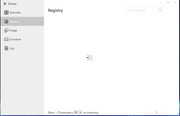
Loading images from the command line now works. But loading from the GUI still doesn't work.
Loading images from the command line now works. But loading from the GUI still doesn't work.
-
moyomoyuno
- Posts: 7
- Joined: 19 Feb 2021, 16:41
Re: Invalid certificate when pulling docker images
TOS 4.2.41-2203011629
Docker 20.10.17
I already update docker to the latest version with the app in TOS

Re: Invalid certificate when pulling docker images
Same problem.
TOS - 4.2.43
Docker version 20.10.17, build 100c701
This is a key feature of this device and it doesn't work.
Apparently the problem is old and hasn't been solved.
TOS - 4.2.43
Docker version 20.10.17, build 100c701
This is a key feature of this device and it doesn't work.
Apparently the problem is old and hasn't been solved.

Re: Invalid certificate when pulling docker images
Regarding Docker image information and image pulls, there seems to be a new issue recently. We are currently discussing solutions.
To contact our team, please send email to following addresses, remember to replace (at) with @:
Technical team: support(at)terra-master.com (for technical support)
Service team: service(at)terra-master.com (for purchasing, return, replacement, RMA service)
Technical team: support(at)terra-master.com (for technical support)
Service team: service(at)terra-master.com (for purchasing, return, replacement, RMA service)
Re: Invalid certificate when pulling docker images
The file "/etc/docker/daemon.json" contains the following information:
{
"registry-mirrors": ["https://docker.ketches.cn/"]
}
When attempting to view the specified resource, it is reported:
"Please check back later
Error 1027
This website has been temporarily rate limited"
Perhaps this is one of the problems?
{
"registry-mirrors": ["https://docker.ketches.cn/"]
}
When attempting to view the specified resource, it is reported:
"Please check back later
Error 1027
This website has been temporarily rate limited"
Perhaps this is one of the problems?

Re: Invalid certificate when pulling docker images
what is happening with this issue, there is always something with tnas, the sooner I can replace it the better