

I'm brand new to TOS and TNAS so I'm probably doing something fundamentally wrong here but I can't see what it is.
With my WD NAS I can navigate around the public folders just fine without having to log in or anything and that's the behaviour I'm expected to see with the TNAS too.
With the TNAS (423, TOS 6.0.577-00166) I have a shared public folder on Volume2 and guest has read / write permissions. In the Mac Finder I can see the TNAS in the Network location but I can't connect to it. I just get a "Connection Failed" message in the Finder.
I can connect as the admin user and as a normal user but to do that I have to actively connect as that user so I guess it's a guest account thing. I'm thinking the guest account should just work and let me navigate around the public folder without having to log on.
What am I doing wrong? How can I make the guest account work properly with the public folder?
Guest on Public Folder Not Working


Re: Guest on Public Folder Not Working
Guest account is disabled by default. so you need to enable the guest account, control panel > user > edit > advanced settings
Then grand the public folder guest permission, control panel > shared folder > public > edit > permissions
Then grand the public folder guest permission, control panel > shared folder > public > edit > permissions
To contact our team, please send email to following addresses, remember to replace (at) with @:
Support team: support(at)terra-master.com (for technical support only)
Service team: service(at)terra-master.com (for purchasing, return, replacement, RMA service)
Support team: support(at)terra-master.com (for technical support only)
Service team: service(at)terra-master.com (for purchasing, return, replacement, RMA service)
Re: Guest on Public Folder Not Working
I figured that bit out.
The guest account has been enabled and appears to be working:

It looks like the folder has the correct user permissions applied to it:
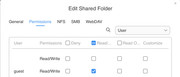
and group permissions too
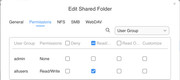
That's why I think I'm missing something. I think I've made all the obvious changes but it looks like I've missed something because it just doesn't work.
The guest account has been enabled and appears to be working:
It looks like the folder has the correct user permissions applied to it:
and group permissions too
That's why I think I'm missing something. I think I've made all the obvious changes but it looks like I've missed something because it just doesn't work.

Re: Guest on Public Folder Not Working
I have to admit, I didn't think of trying that. I might have done it while I was poking around with things but I don't remember explicitly restarting the SMB service.
So, in the absence of a "restart" button, I unchecked the service, applied the change, rechecked the service and applied the change again to no effect.
The finder still fails to connect.
When the service is disabled the TNAS no longer appears in the Finder, so I know the stop worked.
This is what the SMB config looks like:
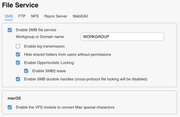
I haven't touched the Advanced config at all.
So, in the absence of a "restart" button, I unchecked the service, applied the change, rechecked the service and applied the change again to no effect.
The finder still fails to connect.
When the service is disabled the TNAS no longer appears in the Finder, so I know the stop worked.
This is what the SMB config looks like:
I haven't touched the Advanced config at all.
Re: Guest on Public Folder Not Working
I enabled "Collect debug log" and here's a snippet that *might* be useful:
2025/01/12 14:32:24.878085, 3] ../../auth/ntlmssp/ntlmssp_server.c:509(ntlmssp_server_preauth)
Got user=[GUEST] domain=[] workstation=[HEL] len1=24 len2=186
[2025/01/12 14:32:24.878118, 3] ../../source3/auth/auth.c:201(auth_check_ntlm_password)
check_ntlm_password: Checking password for unmapped user []\[GUEST]@[HEL] with the new password interface
[2025/01/12 14:32:24.878132, 3] ../../source3/auth/auth.c:204(auth_check_ntlm_password)
check_ntlm_password: mapped user is: []\[GUEST]@[HEL]
[2025/01/12 14:32:24.878307, 3] ../../source3/passdb/lookup_sid.c:2166(get_primary_group_sid)
Forcing Primary Group to 'Domain Users' for guest
[2025/01/12 14:32:24.878387, 3] ../../libcli/auth/ntlm_check.c:446(ntlm_password_check)
ntlm_password_check: NTLMv2 password check failed
[2025/01/12 14:32:24.878398, 3] ../../libcli/auth/ntlm_check.c:492(ntlm_password_check)
ntlm_password_check: Lanman passwords NOT PERMITTED for user guest
[2025/01/12 14:32:24.878431, 3] ../../libcli/auth/ntlm_check.c:637(ntlm_password_check)
ntlm_password_check: LM password, NT MD4 password in LM field and LMv2 failed for user guest
[2025/01/12 14:32:24.878576, 2] ../../source3/auth/auth.c:345(auth_check_ntlm_password)
check_ntlm_password: Authentication for user [GUEST] -> [GUEST] FAILED with error NT_STATUS_WRONG_PASSWORD, authoritative=1
[2025/01/12 14:32:24.878617, 2] ../../auth/auth_log.c:647(log_authentication_event_human_readable)
Auth: [SMB2,(null)] user []\[GUEST] at [Sun, 12 Jan 2025 14:32:24.878604 GMT] with [NTLMv2] status [NT_STATUS_WRONG_PASSWORD] workstation [HEL] remote host [ipv4:10.10.10.13:51217] mapped to []\[GUEST]. local host [ipv4:10.10.10.197:445]
{"timestamp": "2025-01-12T14:32:24.878687+0000", "type": "Authentication", "Authentication": {"version": {"major": 1, "minor": 2}, "eventId": 4625, "logonId": "0", "logonType": 3, "status": "NT_STATUS_WRONG_PASSWORD", "localAddress": "ipv4:10.10.10.197:445", "remoteAddress": "ipv4:10.10.10.13:51217", "serviceDescription": "SMB2", "authDescription": null, "clientDomain": "", "clientAccount": "GUEST", "workstation": "HEL", "becameAccount": null, "becameDomain": null, "becameSid": null, "mappedAccount": "GUEST", "mappedDomain": "", "netlogonComputer": null, "netlogonTrustAccount": null, "netlogonNegotiateFlags": "0x00000000", "netlogonSecureChannelType": 0, "netlogonTrustAccountSid": null, "passwordType": "NTLMv2", "duration": 6032}}
It looks like the system is trying to authenticate the guest user and failing.
Any ideas on how to fix this?
2025/01/12 14:32:24.878085, 3] ../../auth/ntlmssp/ntlmssp_server.c:509(ntlmssp_server_preauth)
Got user=[GUEST] domain=[] workstation=[HEL] len1=24 len2=186
[2025/01/12 14:32:24.878118, 3] ../../source3/auth/auth.c:201(auth_check_ntlm_password)
check_ntlm_password: Checking password for unmapped user []\[GUEST]@[HEL] with the new password interface
[2025/01/12 14:32:24.878132, 3] ../../source3/auth/auth.c:204(auth_check_ntlm_password)
check_ntlm_password: mapped user is: []\[GUEST]@[HEL]
[2025/01/12 14:32:24.878307, 3] ../../source3/passdb/lookup_sid.c:2166(get_primary_group_sid)
Forcing Primary Group to 'Domain Users' for guest
[2025/01/12 14:32:24.878387, 3] ../../libcli/auth/ntlm_check.c:446(ntlm_password_check)
ntlm_password_check: NTLMv2 password check failed
[2025/01/12 14:32:24.878398, 3] ../../libcli/auth/ntlm_check.c:492(ntlm_password_check)
ntlm_password_check: Lanman passwords NOT PERMITTED for user guest
[2025/01/12 14:32:24.878431, 3] ../../libcli/auth/ntlm_check.c:637(ntlm_password_check)
ntlm_password_check: LM password, NT MD4 password in LM field and LMv2 failed for user guest
[2025/01/12 14:32:24.878576, 2] ../../source3/auth/auth.c:345(auth_check_ntlm_password)
check_ntlm_password: Authentication for user [GUEST] -> [GUEST] FAILED with error NT_STATUS_WRONG_PASSWORD, authoritative=1
[2025/01/12 14:32:24.878617, 2] ../../auth/auth_log.c:647(log_authentication_event_human_readable)
Auth: [SMB2,(null)] user []\[GUEST] at [Sun, 12 Jan 2025 14:32:24.878604 GMT] with [NTLMv2] status [NT_STATUS_WRONG_PASSWORD] workstation [HEL] remote host [ipv4:10.10.10.13:51217] mapped to []\[GUEST]. local host [ipv4:10.10.10.197:445]
{"timestamp": "2025-01-12T14:32:24.878687+0000", "type": "Authentication", "Authentication": {"version": {"major": 1, "minor": 2}, "eventId": 4625, "logonId": "0", "logonType": 3, "status": "NT_STATUS_WRONG_PASSWORD", "localAddress": "ipv4:10.10.10.197:445", "remoteAddress": "ipv4:10.10.10.13:51217", "serviceDescription": "SMB2", "authDescription": null, "clientDomain": "", "clientAccount": "GUEST", "workstation": "HEL", "becameAccount": null, "becameDomain": null, "becameSid": null, "mappedAccount": "GUEST", "mappedDomain": "", "netlogonComputer": null, "netlogonTrustAccount": null, "netlogonNegotiateFlags": "0x00000000", "netlogonSecureChannelType": 0, "netlogonTrustAccountSid": null, "passwordType": "NTLMv2", "duration": 6032}}
It looks like the system is trying to authenticate the guest user and failing.
Any ideas on how to fix this?