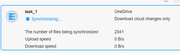
Cloudsync cloudsync downloading files from onedrive is slow

CloudSync is a cloud drive synchronization application for fast and secure data synchronization between your TNAS and cloud drives.
Locked
User avatar
Bato
Posts: 5
Joined: 02 Jan 2025, 00:30
Spain

Cloudsync cloudsync downloading files from onedrive is slow

Post by Bato »

Good afternoon.
I have Cloudsync configured with a OneDrive account to make five simultaneous connections.
However, I see that it only makes one connection, which makes the download speed quite slow.
I have checked the downloads folder, and there is only one file with the name .cloudsyncd_downloading_Filename.avi
Once it finishes downloading that file, it renames it to Filename.avi and moves on to the next file.
I would like to know if this is a bug in the application, as I think it should allow multiple simultaneous connections to download multiple files at once
Regards and thank you very much
Image
Image
User avatar
TMtina
TM Support
Posts: 245
Joined: 01 Nov 2022, 18:00

Re: Cloudsync cloudsync downloading files from onedrive is slow

Post by TMtina »

Bato wrote: 03 Jan 2025, 01:01 Good afternoon.
I have Cloudsync configured with a OneDrive account to make five simultaneous connections.
However, I see that it only makes one connection, which makes the download speed quite slow.
I have checked the downloads folder, and there is only one file with the name .cloudsyncd_downloading_Filename.avi
Once it finishes downloading that file, it renames it to Filename.avi and moves on to the next file.
I would like to know if this is a bug in the application, as I think it should allow multiple simultaneous connections to download multiple files at once
Regards and thank you very much
Image
Image
CloudSync supports creating multiple connections, but if you intend to use the same OneDrive account, you only need to create one connection. Then, you can set up multiple sync tasks under that connection. If you want to use a different OneDrive account, you need to log out of the current account on the OneDrive website, log in with the other account, and then connect through CloudSync.
To contact our team, please send email to following addresses, remember to replace (at) with @:

Technical team: support(at)terra-master.com(for technical support)
Service team: service(at)terra-master.com(for purchasing, return, replacement, RMA service)
User avatar
Stathi
Posts: 4
Joined: 05 Jan 2025, 15:36
Australia

Re: Cloudsync cloudsync downloading files from onedrive is slow

Post by Stathi »

Being new to the forum and Terramaster (F4-423 running TOS 6.0.577-00166) I have successfully created the OneDrive connection for my single OneDrive account, can you please clarify the statement and an example of how this is used "but if you intend to use the same OneDrive account, you only need to create one connection. Then, you can set up multiple sync tasks under that connection."
My current task is to download cloud changes from the root of my OneDrive. Are you saying I need to run multiple identical of tasks?

Image
F4-423
TMpzhen

Re: Cloudsync cloudsync downloading files from onedrive is slow

Post by TMpzhen »

Different OneDrive accounts can create multiple cloud disk connections, and the same account only needs to create one connection.
User avatar
Stathi
Posts: 4
Joined: 05 Jan 2025, 15:36
Australia

Re: Cloudsync cloudsync downloading files from onedrive is slow

Post by Stathi »

TMpzhen wrote: 05 Jan 2025, 17:00 Different OneDrive accounts can create multiple cloud disk connections, and the same account only needs to create one connection.
So if you have multiple folders you create one task per folder you plan to sync with
F4-423
User avatar
Stathi
Posts: 4
Joined: 05 Jan 2025, 15:36
Australia

Re: Cloudsync cloudsync downloading files from onedrive is slow

Post by Stathi »

Has anyone been able to get CloudSync to work with OneDrive where it is not a slow download speed. I have a 1Gbps internet connection and I'm getting from 0 bps to 800 bps
F4-423
User avatar
TMtina
TM Support
Posts: 245
Joined: 01 Nov 2022, 18:00

Re: Cloudsync cloudsync downloading files from onedrive is slow

Post by TMtina »

Stathi wrote: 06 Jan 2025, 13:13 Has anyone been able to get CloudSync to work with OneDrive where it is not a slow download speed. I have a 1Gbps internet connection and I'm getting from 0 bps to 800 bps
Do you mean that OneDrive synchronization is slow? You can see a more accurate speed in the Dashboard on your desktop.
To contact our team, please send email to following addresses, remember to replace (at) with @:

Technical team: support(at)terra-master.com(for technical support)
Service team: service(at)terra-master.com(for purchasing, return, replacement, RMA service)
User avatar
Stathi
Posts: 4
Joined: 05 Jan 2025, 15:36
Australia

Re: Cloudsync cloudsync downloading files from onedrive is slow

Post by Stathi »

TMtina wrote: 06 Jan 2025, 16:04
Stathi wrote: 06 Jan 2025, 13:13 Has anyone been able to get CloudSync to work with OneDrive where it is not a slow download speed. I have a 1Gbps internet connection and I'm getting from 0 bps to 800 bps
Do you mean that OneDrive synchronization is slow? You can see a more accurate speed in the Dashboard on your desktop.
Yes it is very slow, I have used the dashboard and other utilities to monitor the interface same result. From what I have read on the forums CloudSync is problematic. For now I have stopped using it as I don't see a solution to it.
F4-423
User avatar
EthanLiu
TM Product Manager
Posts: 177
Joined: 13 Nov 2023, 14:25
China

Re: Cloudsync cloudsync downloading files from onedrive is slow

Post by EthanLiu »

Stathi wrote: 06 Jan 2025, 20:11
Thank you for your valuable feedback.

We fully understand that synchronization speed is influenced by various factors, including the size of the synchronized files and the current network environment, all of which have an impact on the synchronization process.

Furthermore, optimization of synchronization speed has been identified as one of the key areas for improvement in the next phase of the Cloudsync application. We are committed to continuously enhancing the user experience, so please stay tuned.
To contact our team, please send email to following addresses, remember to replace (at) with @
Technical team: support(at)terra-master.com (for technical support)
Service team: service(at)terra-master.com (for purchasing, return, replacement, RMA service)
Locked

Return to “CloudSync”