Portainer and container console terminal UI issue

Discussion of applications not mentioned above.
Locked
User avatar
neoz
Posts: 23
Joined: 19 Dec 2024, 17:01
Andorra

Portainer and container console terminal UI issue

Post by neoz »

Hi all!

I don't know if this is related with this topic: viewtopic.php?t=5437

I have a F-424 Pro with TOS 6 (6.0.577-00166). I have been installed the Portainer application (from offical TOS applications, now in version 2.19.1-ce), works fine, but when I try to access into a container console (via Exec console from Portainer UI) show the error:

Code: Select all

Unable to retrieve image details
I did a search and I found some possible things related, like this issue from the portainer repository https://github.com/portainer/portainer/issues/11436 .

Seems that is a issue related with new directives introduced in newer Docker versions and old versions of Portainer.
From 2.20.3 Portainer version or upper, the problem has been solved.

To verify that the the Portainer version upgrade works fine. I created a new Docker project with this docker-compose configuration (I have previously disabled the Portainer TOS application):

Code: Select all

version: '3.8'

services:
  portainer:
    image: portainer/portainer-ce:latest
    container_name: portainer
    restart: always
    ports:
      - "8000:8000"
      - "9443:9443"
    volumes:
      - /var/run/docker.sock:/var/run/docker.sock
      - ./data:/data
After generate and execute the project, Portainer works fine, and I can connect to container consoles via UI

Could be possible upgrade the TOS Portainer app version to 2.20.3 or newer?

Thank you!
F4-424 Pro - TOS 6
User avatar
TMlinda
TM Support
Posts: 276
Joined: 13 Jun 2022, 16:57

Re: Portainer and container console terminal UI issue

Post by TMlinda »

neoz wrote: 04 Jan 2025, 15:17
We are adapting to a higher version of Portainer, please wait.
To contact our team, please send email to following addresses, remember to replace (at) with @
Technical team: support(at)terra-master.com (for technical support)
Service team: service(at)terra-master.com (for purchasing, return, replacement, RMA service)
User avatar
neoz
Posts: 23
Joined: 19 Dec 2024, 17:01
Andorra

Re: Portainer and container console terminal UI issue

Post by neoz »

TMwuu wrote: 04 Jan 2025, 15:58
Perfect! Thank you.
F4-424 Pro - TOS 6
User avatar
rvescovi
Posts: 72
Joined: 12 Dec 2024, 01:14
Italy

Re: Portainer and container console terminal UI issue

Post by rvescovi »

neoz wrote: 04 Jan 2025, 16:04
TMwuu wrote: 04 Jan 2025, 15:58
Perfect! Thank you.
Hi Neoz,

May I ask you how you link the Portainer TOS App with Docker environment? Do you use the agent or the sock? With this latest one I obtain access denied within the app.

Thanks.
User avatar
neoz
Posts: 23
Joined: 19 Dec 2024, 17:01
Andorra

Re: Portainer and container console terminal UI issue

Post by neoz »

rvescovi wrote: 04 Jan 2025, 17:00
Hi @rvescovi!

By default, the TOS Portainer App already has the Docker environment configured. You only need install the application and lanunch it. That's all.

But, if you don't want to use the TOS Portainer App, and want to use a docker container (for example, to test a specific version), you can do it like the example I posted. The example configures the docker soket on Portainer by map volumes config.

Hope it helps. Regards!
F4-424 Pro - TOS 6
User avatar
rvescovi
Posts: 72
Joined: 12 Dec 2024, 01:14
Italy

Re: Portainer and container console terminal UI issue

Post by rvescovi »

neoz wrote: 04 Jan 2025, 17:16
Strange, I have the latest one TOS 6 and F4 424 PRO, when I installed Portainer APP, it requests to select an environment link mode but none works except the connection through the agent, which I need to install previously. I think we have two installation which differs for some user permissions.

In any case if I select local sock within the Portainer APP it shows "permission denied" probably if I installed from command line as you suggested it works but I prefer to have the app. Let's wait for an update.

Thanks.
User avatar
neoz
Posts: 23
Joined: 19 Dec 2024, 17:01
Andorra

Re: Portainer and container console terminal UI issue

Post by neoz »

rvescovi wrote: 04 Jan 2025, 20:45
Hi @rvescovi!

As you say, first you need install the "Docker engine" and then Portainer App. I did it like this, but I don't remember to need configure nothing in Portainer. Only change or assign the password and click on the "Get Started" button.

In my opinion, it is also better, as you say, to install Portainer from the TOS applications.

Maybe, if you don't have much docker customization yet, or are just starting with it, you can try to uninstall and try again.

Regards!
F4-424 Pro - TOS 6
User avatar
rvescovi
Posts: 72
Joined: 12 Dec 2024, 01:14
Italy

Re: Portainer and container console terminal UI issue

Post by rvescovi »

neoz wrote: 05 Jan 2025, 03:03
Hi @neoz,

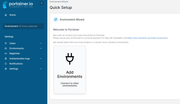
I reinstalled many times both dockerengine and portainer with reboot but every time I don't have the "Get Started" as in your case, but an error followed by the request to add an environment

Image

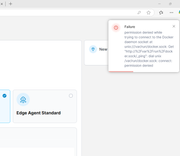
and if I select the local sock, I receive an error of "permission denied"

Image

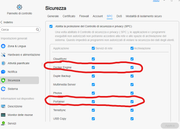
I have SPC enabled and granted to Portainer both network and storage access.

Image

I don't know how to exit from this situation, apart installing the Portainer agent, but it's too slow accessing it, so I'm waiting an update on the app. I read that is also old, let's see.

Thanks.
User avatar
neoz
Posts: 23
Joined: 19 Dec 2024, 17:01
Andorra

Re: Portainer and container console terminal UI issue

Post by neoz »

rvescovi wrote: 05 Jan 2025, 05:13
Hi @rvescovi!

Honestly, it's quite odd that this is happening to you with the Portainer application. Someone from the TerraMaster team can explain it to us.

One question: Do you have the Docker Manager app installed? If so, is it working fine?

Regards!
F4-424 Pro - TOS 6
User avatar
rvescovi
Posts: 72
Joined: 12 Dec 2024, 01:14
Italy

Re: Portainer and container console terminal UI issue

Post by rvescovi »

Yes DockerManager works fine except for empty registry page (known issue). Let's see what they suggest for Portainer, I hope a new release will help.

Thanks.
Locked

Return to “Others”