Volume, Storage Pools and all kinds of other mess

RAID, Volume, storage pool, hard drive, USB, SSD cache and iSCSI LUN
User avatar
Spider
Posts: 35
Joined: 17 Nov 2021, 11:17
United States of America

Volume, Storage Pools and all kinds of other mess

Post by Spider »

Is anyone else equally as frustrated as i am with this OS?
Lets Start from the beginning.
I have 2 NAS
F4-220 and the F5221 Both running TOS version 5.1.145-00320
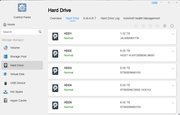
The F5-221 has the following:
Image
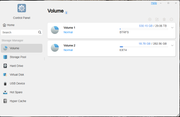
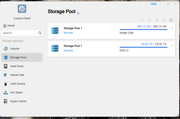
Why are there 2 storage pool 1?

Image
No Volume

Image
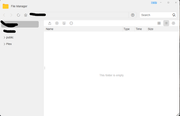
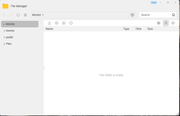
All my files are on a volume that are nor showing in the file manager, but yet my plex server can still see the movies that I was able to add before this happened.
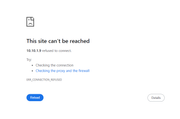
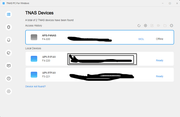
My F4-220 keeps losing connection and I would have to refresh to get to the desktop
Image


Image
Can someone tell me what is going on here?
User avatar
Gremlin
Gold Member
Posts: 1630
Joined: 02 Dec 2022, 22:31
Great Britain

Re: Volume, Storage Pools and all kinds of other mess

Post by Gremlin »

I'll ask before anyone else, since I'm pretty sure @TMsupport will like to know - where do you see 2 x Storage Pool 1?
And, I think if you have a '/public' folder, you have a Volume. Typically /public is held on Volume1 by default. In reality
'/Volume1/public'
F5-221 TOS7.0.0777 - 4x4TB (Ironwolf) Traid
F2-424 TOS7.0.0777 - 2x500GB nvme (P3) Traid, 2x6TB HDD (HGST) Traid
F2-221 TOS7.0.0777 - 1x3TB Ext4, 1x4TB Btrfs
F2-425+ TOS7.0.0777 - 2x500GB nvme (P3) Traid, 2x6TB HDD (EXOS) Traid
User avatar
Spider
Posts: 35
Joined: 17 Nov 2021, 11:17
United States of America

Re: Volume, Storage Pools and all kinds of other mess

Post by Spider »

I am sorry I thought I added that image.
You are right about /public being on Volume 1, but a folder that I had on there is not showing " Plex Movies.
Image

Image
User avatar
Gremlin
Gold Member
Posts: 1630
Joined: 02 Dec 2022, 22:31
Great Britain

Re: Volume, Storage Pools and all kinds of other mess

Post by Gremlin »

Now THAT is odd :shock:
I hope @TMsupport can figure it out.
F5-221 TOS7.0.0777 - 4x4TB (Ironwolf) Traid
F2-424 TOS7.0.0777 - 2x500GB nvme (P3) Traid, 2x6TB HDD (HGST) Traid
F2-221 TOS7.0.0777 - 1x3TB Ext4, 1x4TB Btrfs
F2-425+ TOS7.0.0777 - 2x500GB nvme (P3) Traid, 2x6TB HDD (EXOS) Traid
User avatar
Spider
Posts: 35
Joined: 17 Nov 2021, 11:17
United States of America

Re: Volume, Storage Pools and all kinds of other mess

Post by Spider »

Yeah
I just now added the NAS to my domain and I can see my folder, but can not access it. Says I don't have permission. Tired to give permission and if fails.
User avatar
Spider
Posts: 35
Joined: 17 Nov 2021, 11:17
United States of America

Re: Volume, Storage Pools and all kinds of other mess

Post by Spider »

The only ones I can provide access to are the ones in the screenshot
User avatar
TMlinda
TM Support
Posts: 276
Joined: 13 Jun 2022, 16:57

Re: Volume, Storage Pools and all kinds of other mess

Post by TMlinda »

Did you put the hard drives of both devices together to boot? You can try restarting the devices.
To contact our team, please send email to following addresses, remember to replace (at) with @
Technical team: support(at)terra-master.com (for technical support)
Service team: service(at)terra-master.com (for purchasing, return, replacement, RMA service)
User avatar
Spider
Posts: 35
Joined: 17 Nov 2021, 11:17
United States of America

Re: Volume, Storage Pools and all kinds of other mess

Post by Spider »

I have rebooted and rebooted. I have rebooted with the raid drive's in and out. I have gone into shared folder > advanced settings and did restore several time each with a reboot and nothing.
User avatar
Gremlin
Gold Member
Posts: 1630
Joined: 02 Dec 2022, 22:31
Great Britain

Re: Volume, Storage Pools and all kinds of other mess

Post by Gremlin »

I suspect I can guess what @TMwuu is suggesting.....Did you possibly mix up drives from the 2 devices? That might {might} give 2 Storage Pools of same designation, but I've never seen it and I don't know.
F5-221 TOS7.0.0777 - 4x4TB (Ironwolf) Traid
F2-424 TOS7.0.0777 - 2x500GB nvme (P3) Traid, 2x6TB HDD (HGST) Traid
F2-221 TOS7.0.0777 - 1x3TB Ext4, 1x4TB Btrfs
F2-425+ TOS7.0.0777 - 2x500GB nvme (P3) Traid, 2x6TB HDD (EXOS) Traid
User avatar
Spider
Posts: 35
Joined: 17 Nov 2021, 11:17
United States of America

Re: Volume, Storage Pools and all kinds of other mess

Post by Spider »

No. No changes were made to the drives. The folder was there and now it's not. I was able to add files to it. Now I can't find it.
Locked

Return to “Storage”