JellyFin doesn't get started on f4-424

Discussion on Jellyfin media server, clients
User avatar
Hausmeier
Posts: 49
Joined: 03 Dec 2024, 07:09
Greenland

JellyFin doesn't get started on f4-424

Post by Hausmeier »

Hey,

I tried to install the Jellyfin-App on an F4-424, but it doesn't get started.
I installed the ModBase1-App and the ffmpeg-App as it told me that these are dependencies.
But I just can't activate the Jellyfin.

Maybe the two dependency apps are not fully configurated yet but I'm not sure. I'll post some pictures and it would be great if you couldgive me some advice.
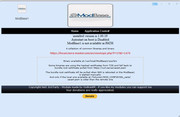
Image

I don't understand what this has to say "ModBase 1 is not available in PATH. Do I have to do here something?
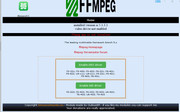

Image

He told me which version is installed but down below in the red line it says "ffmpeg is not installed"... Is here everything allright? And which driver do I have to activate. the f4-424 is not listed...

So what can I do to get Jellyfin started. I already tried to reinstall it or to reboot the f4-424

I am thankful for every kind of advice.

Thanks in advance
User avatar
Hausmeier
Posts: 49
Joined: 03 Dec 2024, 07:09
Greenland

Re: JellyFin doesn't get started on f4-424

Post by Hausmeier »

Maybe it is a help so here are the error messages from the start_log file:

Code: Select all

[00:19:41] [ERR] [1] MediaBrowser.MediaEncoding.Encoder.MediaEncoder: FFmpeg validation: The process returned no result
[00:19:41] [ERR] [1] MediaBrowser.MediaEncoding.Encoder.MediaEncoder: FFmpeg: Failed version check: /usr/local/ffmpeg51/sys/bin/ffmpeg
[00:19:41] [ERR] [1] MediaBrowser.MediaEncoding.Encoder.MediaEncoder: FFmpeg: Path set by command line or environment variable is invalid
[00:19:41] [FTL] [1] Main: Error while starting server
MediaBrowser.Common.FfmpegException: Failed to find valid ffmpeg
   at Emby.Server.Implementations.ApplicationHost.RunStartupTasksAsync()
   at Jellyfin.Server.Program.StartServer(IServerApplicationPaths appPaths, StartupOptions options, IConfiguration startupConfig)
[00:19:41] [INF] [1] Main: Running query planner optimizations in the database... This might take a while
[00:19:41] [INF] [1] Emby.Server.Implementations.ApplicationHost: Disposing CoreAppHost
[00:19:41] [INF] [1] Emby.Server.Implementations.ApplicationHost: Disposing MusicBrainzArtistProvider
[00:19:41] [INF] [1] Emby.Server.Implementations.ApplicationHost: Disposing MusicBrainzAlbumProvider
[00:19:41] [INF] [1] Emby.Server.Implementations.ApplicationHost: Disposing PluginManager
User avatar
outkastm
Gold Member
Posts: 1457
Joined: 29 Dec 2020, 23:52

Re: JellyFin doesn't get started on f4-424

Post by outkastm »

The message says that the ffmpeg app is not installed, so you need to install this app
https://tmnascommunity.eu/download/ffmpeg
User avatar
Hausmeier
Posts: 49
Joined: 03 Dec 2024, 07:09
Greenland

Re: JellyFin doesn't get started on f4-424

Post by Hausmeier »

Ok, thanks for your answer. I installed the ffmpeg but maybe it was the wrong ffmpeg App. I will uninstall it and install the version that you linked and then tell you if it fixed the problem.

Thanks again so far.
User avatar
Hausmeier
Posts: 49
Joined: 03 Dec 2024, 07:09
Greenland

Re: JellyFin doesn't get started on f4-424

Post by Hausmeier »

Ok, I'm back. As I told, I uninstalled my ffmpeg version and installed the one you linked. This time the start_log throws the following error messages:

Code: Select all

[12:04:32] [ERR] [1] MediaBrowser.MediaEncoding.Encoder.MediaEncoder: FFmpeg: Failed version check: /usr/local/ffmpeg51/sys/bin/ffmpeg
[12:04:32] [ERR] [1] MediaBrowser.MediaEncoding.Encoder.MediaEncoder: FFmpeg: Path set by command line or environment variable is invalid
[12:04:32] [FTL] [1] Main: Error while starting server
MediaBrowser.Common.FfmpegException: Failed to find valid ffmpeg
   at Emby.Server.Implementations.ApplicationHost.RunStartupTasksAsync()
   at Jellyfin.Server.Program.StartServer(IServerApplicationPaths appPaths, StartupOptions options, IConfiguration startupConfig)
[12:04:32] [INF] [1] Main: Running query planner optimizations in the database... This might take a while
[12:04:32] [INF] [1] Emby.Server.Implementations.ApplicationHost: Disposing CoreAppHost
[12:04:32] [INF] [1] Emby.Server.Implementations.ApplicationHost: Disposing MusicBrainzArtistProvider
[12:04:32] [INF] [1] Emby.Server.Implementations.ApplicationHost: Disposing MusicBrainzAlbumProvider
[12:04:32] [INF] [1] Emby.Server.Implementations.ApplicationHost: Disposing PluginManager
I would also like to add some photos for further information: The ffmpeg app says the following (seems to work correctly in my eyes):


Image

And jellyfin says the following (still seems to have issues with ffmpeg...)


Image

Any ideas? Thanks again for your help.
User avatar
outkastm
Gold Member
Posts: 1457
Joined: 29 Dec 2020, 23:52

Re: JellyFin doesn't get started on f4-424

Post by outkastm »

According to the message from WebUI, you removed ffmpeg51 app. You need to have both ffmpeg and ffmpeg51 installed.

ffmpeg require ModBase1 as dependency
ffmpeg51 require ffmpeg as dependency
Jellyfin require ffmpeg51 as dependency

So in order to run Jellyfin, you need to have ModBase1, ffmpeg and ffmpeg51 installed
User avatar
Hausmeier
Posts: 49
Joined: 03 Dec 2024, 07:09
Greenland

Re: JellyFin doesn't get started on f4-424

Post by Hausmeier »

That was the point - thank you. I wasn't aware that two ffmpeg versions/apps have to be installed as normally only the latest version is required.
Trying now to setup Jellyfin.

Thanks so much for your help so far.
User avatar
Hausmeier
Posts: 49
Joined: 03 Dec 2024, 07:09
Greenland

Re: JellyFin doesn't get started on f4-424

Post by Hausmeier »

Ok, I can enter the Web-OS now. But the library I made doesn't contain the movies that are in the Folder that I added to this library. What could be the reason?
User avatar
Hausmeier
Posts: 49
Joined: 03 Dec 2024, 07:09
Greenland

Re: JellyFin doesn't get started on f4-424

Post by Hausmeier »

Due to the fact that the movies are not found I uninstalled Jellyfin and installed it again. Now it cannot connect to the server anymore. This is what the logfile says:

Code: Select all

[22:01:12] [WRN] [1] Microsoft.AspNetCore.DataProtection.Repositories.EphemeralXmlRepository: Using an in-memory repository. Keys will not be persisted to storage.
[22:01:12] [WRN] [1] Microsoft.AspNetCore.DataProtection.KeyManagement.XmlKeyManager: Neither user profile nor HKLM registry available. Using an ephemeral key repository. Protected data will be unavailable when application exits.
[22:01:12] [INF] [1] Main: Kestrel is listening on 0.0.0.0
[22:01:12] [WRN] [1] Microsoft.AspNetCore.DataProtection.KeyManagement.XmlKeyManager: No XML encryptor configured. Key {910498ce-a0be-4e71-b7fe-d605c81c35da} may be persisted to storage in unencrypted form.
[22:01:13] [WRN] [1] Microsoft.AspNetCore.StaticFiles.StaticFileMiddleware: The WebRootPath was not found: /wwwroot. Static files may be unavailable.
What can I do? I don't know what to do anymore...
User avatar
outkastm
Gold Member
Posts: 1457
Joined: 29 Dec 2020, 23:52

Re: JellyFin doesn't get started on f4-424

Post by outkastm »

reboot the NAS, install the last version available (10.10.3.2).
You have to assign permission to jellyfin app user for the folders added in the media libray
Image
Post Reply

Return to “Jellyfin Media Server”