
Instructions for Online RAID Expansion

Hard Drive, volume, storage pool, RAID
Post Reply
User avatar
TMSupport
TM Support
Posts: 2308
Joined: 13 Dec 2019, 15:15

Instructions for Online RAID Expansion

Post by TMSupport »

Applicable model: all TNAS models.

Applicable RAID mode: RAID1, RAID5 and RAID6.

The following instructions will guide you to replace HDDs in existing Storage pool with bigger sized new HDDs to expand the capacity of the RAID without losing data nor changing the RAID mode.

Take RAID1 for example, replacing 2*1TB HDDs in RAID1 with 2*6TB HDDs:

Steps:
1. Boot your TNAS up and log into TOS webpage.
2. Pull out one 1TB drive at power-on stage, constant beeping sound will be alarmed (you can mute it by clicking the bell icon at the top right corner of TOS) and "Hard drive is missing from the RAID" will be prompted.
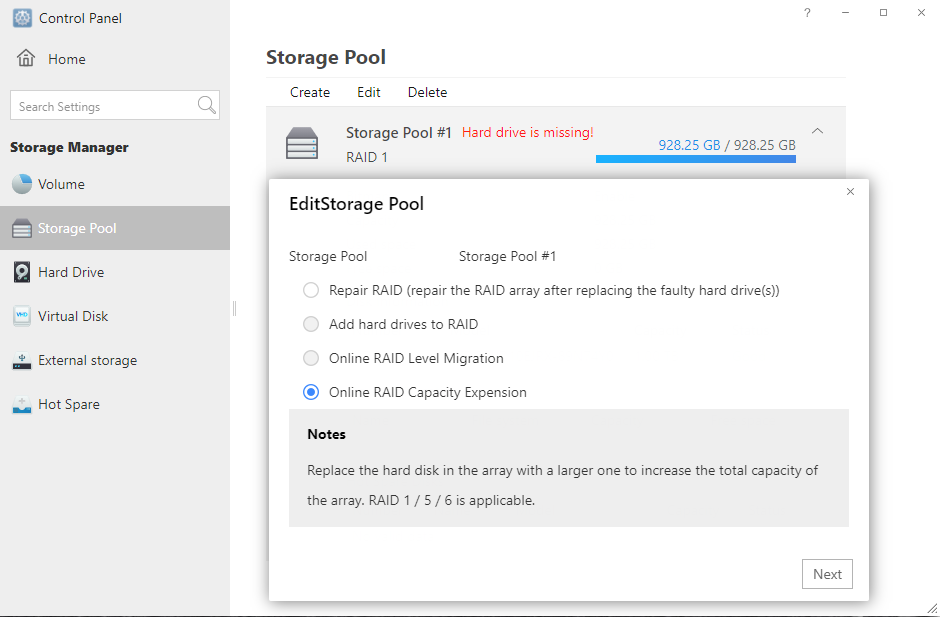
3. Insert one new 6TB drive, and go to TOS Control panel - Storage manager- Storage pool- click Edit, and select "Online RAID Capacity Expansion" from the list, check the added HDD and follow the wizard to complete.
Image

4. RAID will be rebuilt, it will take several hours to complete.
5. When RAID rebuilding is completed, you can pull out the second 1TB drive and insert the new 6TB drive and repeat the above steps to rebuild the RAID.
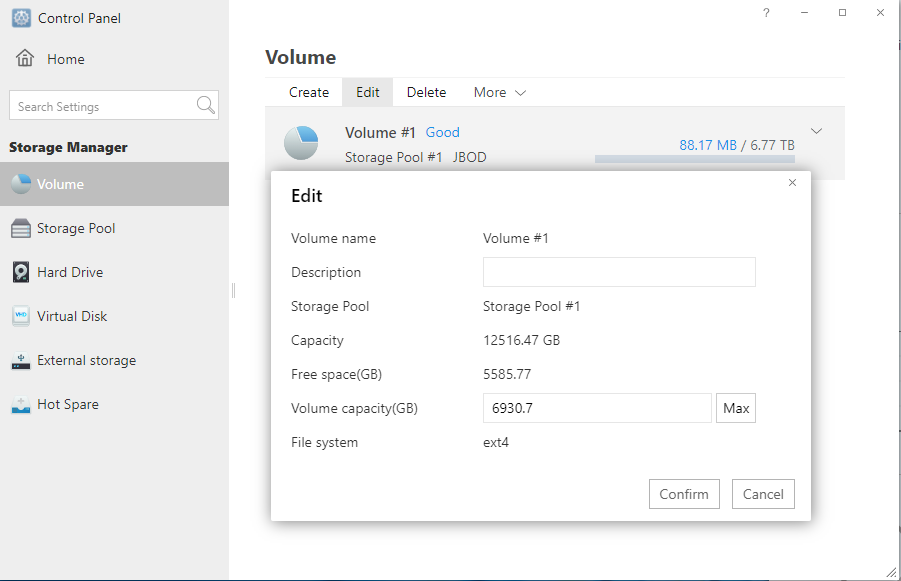
6. Go to TOS Control panel - Volume - Edit to add the capacity for your volume.
The number at Free capacity is the capacity you can add for your existing volume.
The number at Volume capacity is the capacity of your existing volume, the capacity of your volume could only be added but not decreased.
Image

Note: The performance would be affected when the RAID is in rebuilding, it's not suggested to make other operations at the same time.

After you replace all hard disks, if you find that you still cannot expand the storage pool or volume, please refer to this guide to manually expand the capacity.
viewtopic.php?f=79&t=2342
To contact our team, please send email to following addresses, remember to replace (at) with @
Technical team: support(at)terra-master.com (for technical support)
Service team: service(at)terra-master.com (for purchasing, return, replacement, RMA service)
User avatar
TMF522123
Posts: 2
Joined: 22 Mar 2023, 08:10
United States of America

Re: Instructions for Online RAID Expansion

Post by TMF522123 »

When I followed the instructions at step 3 when I edit the Storage pool, it defaulted the selection to "Repair RAID (repair the RAID array after replacing the faulty hard drive(s)). It won't allow me to click "Online RAID Capacity Expansion".
User avatar
daebrewer179
Posts: 2
Joined: 01 Oct 2024, 21:23
United States of America

Re: Instructions for Online RAID Expansion

Post by daebrewer179 »

What are the steps when using TRAID mode?

I plan to purchase larger HHDs to replace my current HHDs. How do I replace them?
User avatar
ColaChen
TM Support
Posts: 164
Joined: 11 Aug 2023, 18:15
China

Re: Instructions for Online RAID Expansion

Post by ColaChen »

Please refer to the operation instructions of this post.
User avatar
daebrewer179
Posts: 2
Joined: 01 Oct 2024, 21:23
United States of America

Re: Instructions for Online RAID Expansion

Post by daebrewer179 »

The instructions state they are applicable to "RAID mode: RAID1, RAID5 and RAID6". I am using TRAID. Where can I find these instructions, or are they the same?
User avatar
scheppi2003
Posts: 10
Joined: 17 Jul 2022, 22:29
Germany

Re: Instructions for Online RAID Expansion

Post by scheppi2003 »

Same here. I am on TRIAD and I do not get the option ONLINE RIAD CAPACITY EXPANSION. I only can choose REPAIR RAID, which unfortunately does not work. It simply restores the old value on the new bigger HDD. Nothing else.
User avatar
TMroy
TM Support
Posts: 3060
Joined: 10 Mar 2020, 14:04
China

Re: Instructions for Online RAID Expansion

Post by TMroy »

scheppi2003 wrote: 02 Jan 2025, 21:18 Same here. I am on TRIAD and I do not get the option ONLINE RIAD CAPACITY EXPANSION. I only can choose REPAIR RAID, which unfortunately does not work. It simply restores the old value on the new bigger HDD. Nothing else.
It seems there is raid on your nas need to repaired. before you can add drive to expend your raid, you have to repair your current raid first.
To contact our team, please send email to following addresses, remember to replace (at) with @:
Support team: support(at)terra-master.com (for technical support only)
Service team: service(at)terra-master.com (for purchasing, return, replacement, RMA service)
Post Reply

Return to “Storage”
