

Evening
Does anyone know how to enable the ASPM in the bios for the NVME's and the 10 Gig network card?
Here in Germany, electricity is very expensive, so we are very keen to save energy.
I have already set C-State to C10 for the CPU.
Only for the NVME's and for the network card I have not found the option.
F8 SSD Plus
F8 SSD Plus
CASE: Terramaster F8 SSD PLus
SSD: 8x 2TB NVME Crucial P3
HDD: 2X20TB
IOS: Unraid
Net: 1 Gig Fiber
SSD: 8x 2TB NVME Crucial P3
HDD: 2X20TB
IOS: Unraid
Net: 1 Gig Fiber
Re: F8 SSD Plus
As you can see on the picture, NVME's PCIE has the ASPM disabled.
ASPM is also disabled on the network card.
Is there a hidden option in Bios to enable it?
Or is it possible to get a bios update for it?
Are there any Terramaster employees here?
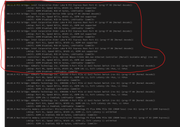
ASPM is also disabled on the network card.
Is there a hidden option in Bios to enable it?
Or is it possible to get a bios update for it?
Are there any Terramaster employees here?
CASE: Terramaster F8 SSD PLus
SSD: 8x 2TB NVME Crucial P3
HDD: 2X20TB
IOS: Unraid
Net: 1 Gig Fiber
SSD: 8x 2TB NVME Crucial P3
HDD: 2X20TB
IOS: Unraid
Net: 1 Gig Fiber


Re: F8 SSD Plus
Only those with screen names starting with 'TM' (i.e. quite a few).
F5-221 TOS7.0.1278 - 4x4TB (Ironwolf) Traid
F2-424 TOS7.0.1278 - 2x500GB nvme (P3) Traid, 2x6TB HDD (HGST) Traid
F2-221 TOS7.0.1278 - 1x3TB Ext4, 1x4TB Btrfs
F2-425+ TOS7.0.1278 - 2x500GB nvme (P3) Traid, 2x6TB HDD (EXOS) Traid
F2-424 TOS7.0.1278 - 2x500GB nvme (P3) Traid, 2x6TB HDD (HGST) Traid
F2-221 TOS7.0.1278 - 1x3TB Ext4, 1x4TB Btrfs
F2-425+ TOS7.0.1278 - 2x500GB nvme (P3) Traid, 2x6TB HDD (EXOS) Traid
-
crisisacting

- Silver Member
- Posts: 531
- Joined: 20 Jan 2022, 16:42


Re: F8 SSD Plus
Indeed, ASPM is disabled by default on our systems, primarily due to considerations of peripheral stability and compatibility. Currently, there is no way to enable it. We will need to wait for a BIOS update before that becomes possible. Our team will subsequently evaluate whether to make any changes in this regard.
To contact our team, please send email to following addresses, remember to replace (at) with @:
Support team: support(at)terra-master.com (for technical support only)
Support team: support(at)terra-master.com (for technical support only)
Re: F8 SSD Plus
Good morning,TMnick wrote: ↑01 Jan 2025, 14:12 Indeed, ASPM is disabled by default on our systems, primarily due to considerations of peripheral stability and compatibility. Currently, there is no way to enable it. We will need to wait for a BIOS update before that becomes possible. Our team will subsequently evaluate whether to make any changes in this regard.
It's a real shame that this is deactivated by default.
Grade NAS community in Germany is very ASPM function out.
Yes, it would be very nice if you could ask your department for an update.
Currently the system is running IDEL with 4 NVME's 15 Watt.
And I can imagine that you could get F8 Plus to under 10 watts in the IDEL.
CASE: Terramaster F8 SSD PLus
SSD: 8x 2TB NVME Crucial P3
HDD: 2X20TB
IOS: Unraid
Net: 1 Gig Fiber
SSD: 8x 2TB NVME Crucial P3
HDD: 2X20TB
IOS: Unraid
Net: 1 Gig Fiber
Re: F8 SSD Plus
We will notify you once our team has reached a decision, which may take a few days. Lastly, wish you a Happy New Year!Sven wrote: ↑01 Jan 2025, 14:25Good morning,TMnick wrote: ↑01 Jan 2025, 14:12 Indeed, ASPM is disabled by default on our systems, primarily due to considerations of peripheral stability and compatibility. Currently, there is no way to enable it. We will need to wait for a BIOS update before that becomes possible. Our team will subsequently evaluate whether to make any changes in this regard.
It's a real shame that this is deactivated by default.
Grade NAS community in Germany is very ASPM function out.
Yes, it would be very nice if you could ask your department for an update.
Currently the system is running IDEL with 4 NVME's 15 Watt.
And I can imagine that you could get F8 Plus to under 10 watts in the IDEL.
To contact our team, please send email to following addresses, remember to replace (at) with @:
Support team: support(at)terra-master.com (for technical support only)
Support team: support(at)terra-master.com (for technical support only)
Re: F8 SSD Plus
Thank you very much, I would be very happy if this would work.
And thank you very much, we wish you the same.
Happy New Year
And thank you very much, we wish you the same.
Happy New Year
CASE: Terramaster F8 SSD PLus
SSD: 8x 2TB NVME Crucial P3
HDD: 2X20TB
IOS: Unraid
Net: 1 Gig Fiber
SSD: 8x 2TB NVME Crucial P3
HDD: 2X20TB
IOS: Unraid
Net: 1 Gig Fiber
Re: F8 SSD Plus
@tMnick have you been able to find out anything?
CASE: Terramaster F8 SSD PLus
SSD: 8x 2TB NVME Crucial P3
HDD: 2X20TB
IOS: Unraid
Net: 1 Gig Fiber
SSD: 8x 2TB NVME Crucial P3
HDD: 2X20TB
IOS: Unraid
Net: 1 Gig Fiber
Re: F8 SSD Plus
?
CASE: Terramaster F8 SSD PLus
SSD: 8x 2TB NVME Crucial P3
HDD: 2X20TB
IOS: Unraid
Net: 1 Gig Fiber
SSD: 8x 2TB NVME Crucial P3
HDD: 2X20TB
IOS: Unraid
Net: 1 Gig Fiber