Hello,
I am receiving since yesterday these kind of emails (4 so far).
Found someone logged into your system via SSH connection. Login time: 2024-12-24 08:53:40 , IP: 127.0.0.1 --help
Once I first saw it I changed my password from 12 length to 18 length and not saved it in any electronic form. I was skeptical initially since it could be my personal computer in which I'm doing SCP (password I type each time and I didn't have it saved. I had previously only saved password in TOS on chrome). Anyhow, since I saw the emails, I deactivated SSH, changed the password to 18 length and even rebooted the TNAS to force out anyone that might be there (eventhough the system log didn't show any login activity).
However, today again I received above email that someone logged in via SSH. I know for sure that at this time I didn't do any SFTP/SCP or checked my files. Only my daughter was watching on PLEX some movies. I tried SSH from my mobile and I could successfuly do it. I logged in TOS and deactivated SFTP also which forcefully disconnected my mobile. But like this I can no longer reach my files via SFTP and this was something I needed.
So, my questions....
- Was this a real security threat? Even after changing the pasword to something super strong (small letters,capitals,numbers,special characters - 18 long) and not even saving it but only have it in my mind.... did someone so fast managed to enter my TOS?
- IP is localhost(127.0.0.1), so what does this mean? that someone is from TNAS internal was doing SSH to TNAS? Or could it be an application-virus that does this? But how can an application successfully do SSH with an unknown/new password?
- My personal PC was even turned off during time of latest event, so it isn't possible that someone did something using my PC as hop to my NAS
- Or, is it a bug of the system and these are faulty alerts? Sytem log only shows my connections and actions. Nothing I don't recognize.
Please tell me what I can do to secure myself and also keep SFTP possibility.
I have suffered a lot from hackers last year and I don't want history to repeat itself.
Found someone logged into your system via SSH connection
-
dkaratasos

- Posts: 10
- Joined: 04 Aug 2023, 20:15


Re: Found someone logged into your system via SSH connection
ip: 127.0.0.1
That's 'localhost'. i.e. the NAS itself.
Next time you can check in control panel the identity of 'who' is actually logged in (might be a system app user name like 'plex' I expect but I don't use Plex).
Control Panel > System Info > On line Users (for Tos6)
That's 'localhost'. i.e. the NAS itself.
Next time you can check in control panel the identity of 'who' is actually logged in (might be a system app user name like 'plex' I expect but I don't use Plex).
Control Panel > System Info > On line Users (for Tos6)
F5-221 TOS7.0.1278 - 4x4TB (Ironwolf) Traid
F2-424 TOS7.0.1278 - 2x500GB nvme (P3) Traid, 2x6TB HDD (HGST) Traid
F2-221 TOS7.0.1278 - 1x3TB Ext4, 1x4TB Btrfs
F2-425+ TOS7.0.1278 - 2x500GB nvme (P3) Traid, 2x6TB HDD (EXOS) Traid
F2-424 TOS7.0.1278 - 2x500GB nvme (P3) Traid, 2x6TB HDD (HGST) Traid
F2-221 TOS7.0.1278 - 1x3TB Ext4, 1x4TB Btrfs
F2-425+ TOS7.0.1278 - 2x500GB nvme (P3) Traid, 2x6TB HDD (EXOS) Traid
-
dkaratasos
- Posts: 10
- Joined: 04 Aug 2023, 20:15
Re: Found someone logged into your system via SSH connection
I am using plex for a year now. I never had these notifications before. On on-line users I was checking.. it only showed me and I was checking on system log that it was showing only me and my actions. If something bad is inside, maybe hides itself?
Or again is a falty alarm...?
I just got another one of these emails. Timestamp is a hour before I deactivated SFTP. Let's see if I get something after SFTP deactivation
Or again is a falty alarm...?
I just got another one of these emails. Timestamp is a hour before I deactivated SFTP. Let's see if I get something after SFTP deactivation


Re: Found someone logged into your system via SSH connection
May I ask what version of TOS you are using? We have previously encountered situations where using SFTP triggered SSH notifications, and we can verify this.
To contact our team, please send email to following addresses, remember to replace (at) with @
Technical team: support(at)terra-master.com (for technical support)
Service team: service(at)terra-master.com (for purchasing, return, replacement)
Technical team: support(at)terra-master.com (for technical support)
Service team: service(at)terra-master.com (for purchasing, return, replacement)
-
dkaratasos
- Posts: 10
- Joined: 04 Aug 2023, 20:15
Re: Found someone logged into your system via SSH connection
Model TOS version
F2-223 5.1.67-00214
Is what I have.
However the 2 todays notifications have been triggered without me doing sftp. Well this is true for the first one at least, for the second im not very sure as I tried sftp to see if it is working after I received the email. The time stamp of the second though is before I did this test.
Something I remembered now is that I did reboot of the tnas the night before yesterday. Before that reboot I never got such notification and I was doing sftp every days multiple times. Even sometimes ssh from mobile or pc but I never got these emails.
Yesterday morning I had to restart because transmission stopped working. So after several months I did a reboot. Since yesterday I received 5 such emails.. Like something from inside is trying ssh.
Can it possiblly be from my user trying to ssh to my admin account? I say from my user because she doesn't even know what ssh is and zero bash /Linux experience. But can it be that someone logged on her account? I have deactivated all other users. Is it possible that I can check somehow this? Ie if it is some bug or someone from outside is trying to hack me?
F2-223 5.1.67-00214
Is what I have.
However the 2 todays notifications have been triggered without me doing sftp. Well this is true for the first one at least, for the second im not very sure as I tried sftp to see if it is working after I received the email. The time stamp of the second though is before I did this test.
Something I remembered now is that I did reboot of the tnas the night before yesterday. Before that reboot I never got such notification and I was doing sftp every days multiple times. Even sometimes ssh from mobile or pc but I never got these emails.
Yesterday morning I had to restart because transmission stopped working. So after several months I did a reboot. Since yesterday I received 5 such emails.. Like something from inside is trying ssh.
Can it possiblly be from my user trying to ssh to my admin account? I say from my user because she doesn't even know what ssh is and zero bash /Linux experience. But can it be that someone logged on her account? I have deactivated all other users. Is it possible that I can check somehow this? Ie if it is some bug or someone from outside is trying to hack me?
Re: Found someone logged into your system via SSH connection
When you upgraded to Tos 5.1 did you upgrade the os partition to 8GB at same time? If you did, you seem to be well behind on the updates for your model. (Just a thought.)
F5-221 TOS7.0.1278 - 4x4TB (Ironwolf) Traid
F2-424 TOS7.0.1278 - 2x500GB nvme (P3) Traid, 2x6TB HDD (HGST) Traid
F2-221 TOS7.0.1278 - 1x3TB Ext4, 1x4TB Btrfs
F2-425+ TOS7.0.1278 - 2x500GB nvme (P3) Traid, 2x6TB HDD (EXOS) Traid
F2-424 TOS7.0.1278 - 2x500GB nvme (P3) Traid, 2x6TB HDD (HGST) Traid
F2-221 TOS7.0.1278 - 1x3TB Ext4, 1x4TB Btrfs
F2-425+ TOS7.0.1278 - 2x500GB nvme (P3) Traid, 2x6TB HDD (EXOS) Traid
-
dkaratasos
- Posts: 10
- Joined: 04 Aug 2023, 20:15
Re: Found someone logged into your system via SSH connection
my system doesn't give me any new update. I had updated once in the past and just followed the prompts on what was proposed then. I think it was a year ago?
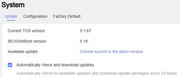
If someone has hacked my other user... wouldn't I see the login attempt etc on system log? I know she hasn't logged in for months and I indeed don't see any login attempts on system log. So, I exclude this possibility or go ahead to change that user's password?
If someone has hacked my other user... wouldn't I see the login attempt etc on system log? I know she hasn't logged in for months and I indeed don't see any login attempts on system log. So, I exclude this possibility or go ahead to change that user's password?
-
dkaratasos
- Posts: 10
- Joined: 04 Aug 2023, 20:15
Re: Found someone logged into your system via SSH connection
I forcefully changed my users password. I will try to enable SFTP again to see if i'll get another notification.
Is there some log that I check check for the reasons behind this notification? eg which process tried to do the ssh etc?
Is there some log that I check check for the reasons behind this notification? eg which process tried to do the ssh etc?
-
dkaratasos
- Posts: 10
- Joined: 04 Aug 2023, 20:15
Re: Found someone logged into your system via SSH connection
I sshed to check messages and users logs.
At the mentioned times of the email I can only see (besides transmission daemon) only some falied DDNS attempts
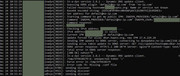
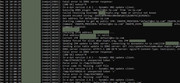
these failed DDNS are throught the logs anyway though, before and after the notifications.. not only at that points of time. They come every few minutes so not sure if they are related.
Besides these, though nothing else is logged in the system.
A puzzle
At the mentioned times of the email I can only see (besides transmission daemon) only some falied DDNS attempts
these failed DDNS are throught the logs anyway though, before and after the notifications.. not only at that points of time. They come every few minutes so not sure if they are related.
Besides these, though nothing else is logged in the system.
A puzzle
-
dkaratasos
- Posts: 10
- Joined: 04 Aug 2023, 20:15