attaching an eGPU to the F6-424 max

RAID storage for video editing professionals or who care much about the speed
Post Reply
User avatar
pacorabanna
Posts: 5
Joined: 30 Nov 2024, 10:00
Italy

attaching an eGPU to the F6-424 max

Post by pacorabanna »

Hi Terramaster Community,

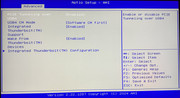
I am planning to attach an external GPU to my Terramaster F6-424 max NAS to use it with Ollama and Large Language Models (LLMs). While the official specifications do not mention Thunderbolt, I noticed a reference to Thunderbolt capabilities and PCI tunneling over USB4 in the BIOS. This has led me to wonder if my NAS is actually Thunderbolt compatible.

Could you please confirm if the F6-424 max supports Thunderbolt? If so, would it be possible to use this feature to connect an external GPU and leverage its additional processing power for running LLMs on the NAS?

Thank you in advance for your assistance.
Image
User avatar
crisisacting
Silver Member
Posts: 499
Joined: 20 Jan 2022, 16:42

Re: attaching an eGPU to the F6-424 max

Post by crisisacting »

Doubt that it's capable since none of the USB ports are capable of >10 Gbps nor USB4; it's likely the board's UEFI has the option due to being an industrial/commercial solution which may offer it in other configurations.

You should run

Code: Select all

lspci -tv | grep Thunderbolt
under Linux or through SSH if you have a TOS build installed to verify if one (would likely be an Intel JHL controller) is available.
User avatar
pacorabanna
Posts: 5
Joined: 30 Nov 2024, 10:00
Italy

Re: attaching an eGPU to the F6-424 max

Post by pacorabanna »

Hi, thank your for your reply. You're unfortunately correct and the command "lspci -tv | grep Thunderbolt" does not show any attached devices.
Post Reply

Return to “Thunderbolt Series”