TNAS Mobile 3.3.038 no stats in overview

Engage in discussions, seek assistance, and report issues related to client applications, including: TNAS PC for Windows and macOS, TNAS mobile for iOS and Android, as well as smart TV applications and clients.
User avatar
Bartman
Posts: 18
Joined: 14 Sep 2024, 01:36
Great Britain

TNAS Mobile 3.3.038 no stats in overview

Post by Bartman »

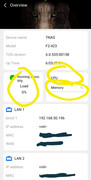
Hello, I am not receiving and Stats on TNAS Mobile, no numerical output, even on the fans. This has been happening since the last update, I have cleared all cache on the phone, uninstalled and reinstalled, Samsung S24 Ultra.
Image

Kind Regards
F2-423
TOS 7.0.0777 (X86)
User avatar
TMtina
TM Support
Posts: 245
Joined: 01 Nov 2022, 18:00

Re: TNAS Mobile 3.3.038 no stats in overview

Post by TMtina »

Are you connecting remotely through TNAS.online? On the "My" page of the TNAS mobile app, is the displayed connection address in the format of tnas.online/ID? Please try refreshing the page. When the connection method is not tnas.online/ID, you should be able to view the overview information.
To contact our team, please send email to following addresses, remember to replace (at) with @:

Technical team: support(at)terra-master.com(for technical support)
Service team: service(at)terra-master.com(for purchasing, return, replacement, RMA service)
User avatar
Bartman
Posts: 18
Joined: 14 Sep 2024, 01:36
Great Britain

Re: TNAS Mobile 3.3.038 no stats in overview

Post by Bartman »

Than, you for the reply TMtina, I can get the data through TNAS.online, on a data connection, it was when it's connected to the local network that the data did not displayed, thank you for this.


Kind Regards
F2-423
TOS 7.0.0777 (X86)
User avatar
Bartman
Posts: 18
Joined: 14 Sep 2024, 01:36
Great Britain

Re: TNAS Mobile 3.3.038 no stats in overview

Post by Bartman »

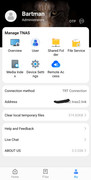
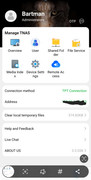
Scrap that, it connected to s2.tnas2.link using my mobile network, then it changed its IP to the one you get given as it tunnels to the F2-423 (100.88.0.*:****) and all dials went blank, it only seems to work when its only connected to tnas2.link, but once it changes to the given Tunnel (VPN?) 100.88.0.*:****

Image

Image


Kind Regards
F2-423
TOS 7.0.0777 (X86)
User avatar
TMtina
TM Support
Posts: 245
Joined: 01 Nov 2022, 18:00

Re: TNAS Mobile 3.3.038 no stats in overview

Post by TMtina »

Bartman wrote: 04 Dec 2024, 00:41 Scrap that, it connected to s2.tnas2.link using my mobile network, then it changed its IP to the one you get given as it tunnels to the F2-423 (100.88.0.*:****) and all dials went blank, it only seems to work when its only connected to tnas2.link, but once it changes to the given Tunnel (VPN?) 100.88.0.*:****

Image

Image


Kind Regards
When the connection address is s2.tnas2.link, the overview information can be displayed, but when it is 100.88.0.*:*, the overview information is not displayed, right? Please enter 100.88.0.*:* in your mobile browser to log in to your TOS and observe whether the overview information is displayed properly. Additionally, I noticed that you have created a Bond; which specific mode is it? We need to verify it.
To contact our team, please send email to following addresses, remember to replace (at) with @:

Technical team: support(at)terra-master.com(for technical support)
Service team: service(at)terra-master.com(for purchasing, return, replacement, RMA service)
User avatar
Bartman
Posts: 18
Joined: 14 Sep 2024, 01:36
Great Britain

Re: TNAS Mobile 3.3.038 no stats in overview

Post by Bartman »

100.88.0.* in the browser on my phone gives me a 400, so that's a no go with the browser, the app still comes up connection Method TPT Connection with IP 100.88.0.1:5443 with no stats, my connection on the NAS is Bonded with adaptive load balancing, (which works great BTW). It only shows stats if I get the s2.tnas2.link but it changes straight away to 100.88.0.1. It is the Remote Access that gives me the Virtual IP of 100.88.0.1.

I have logged onto the app with all information that is supplied in the Remote Access settings, tnas.online works fine on the PC.

Your Help page does say that its the way that its is supposed to happen (https://toshelp.terra-master.com/web/#/en/remote_access) QUOTE:

Method 2: Access via Client Applications (Recommended)

1.Install TNAS mobile on your Android or iOS mobile device, and TNAS PC application on your computer.
2.Click “+”, enter TNAS ID, TNAS username, and password, then click “Confirm”.
3.Once the client application logs in successfully, you will be able to access the device in your browser using TNAS’s virtual IP address. The access address format is: [protocol]://[TNAS virtual IP]:[port number]. For example: https://100.88.0.1:5443

Kind Regards
F2-423
TOS 7.0.0777 (X86)
User avatar
Bartman
Posts: 18
Joined: 14 Sep 2024, 01:36
Great Britain

Re: TNAS Mobile 3.3.038 no stats in overview

Post by Bartman »

It is when it connects to Terrmasters VPN when all the live stats stop working.


Regards
F2-423
TOS 7.0.0777 (X86)
User avatar
Bartman
Posts: 18
Joined: 14 Sep 2024, 01:36
Great Britain

Re: TNAS Mobile 3.3.038 no stats in overview

Post by Bartman »

So to summarise, TNAS Mobile live stats only work in Mobile mode without using the Terramaster VPN, you get NO live stats in local network mode (ie LAN) or Mobile Network mode (Using Terramasters inbuilt VPN connection)...

Regards
F2-423
TOS 7.0.0777 (X86)
User avatar
RyanYang
TM Support
Posts: 1141
Joined: 01 Dec 2020, 11:50
China

Re: TNAS Mobile 3.3.038 no stats in overview

Post by RyanYang »

Maybe you could try recreating bond.
To contact our team, please send email to following addresses, remember to replace (at) with @
Technical team: support(at)terra-master.com (for technical support)
Service team: service(at)terra-master.com (for purchasing, return, replacement)
User avatar
Bartman
Posts: 18
Joined: 14 Sep 2024, 01:36
Great Britain

Re: TNAS Mobile 3.3.038 no stats in overview

Post by Bartman »

TMRyan wrote: 06 Dec 2024, 17:45 Maybe you could try recreating bond.
One of the first things I did try.

Kind Regards
F2-423
TOS 7.0.0777 (X86)
Locked

Return to “Mobile Apps and Desktop Clients”
