

The expansion of a LUN function for the ISCSI module is not working correctly. it will only let you expand the LUN based on the size of the free space of the volume.
i belive this to be a bug
example
existing config
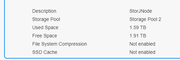
2 TB volume
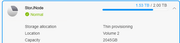
1.8TB LUN
objective expand lun to 2.8 TB
steps
extend volume to 3TB
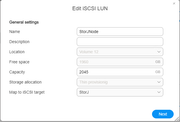
go to iscsi interface edit existing lun
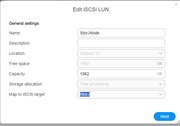
existing free space shows 1228 free
existing size shows 1843
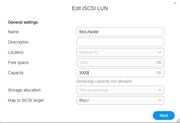
type in new size capacity of 2867
tab off the capacity field
field reverts to the maximum free space available of 1228, does not keep the 2867.
can not expand the LUN as this is now less then the existing config and the goal is to go bigger.
i believe the problem is that the edit UI is using the same ui as the create. so the capacity box is calculating with the assumption of that this is a new LUN not a modify of a exiting lun thus it dynamically adjusts the the maximum free space available number.
this is a huge issue, as it would mean the only way to expand a LUN is to have the volume to have the entire of the objective size of the lun as free space in the volume further example
if you wanted to have a 4TB lun and expand it to 4.5 TB... you couldn't just expand the volume the 500-600GB you would have to expand the volume by 4.6~ TB so that the UI would let you type in the 4608 with out revering it. that would then get you a 4.5TB lun however now the volume is the 4.5 + the original 4TB so 8.5 TB just to support a 4.5 LUN because the gui wouldn't allow the expand. and as volumes are thick provisioned against the storage pool that is now storage that cant be used for other purposes
this testing was done via thing provisioned luns
in my real world impact i have a storJnode that is about to run out of space with out the ability to expand the LUN with out massive over provisioning space to the volume that i need for other things
ISCSI LUN expansion calcuation does not work correctly
Re: ISCSI LUN expansion calcuation does not work correctly
This is not working and infact has actually resulted in my lun getting smaller, screen recordings have been provided to the support email address

Re: ISCSI LUN expansion calcuation does not work correctly
Thanks for your feedback! Is it convenient to tell us your TOS version and app version?
On the latest app, when the free space is less than the capacity is supported for modification.
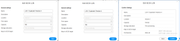
May I ask if you edit the LUN as soon as you expand the volume? After rebooting the system, do you go back to edit the LUN and still get the same result?
If it's convenient, you can go to the official website online customer service to make an appointment for a remote check.
To contact our team, please send email to following addresses, remember to replace (at) with @
Technical team: support(at)terra-master.com (for technical support)
Service team: service(at)terra-master.com (for purchasing, return, replacement, RMA service)
Technical team: support(at)terra-master.com (for technical support)
Service team: service(at)terra-master.com (for purchasing, return, replacement, RMA service)
Re: ISCSI LUN expansion calcuation does not work correctly
fresh reboots have not made a difference, presently the NTFS on that lun is corrupt it is in chkdsk for the next bit of long time hopefully it recovers
tos 6.0.535 version
i see your print screens and that is not what i am getting as a end result, in your case you started with a 84 you edited to a 184 thus useing up your full space. in my scenerio the edit would revert to whatever the free space would be in this case 84 or in my case even smaller then the existing lun (and this is what corrupted my NTFS volume in that lun)
tos 6.0.535 version
i see your print screens and that is not what i am getting as a end result, in your case you started with a 84 you edited to a 184 thus useing up your full space. in my scenerio the edit would revert to whatever the free space would be in this case 84 or in my case even smaller then the existing lun (and this is what corrupted my NTFS volume in that lun)

Re: ISCSI LUN expansion calcuation does not work correctly
If it's convenient, you can book a technical engineer through our website's online support to remotely troubleshoot the issue for you.
To contact our team, please send email to following addresses, remember to replace (at) with @:
Technical team: support(at)terra-master.com(for technical support)
Service team: service(at)terra-master.com(for purchasing, return, replacement, RMA service)
Technical team: support(at)terra-master.com(for technical support)
Service team: service(at)terra-master.com(for purchasing, return, replacement, RMA service)