Volume naming issue after disc failure

RAID, Volume, storage pool, hard drive, USB, SSD cache and iSCSI LUN
Locked
User avatar
incni
Posts: 3
Joined: 25 Nov 2024, 02:53
Andorra

Volume naming issue after disc failure

Post by incni »

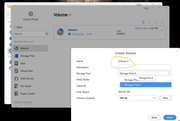
I have a disk failure that was assigned to Volume 2, after replacing and creating a new Volume, it automatically "Volume 3" as shown on screen.

Image

my question: how can I remove the failed "Volume 2" as it is no longer shown in the Volume section
User avatar
TMnick
TM Product Manager
Posts: 95
Joined: 03 Jul 2024, 15:56
China

Re: Volume naming issue after disc failure

Post by TMnick »

incni wrote: 01 Dec 2024, 18:56 I have a disk failure that was assigned to Volume 2, after replacing and creating a new Volume, it automatically "Volume 3" as shown on screen.

Image

my question: how can I remove the failed "Volume 2" as it is no longer shown in the Volume section
This situation usually arises due to a direct ejection of the disk, which results in the configuration file of Volume 2 not being deleted. Have you performed such an operation? Therefore, when creating a new volume, Volume 2's configuration file was already occupied, which is why the new volume is named Volume 3. However, this does not affect its usage, does it? If you absolutely need to delete it, please contact our after-sales team to schedule a remote assistance session with a technical engineer to help you with the deletion.
To contact our team, please send email to following addresses, remember to replace (at) with @:
Support team: support(at)terra-master.com (for technical support only)
User avatar
Gremlin
Gold Member
Posts: 1627
Joined: 02 Dec 2022, 22:31
Great Britain

Re: Volume naming issue after disc failure

Post by Gremlin »

I had a somewhat similar issue recently that corrected itself with a reboot (Volume3 became Volume2).
F5-221 TOS7.0.0777 - 4x4TB (Ironwolf) Traid
F2-424 TOS7.0.0777 - 2x500GB nvme (P3) Traid, 2x6TB HDD (HGST) Traid
F2-221 TOS7.0.0777 - 1x3TB Ext4, 1x4TB Btrfs
F2-425+ TOS7.0.0777 - 2x500GB nvme (P3) Traid, 2x6TB HDD (EXOS) Traid
User avatar
incni
Posts: 3
Joined: 25 Nov 2024, 02:53
Andorra

Re: Volume naming issue after disc failure

Post by incni »

Gremlin wrote: 01 Dec 2024, 22:48 I had a somewhat similar issue recently that corrected itself with a reboot (Volume3 became Volume2).
after reading your message I have create Volume 3 and indeed after reboot it become Volume 2 :shock:
User avatar
Gremlin
Gold Member
Posts: 1627
Joined: 02 Dec 2022, 22:31
Great Britain

Re: Volume naming issue after disc failure

Post by Gremlin »

Voila!
F5-221 TOS7.0.0777 - 4x4TB (Ironwolf) Traid
F2-424 TOS7.0.0777 - 2x500GB nvme (P3) Traid, 2x6TB HDD (HGST) Traid
F2-221 TOS7.0.0777 - 1x3TB Ext4, 1x4TB Btrfs
F2-425+ TOS7.0.0777 - 2x500GB nvme (P3) Traid, 2x6TB HDD (EXOS) Traid
Locked

Return to “Storage”