

File Names with apostrophes and/or commas will basically refuse to upload, but you will only see this error showing up if you upload one file at a time.
If I try to do a multi file upload, It will start fine and then when it gets to the file before it uploads the one with the file name error, the upload will freeze. no further upload can happen. no warning or error is given. It just kinda looks like it crashed. Not only that, there is good chance that it will invisibly strain the connection between the NAS and PC.because then for a short time, I will have trouble accessing the NAS.
In addition, randomly, I would be uploading multiple files, and the upload would fail. it just gives an error that upload failed. I would try to stop it. close it and reopen the file manager and it wouldnt load properly. I go to TNAS Desktop app, and it has trouble connecting to it.
This is a NAS that is connected by ethernet cable directly to my PC (like a DAS). None of these things should be an issue for a device thats been on the market for a few months now, with version 6 of the NAS Software
Issues with File Name and Connection Loss
Re: Issues with File Name and Connection Loss
The file name is easy to get around. just remove all apostrophes and commas
and i can do it in batches with other apps. its just.... really wierd and annoying.
also, i just started using this a couple days ago. do i already need to update it? i manually downloaded from terra's site
and i can do it in batches with other apps. its just.... really wierd and annoying.
also, i just started using this a couple days ago. do i already need to update it? i manually downloaded from terra's site


Re: Issues with File Name and Connection Loss
Thank you for contacting TerraMaster!
The TOS system does not currently support the use of filenames containing special characters when uploading files. In the latest version, we have added this alert feature. When the upload fails due to the file name containing special characters, the system will display a corresponding prompt. Regarding the issue of upload stopping when uploading multiple files, we have verified and fixed the issue. Please stay tuned to our official forum and we recommend trying to upgrade when the next installer is released.
If you have any other questions, please feel free to contact us!
Re: Issues with File Name and Connection Loss
Theres no way to get around this file name issue? its kind of a pain because i have more than a hundred files that have these special characters....
How about the issue of what seems like a random loss of connection? I would be uploading files then it would freeze and stop uploading because according the ethernet light, it shows as orange, which im assuming is a bad connection of some sort
How about the issue of what seems like a random loss of connection? I would be uploading files then it would freeze and stop uploading because according the ethernet light, it shows as orange, which im assuming is a bad connection of some sort


Re: Issues with File Name and Connection Loss
To add to this: are German Umlauts (äöüÄÖÜß) regarded to be special characters as well?
I was able to add files to the NAS, and they are visible on the file explorer, but when trying to read them from a laptop, they first are shown correctly, a few seconds later, they are not accessible any longer.
@shinegull: is this the same thing you're observing or is this a new issue, which should be documented separately?
Thx.
I was able to add files to the NAS, and they are visible on the file explorer, but when trying to read them from a laptop, they first are shown correctly, a few seconds later, they are not accessible any longer.
@shinegull: is this the same thing you're observing or is this a new issue, which should be documented separately?
Thx.

Re: Issues with File Name and Connection Loss
The German vowel change symbol (äöüÄÖẞ) is not recognized as a special character.
To contact our team, please send email to following addresses, remember to replace (at) with @:
Technical team: support(at)terra-master.com (for technical support)
Service team: service(at)terra-master.com (for purchasing, return, replacement, RMA service)
Technical team: support(at)terra-master.com (for technical support)
Service team: service(at)terra-master.com (for purchasing, return, replacement, RMA service)
Re: Issues with File Name and Connection Loss
I have 2 specific cases for special characters. Comma and Apostrophe. I haven't tried anything else, but just these two. I can get around it with a bulk rename application that just changes all of these to a period or just remove it. but thats still a manual process I need to check for.
for sudden case of error not showing as error, my frustration is 2 fold. first is while sometimes, it will tell you invalid character or something, but its not guaranteed.
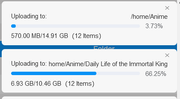
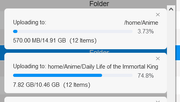
The file it had an issue with is

where you can see there is an apostrophe. Here is doesnt tell me that.
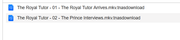
1) The folder and the files will have an incomplete download signature with that .tnas thing. at least its easy to find after.
2) it doesn't skip that file and keep going. I wish it didnt have this "special" character issue, but in lieu of that, having it upload what it can fully and properly then providing a report for after seems a lot more realistic, rather it it stopping anything further, and just basically shut down. Its like having a car where a single light bulb going out means you have to stop, tell the car to ignore the issue before you can continue forward.
Not only that since it doesn't truly upload one file at a time, the upload will generally fail at a point where it can affect at minimum 1 other file.
If you were able to generate an immediate report of the file that failed, i.e. file name + file folder, and continue to upload the files that are not problematic that would be temporary but detailed workaround. because now you know which files/folders failed to upload properly.
Because with the way it seems to function. you could upload 800 files. but at the third file, because of a special character, at minimum, the second file will not upload completely. and the other 797 wouldn't even be attempted, even if there was not issue with them at all.
my best workaround if to upload each folder as a separate item. though obviously, this make the effort a bit more manual.
3) Let say you do get around to starting a 800 file and halfway through, it fails for whatever reason. the files that failed, and the folder would have a .tnas something. attached. If you upload another copy of all 800. there is a setting to skip the replacement, i think. but the folder itself would not rename itself. all the files inside could have uploaded properly. but it would stay with the .tnas extension.
Just now, i had some files failed to upload.
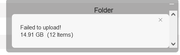
I get that, but theres no granularity to this error and I can guess why it failed, temporary loss of connection. Except a person may not always be able to diagnose something like this, nor will the be able to diagnose where the loss of connection happened from.
I hope this provides enough detail
for sudden case of error not showing as error, my frustration is 2 fold. first is while sometimes, it will tell you invalid character or something, but its not guaranteed.
The file it had an issue with is
where you can see there is an apostrophe. Here is doesnt tell me that.
1) The folder and the files will have an incomplete download signature with that .tnas thing. at least its easy to find after.
2) it doesn't skip that file and keep going. I wish it didnt have this "special" character issue, but in lieu of that, having it upload what it can fully and properly then providing a report for after seems a lot more realistic, rather it it stopping anything further, and just basically shut down. Its like having a car where a single light bulb going out means you have to stop, tell the car to ignore the issue before you can continue forward.
Not only that since it doesn't truly upload one file at a time, the upload will generally fail at a point where it can affect at minimum 1 other file.
If you were able to generate an immediate report of the file that failed, i.e. file name + file folder, and continue to upload the files that are not problematic that would be temporary but detailed workaround. because now you know which files/folders failed to upload properly.
Because with the way it seems to function. you could upload 800 files. but at the third file, because of a special character, at minimum, the second file will not upload completely. and the other 797 wouldn't even be attempted, even if there was not issue with them at all.
my best workaround if to upload each folder as a separate item. though obviously, this make the effort a bit more manual.
3) Let say you do get around to starting a 800 file and halfway through, it fails for whatever reason. the files that failed, and the folder would have a .tnas something. attached. If you upload another copy of all 800. there is a setting to skip the replacement, i think. but the folder itself would not rename itself. all the files inside could have uploaded properly. but it would stay with the .tnas extension.
Just now, i had some files failed to upload.
I get that, but theres no granularity to this error and I can guess why it failed, temporary loss of connection. Except a person may not always be able to diagnose something like this, nor will the be able to diagnose where the loss of connection happened from.
I hope this provides enough detail

Re: Issues with File Name and Connection Loss
Thank you very much for your valuable suggestion. We have forwarded it to the product team for further evaluation.
To contact our team, please send email to following addresses, remember to replace (at) with @:
Technical team: support(at)terra-master.com(for technical support)
Service team: service(at)terra-master.com(for purchasing, return, replacement, RMA service)
Technical team: support(at)terra-master.com(for technical support)
Service team: service(at)terra-master.com(for purchasing, return, replacement, RMA service)