
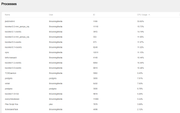
Is your NAS performing array synchronization? From your screenshot, it seems that array synchronization is consuming a lot of resources. Additionally, are your hard drives on our compatibility list?SBNAS92 wrote: ↑24 Nov 2024, 16:41 Bought and set up yesterday, last night ran smoothly, this morning, I couldn't connect, finally managed to after manually rebooting the device now it is showing system sluggish Load 100%. I've attached screens of the process, just want to know if I should be concerned about anything.
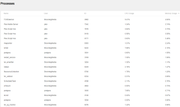
New TNAS F2-212
Re: New TNAS F2-212
To contact our team, please send email to following addresses, remember to replace (at) with @:
Technical team: support(at)terra-master.com(for technical support)
Service team: service(at)terra-master.com(for purchasing, return, replacement, RMA service)
Technical team: support(at)terra-master.com(for technical support)
Service team: service(at)terra-master.com(for purchasing, return, replacement, RMA service)


Re: New TNAS F2-212
Where do I check if it is doing the array synchronization? My previous Nas was a ReadyNAS so still getting used to the TNAS system. The drives are 2x Seagate Ironwolf (ST2000VN004) 2TB NAS Drive SATA. I've tried adding some files and yesterday it was transferring at about 75mb/s today its going about 15 then pausing for 30 seconds at 0/sTMtina wrote: ↑24 Nov 2024, 20:36Is your NAS performing array synchronization? From your screenshot, it seems that array synchronization is consuming a lot of resources. Additionally, are your hard drives on our compatibility list?SBNAS92 wrote: ↑24 Nov 2024, 16:41 Bought and set up yesterday, last night ran smoothly, this morning, I couldn't connect, finally managed to after manually rebooting the device now it is showing system sluggish Load 100%. I've attached screens of the process, just want to know if I should be concerned about anything.