

Hey,
I am pretty new to NAS. I have a F2-212 with 2 drives. But i just bought a second one and planning to use it in a different building but within the same network. All the other one will do is store a copy of the main F2-212. That way if the building was to be damaged or someone broke in or something, Ill have another copy of my files in the other building. That new NAS only has 1 drive which is the same size as the main ones, all 4TB.
I cant find any useful setup guides or videos and Duple Backup seems to be the best solution. But I cant seem to be able to log into the new NAS, I keep getting an error code. But I also have no clue how to set this up. All I want to do is every so often have the new files sent over to the remote nas.
Thanks
Duple Backup setup


回复:重复备份设置
Hello, Are you unable to log into the new NAS? Could you be more specific? Which step are you stuck on?Krbuc wrote: ↑03 Nov 2024, 07:06 Hey,
I am pretty new to NAS. I have a F2-212 with 2 drives. But i just bought a second one and planning to use it in a different building but within the same network. All the other one will do is store a copy of the main F2-212. That way if the building was to be damaged or someone broke in or something, Ill have another copy of my files in the other building. That new NAS only has 1 drive which is the same size as the main ones, all 4TB.
I cant find any useful setup guides or videos and Duple Backup seems to be the best solution. But I cant seem to be able to log into the new NAS, I keep getting an error code. But I also have no clue how to set this up. All I want to do is every so often have the new files sent over to the remote nas.
Thanks
To contact our team, please send email to following addresses, remember to replace (at) with @:
Support team: support(at)terra-master.com (for technical support only)
Support team: support(at)terra-master.com (for technical support only)
Re: Duple Backup setup
Yes I can log into the new NAS just fine.
This picture is on the old NAS. The IP is the IP of the new NAS, I just blurred out the IP and username. The username and password are for a user on the new NAS. After hitting next I get a connection error.
But I also haven't found any directions to follow to set up so I'm just assuming things. If I can't get the new NAS to copy from the old one I'll have to return both and go with a different brand since they are within the return period.
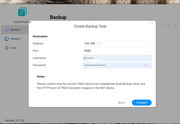
This picture is on the old NAS. The IP is the IP of the new NAS, I just blurred out the IP and username. The username and password are for a user on the new NAS. After hitting next I get a connection error.
But I also haven't found any directions to follow to set up so I'm just assuming things. If I can't get the new NAS to copy from the old one I'll have to return both and go with a different brand since they are within the return period.

Re: Duple Backup setup
Hello! Has DupleBackupVault been successfully installed on your backup target device (new NAS)?Krbuc wrote: ↑03 Nov 2024, 23:13 Yes I can log into the new NAS just fine.
This picture is on the old NAS. The IP is the IP of the new NAS, I just blurred out the IP and username. The username and password are for a user on the new NAS. After hitting next I get a connection error.
But I also haven't found any directions to follow to set up so I'm just assuming things. If I can't get the new NAS to copy from the old one I'll have to return both and go with a different brand since they are within the return period.
To contact our team, please send email to following addresses, remember to replace (at) with @:
Technical team: support(at)terra-master.com(for technical support)
Service team: service(at)terra-master.com(for purchasing, return, replacement, RMA service)
Technical team: support(at)terra-master.com(for technical support)
Service team: service(at)terra-master.com(for purchasing, return, replacement, RMA service)
Re: Duple Backup setup
In order to find out the problem you encountered, we can arrange for you to have an engineer to investigate the problem remotely.
If you agree, please contact our technical support mailbox or the customer service window on the homepage of our website to schedule an appointment. Please remember to provide them with a link to this post.
To contact our team, please send email to following addresses, remember to replace (at) with @:
Technical team: support(at)terra-master.com(for technical support)
Service team: service(at)terra-master.com(for purchasing, return, replacement, RMA service)
Technical team: support(at)terra-master.com(for technical support)
Service team: service(at)terra-master.com(for purchasing, return, replacement, RMA service)

Re: Duple Backup setup
I am having the exact same issue. Trying to backup a F2-424 to an F2-212. I have Duple Backup Vault installed on the F2-212 and Duple Backup installed on the F2-424 and no luck. Please post the solution here so I can keep moving forward as well.
I have resorted to using RSYNC to backup the F2-424 but that doesn't work for home directories so I use TFM Backup to save the home directories on the remote TNAS by mounting the home directories locally. Pretty clunky and really would expect TNAS to TNAS backup to be super simple...
I have resorted to using RSYNC to backup the F2-424 but that doesn't work for home directories so I use TFM Backup to save the home directories on the remote TNAS by mounting the home directories locally. Pretty clunky and really would expect TNAS to TNAS backup to be super simple...
Re: Duple Backup setup
That sucks. I'm tired up for the next while so won't have time to get to this right away. But if I get it going I'll post again. It's really too bad because if I can't get something sorted out then unfortunately I'll have to go with a different brand and return both since they are still within the return window.
Re: Duple Backup setup
I'm very sorry for the inconvenience, but currently DupleBackup does not support mutual backup between devices with X86 architecture (F2-424) and those with ARM architecture (F2-212). We have already reported this issue to our product team for consideration and optimization. Thank you for your understanding and patience.DrDigital wrote: ↑05 Nov 2024, 09:34 I am having the exact same issue. Trying to backup a F2-424 to an F2-212. I have Duple Backup Vault installed on the F2-212 and Duple Backup installed on the F2-424 and no luck. Please post the solution here so I can keep moving forward as well.
I have resorted to using RSYNC to backup the F2-424 but that doesn't work for home directories so I use TFM Backup to save the home directories on the remote TNAS by mounting the home directories locally. Pretty clunky and really would expect TNAS to TNAS backup to be super simple...
To contact our team, please send email to following addresses, remember to replace (at) with @:
Technical team: support(at)terra-master.com(for technical support)
Service team: service(at)terra-master.com(for purchasing, return, replacement, RMA service)
Technical team: support(at)terra-master.com(for technical support)
Service team: service(at)terra-master.com(for purchasing, return, replacement, RMA service)
Re: Duple Backup setup
We sincerely apologize for any inconvenience caused and the suboptimal experience. To schedule a remote technical support session, please reach out to us through the customer service window on our homepage. We are fully committed to troubleshooting and resolving the issue for you.Krbuc wrote: ↑05 Nov 2024, 13:09 That sucks. I'm tired up for the next while so won't have time to get to this right away. But if I get it going I'll post again. It's really too bad because if I can't get something sorted out then unfortunately I'll have to go with a different brand and return both since they are still within the return window.
To contact our team, please send email to following addresses, remember to replace (at) with @:
Technical team: support(at)terra-master.com(for technical support)
Service team: service(at)terra-master.com(for purchasing, return, replacement, RMA service)
Technical team: support(at)terra-master.com(for technical support)
Service team: service(at)terra-master.com(for purchasing, return, replacement, RMA service)