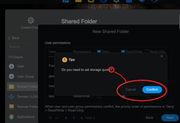
ISSUE: When setting up a new Shared Folder, the user is asked the question "Do you need to set up a storage quota?" but the confirmation prompt options presented are "[Cancel][Confirm])" (<-- underlined here to show preselected default), neither of which are appropriate responses to the question asked.
Expected behaviour: In response to a "Do you need to [...]?" question, I expect to be given "[NO][YES]" or "[YES][NO]" option. I expect "No" to be the pre-selected default option.
Explanation: The storage quota question is presented as part of the linear setup process; if the user does not wish to set up a storage quota for the new Shared Folder, they would NOT want to click the pre-selected (default) "Confirm" option but they would also NOT want to click the "Cancel" option as that suggests cancelling the Shared Folder setup process. Clicking the "Cancel" option doesn't actually cancel the process but first-time users would not know this until they try. Revising the response wording to "Yes" and "No" avoids this confusion. Also, regarding the default pre-selected response: I'm sure you at Terra-Master know your users' typical usage scenarios better than me, but personally I do not wish to set up a storage quota by default and believe that saying "yes" to something that requires careful consideration should not be the default option, so I would prefer to see the "No" option pre-selected as the default. (Thoughts?)