

Unable to log-in to TNAS F8 Plus running TOS 6.0 -
Host computer Mac Studio M2 Ultra - macOS 14.7 Sonoma
The TNAS has been up and running for about 10 days, I am using it in Security Isolation mode (no internet access) each day transferring data to it, no problem. I login in/out as normal.
Today I find I’m unable to log-in via the browser (Safari) & also TNAS PC App..
Safari browser doesn’t load the log-in page - The TNAS PC app, despite showing the TNAS on the correctly assigned local LAN, will not accept the correct SuperUser name & password.
I can confirm the name and password - has NOT changed !!
Using the very same SuperUser Name/Password - I am able to access the TNAS via the Mac Finder window - The TNAS will mount shared folders etc and I have full access to upload/download my data..
However, the TOS not working correctly leaves me with no control over the TNAS - How do I get this OS running properly again?
Please advise.
Unable to log-in to TNAS F8 Plus running TOS 6.0

Re: Unable to log-in to TNAS F8 Plus running TOS 6.0
We have not been able to confirm the problem from the information you have provided.
Can you log in to the terminal via HDMI/SSH/Telnet?
If you can log in to the terminal, please contact the technical support e-mail or the customer service window on the official website, and we can arrange an engineer to troubleshoot the problem for you remotely.
Can you log in to the terminal via HDMI/SSH/Telnet?
If you can log in to the terminal, please contact the technical support e-mail or the customer service window on the official website, and we can arrange an engineer to troubleshoot the problem for you remotely.
To contact our team, please send email to following addresses, remember to replace (at) with @:
Technical team: support(at)terra-master.com (for technical support)
Service team: service(at)terra-master.com (for purchasing, return, replacement, RMA service)
Technical team: support(at)terra-master.com (for technical support)
Service team: service(at)terra-master.com (for purchasing, return, replacement, RMA service)
Re: Unable to log-in to TNAS F8 Plus running TOS 6.0
Thank you for your response.
I've tried to login to the TNAS via Terminal to no avail. The command times out..
I'm guessing, somehow the issue is with the TOS?
What options are available to resolve this ?
I've tried to login to the TNAS via Terminal to no avail. The command times out..
I'm guessing, somehow the issue is with the TOS?
What options are available to resolve this ?

Re: Unable to log-in to TNAS F8 Plus running TOS 6.0
According to the Warning Notes for Security Isolation Mode:
So, not really a surprise the OP cannot login.4) SSH, Telnet and TNAS Online cannot be used.

F5-221 TOS7.0.1201 - 4x4TB (Ironwolf) Traid
F2-424 TOS7.0.1278 - 2x500GB nvme (P3) Traid, 2x6TB HDD (HGST) Traid
F2-221 TOS7.0.1278 - 1x3TB Ext4, 1x4TB Btrfs
F2-425+ TOS7.0.1278 - 2x500GB nvme (P3) Traid, 2x6TB HDD (EXOS) Traid
F2-424 TOS7.0.1278 - 2x500GB nvme (P3) Traid, 2x6TB HDD (HGST) Traid
F2-221 TOS7.0.1278 - 1x3TB Ext4, 1x4TB Btrfs
F2-425+ TOS7.0.1278 - 2x500GB nvme (P3) Traid, 2x6TB HDD (EXOS) Traid


Re: Unable to log-in to TNAS F8 Plus running TOS 6.0
TM F8 SSD: 8GB RAM: 9 TB TRAID EXT4: TOS 7:
TM F8 SSD Plus: 32GB RAM: 4TB RAID0 EXT4: 2TB RAID0 EXT4: TOS 7:
TM F4-425 Pro (N350): 16GB RAM: 8TB RAID0 EXT4: 6TB RAID5 EXT4: TOS 7:
---
[ DekkaR ]
TM F8 SSD Plus: 32GB RAM: 4TB RAID0 EXT4: 2TB RAID0 EXT4: TOS 7:
TM F4-425 Pro (N350): 16GB RAM: 8TB RAID0 EXT4: 6TB RAID5 EXT4: TOS 7:
---
[ DekkaR ]
Re: Unable to log-in to TNAS F8 Plus running TOS 6.0
Thank's for the heads-up Gremlin, DekkaR ..
A solution for my initial post isn't looking very hopeful.
Anyone care to comment on what my options are at this stage? TMSupport and the TMTeam here, have gone quiet..
A solution for my initial post isn't looking very hopeful.
Anyone care to comment on what my options are at this stage? TMSupport and the TMTeam here, have gone quiet..
Re: Unable to log-in to TNAS F8 Plus running TOS 6.0
Sorry, I just noticed that you have Security Isolation mode enabled. In this case, I'm afraid you'll have to check via HDMI as the only way.
You can try these commands to check the CPU/RAM/IO usage and processes: top, ps -ef, iostat, pidstat and so on.
You can try the command dmesg to see if there is a kernel error at the end.
You can try to take a picture of the limited output to us.
If you don't find anything, you can try to reboot. Then generate and download the log report in TOS > Technical Support > Report Issues, and then send it to support mailbox for inspection.( Please provide us with a link via NetDisk share if it's too large.)
To contact our team, please send email to following addresses, remember to replace (at) with @:
Technical team: support(at)terra-master.com (for technical support)
Service team: service(at)terra-master.com (for purchasing, return, replacement, RMA service)
Technical team: support(at)terra-master.com (for technical support)
Service team: service(at)terra-master.com (for purchasing, return, replacement, RMA service)
Re: Unable to log-in to TNAS F8 Plus running TOS 6.0
None of the above was successful. I wish to reset and re-initialise.
However, I'm unable to. I can't get past the window posted below...
The TNASS is in the correct reset state and the correct IP address - Why is prompting to change the IP when I hit "login" as opposed to a redirection to the initialisation page?
Please give a step by step guide to re-initialise including any default passwords I may need.
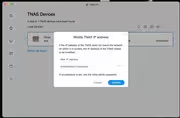
However, I'm unable to. I can't get past the window posted below...
The TNASS is in the correct reset state and the correct IP address - Why is prompting to change the IP when I hit "login" as opposed to a redirection to the initialisation page?
Please give a step by step guide to re-initialise including any default passwords I may need.
Re: Unable to log-in to TNAS F8 Plus running TOS 6.0
Please ignore my last post.. I've managed to reinitialise and reinstall TOS 6.0
-
vicetovirtue

- Posts: 1
- Joined: 06 Dec 2024, 05:12

Re: Unable to log-in to TNAS F8 Plus running TOS 6.0
Did this erase your your data?