

I managed to solve the problem.
I looked again at beagle's post and his comment "application user (plex) can not transverse folder below first folder share /Volume1/_Movies-Archive". That led me to look at the Properties for the individual subfolders (containing the actual movie files) in the Multimedia > Movies folder and then check the Permissions for the User Group "media". I saw that the "Deny" box was ticked instead of "Read/Write". I wanted to avoid having to manually change the Properties>Permission>User Group>media for each individual folder. So, I went to Control Panel>User Group and saw that the User group "media" had no members. I edited the "media" User Group to add my User name to it as I had given myself read/write privileges. With that change, all of the individual movie and tv subfolders showed the Permission for the User Group "media" as being "Read/Write" instead of "Deny". With that change, the Plex Media Server could now "see" all of the movies and the library for Movies was now populated with the actual movies. Same thing with all of the subfolders in my Multimedia > TV folder.
I hope this solution works for others.
The references to "Terramaster NAS is currently unavailable" were references to earlier deleted instal attempts. Still not sure why they showed up, but I unpinned them and they went away. Still appear when you click More, but they are just an annoyance at this point.
Plex library is empty, but has access to NAS media!


Re: Plex library is empty, but has access to NAS media!
Thank you Murrayb!
I do not have a User Group Media on my Terramaster F2-424 / TOS 6.0.507. See screenshot below
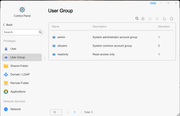
I tried to manually create a user group media. However, it fails with "the name already exists." See screenshot below.
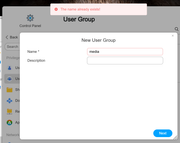
Any idea why I am missing the User Group Media?
I documented my experience with this issue below.
------------
Problem
------------
After giving Plex read/write permissions to a media “Shared Folder”, Plex will only show one folder deep. Therefore, you can not select sub-folders to scan for plex media.
It appears that the Plex application user account (plex) cannot browse or transverse the sub-folders below the TNAS shared folder.
My Plex Media Server.log file has access errors
Oct 12, 2024 09:32:42.033 [139686843248384] DEBUG - * Scanning /Volume1/_Movies-Archive/_Verify
Oct 12, 2024 09:32:42.033 [139686843248384] ERROR - Failed to create iterator to "/Volume1/_Movies-Archive/_Verify": Permission denied
Oct 12, 2024 09:32:42.033 [139686843248384] DEBUG - * Marking media not available in /Volume1/_Movies-Archive/_Verify
---------------------
My Workaround:
---------------------
I successfully worked around the issue by…
1. Creating a new a “New Shared Folder”
2. Set permission for application user (plex) to Read Only or Read\Write on the “New Shared Folder”
3. Copy (Not Move) all of the data in the existing shared folder to the “New Shared Folder”
a. Moving the data did not work for me. Plex still only able to display one folder deep.
4. Now, Plex was able to successfully scan my media in sub-folders in the “New Shared Folder”
The huge downside to this is I have nearly 5 TB of data. It took nearly 24 hours (an entire day) to copy the existing data into the “New Shared Folder”.
Fortunately, I recently purchased a 12 TB disk drive so I had more than enough free space to copy the data into a 2nd “New Shared Folder”
My final comment is the Edit Shared Folder checkbox option to “Replace the permissions of all the subdirectories with the permissions of the folder” did not work also.
After many, many hours of troubleshooting the only thing that worked for me was my procedure above.
My hardware is Terramaster F2-424 / TOS 6.0.507. I installed Plex from TNAS App Center
I sincerely hope my experience help find & resolve the Plex issue with TOS 6/0/507.
I do not have a User Group Media on my Terramaster F2-424 / TOS 6.0.507. See screenshot below
I tried to manually create a user group media. However, it fails with "the name already exists." See screenshot below.
Any idea why I am missing the User Group Media?
I documented my experience with this issue below.
------------
Problem
------------
After giving Plex read/write permissions to a media “Shared Folder”, Plex will only show one folder deep. Therefore, you can not select sub-folders to scan for plex media.
It appears that the Plex application user account (plex) cannot browse or transverse the sub-folders below the TNAS shared folder.
My Plex Media Server.log file has access errors
Oct 12, 2024 09:32:42.033 [139686843248384] DEBUG - * Scanning /Volume1/_Movies-Archive/_Verify
Oct 12, 2024 09:32:42.033 [139686843248384] ERROR - Failed to create iterator to "/Volume1/_Movies-Archive/_Verify": Permission denied
Oct 12, 2024 09:32:42.033 [139686843248384] DEBUG - * Marking media not available in /Volume1/_Movies-Archive/_Verify
---------------------
My Workaround:
---------------------
I successfully worked around the issue by…
1. Creating a new a “New Shared Folder”
2. Set permission for application user (plex) to Read Only or Read\Write on the “New Shared Folder”
3. Copy (Not Move) all of the data in the existing shared folder to the “New Shared Folder”
a. Moving the data did not work for me. Plex still only able to display one folder deep.
4. Now, Plex was able to successfully scan my media in sub-folders in the “New Shared Folder”
The huge downside to this is I have nearly 5 TB of data. It took nearly 24 hours (an entire day) to copy the existing data into the “New Shared Folder”.
Fortunately, I recently purchased a 12 TB disk drive so I had more than enough free space to copy the data into a 2nd “New Shared Folder”
My final comment is the Edit Shared Folder checkbox option to “Replace the permissions of all the subdirectories with the permissions of the folder” did not work also.
After many, many hours of troubleshooting the only thing that worked for me was my procedure above.
My hardware is Terramaster F2-424 / TOS 6.0.507. I installed Plex from TNAS App Center
I sincerely hope my experience help find & resolve the Plex issue with TOS 6/0/507.

Re: Plex library is empty, but has access to NAS media!
TOS5 and TOS6 have different methods for setting app permissions.
Regarding the case where you set permissions but they didn't take effect, we mimicked it slightly but did not reproduce it.
We suspect it may be that the permissions are not taking full effect. (You have more than 5TB of data, the number of files should be large and the modification of permissions should take longer.)
Also don't rule out the possibility that there may be a file system error on your previous folder, which can often cause permission anomalies.
To contact our team, please send email to following addresses, remember to replace (at) with @:
Technical team: support(at)terra-master.com (for technical support)
Service team: service(at)terra-master.com (for purchasing, return, replacement, RMA service)
Technical team: support(at)terra-master.com (for technical support)
Service team: service(at)terra-master.com (for purchasing, return, replacement, RMA service)


Re: Plex library is empty, but has access to NAS media!
Hi,
it looks like, in my case, i needed to copy the music folders across into the home/Plex directory structure, for it to be able to scan them. It looks like a permissions problem, and like others have said above, Plex user, although it exists doesn't appear in the user list, or to be able to assign permissions to. I'm using TOS 6.0.577-00166 on F4-424 Pro.
it looks like, in my case, i needed to copy the music folders across into the home/Plex directory structure, for it to be able to scan them. It looks like a permissions problem, and like others have said above, Plex user, although it exists doesn't appear in the user list, or to be able to assign permissions to. I'm using TOS 6.0.577-00166 on F4-424 Pro.


Re: Plex library is empty, but has access to NAS media!
You will need to copy the files into a shared folder where permissions can be set, and we will consider permissions for this directory.
Set the permissions, you can refer to the following methods: viewtopic.php?t=6868
To contact our team, please send email to following addresses, remember to replace (at) with @
Technical team: support(at)terra-master.com (for technical support)
Service team: service(at)terra-master.com (for purchasing, return, replacement)
Technical team: support(at)terra-master.com (for technical support)
Service team: service(at)terra-master.com (for purchasing, return, replacement)