

Dear Developers,
We are excited to announce the release of TOS 6, designed to provide an enhanced user experience. In this new version, we have adopted a root filesystem fully compatible with Ubuntu 22.04 and introduced the systemd method for starting the system, launching applications, and hosting application programs. Consequently, adjustments are required for the startup method of native applications running on TOS 6. Please refer to the following guidelines to pack your native applications accordingly.
The following is the first TOS 6 application development guide released by TerraMaster to the public. There may be some deficiencies in the first version of the development guide. If you encounter problems during use, please contact our tech team and provide us with methods to reproduce the issues, code samples, and screenshots, so that we can analyze and fix them. We will continue to optimize and update the development tools, please pay attention to our updates.
https://github.com/TerraMasterOfficial/ ... -pkg-tools
Technical team contact email
[email protected]
TOS 6 Native Application Development Guide
TOS 6 Native Application Development Guide
To contact our team, please send email to following addresses, remember to replace (at) with @:
Support team: support(at)terra-master.com (for technical support only)
Service team: service(at)terra-master.com (for purchasing, return, replacement, RMA service)
Support team: support(at)terra-master.com (for technical support only)
Service team: service(at)terra-master.com (for purchasing, return, replacement, RMA service)


Re: TOS 6 Native Application Development Guide
Hi,
I'm trying to make my first TOS app (for TOS 6 latest beta). The makeapp_x64 command completed successfully, but I cannot seem to install the package onto my NAS.
Every attempt results in .."Error! This file is incorrect and cannot be installed".
Are there any logs created anywhere on the NAS, or is there an alternative way to install such as a shell command that is a bit more helpful as to what has actually gone wrong?

I'm trying to make my first TOS app (for TOS 6 latest beta). The makeapp_x64 command completed successfully, but I cannot seem to install the package onto my NAS.
Every attempt results in .."Error! This file is incorrect and cannot be installed".
Are there any logs created anywhere on the NAS, or is there an alternative way to install such as a shell command that is a bit more helpful as to what has actually gone wrong?

Re: TOS 6 Native Application Development Guide
I have done as instructed, but nothing at all happened during the installation process. The file uploads to 100%, but very shortly after the same error appears in the browse, but there is no output on the console.
See attached photo. Everything you see there was present before the installation attempt.
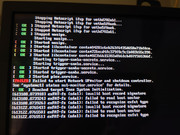
See attached photo. Everything you see there was present before the installation attempt.
Re: TOS 6 Native Application Development Guide
I found the problem, it was the structure of my source package, and me making assumptions about how the build tool would work.
At some point, i'd rearranged my project so that I could build it with a script to make future updates easier, and to deal with multiple versions and architecture. While doing so, I had changed the layout of my project a little.
I was trying something like this ..
Then for example i would do ..
However it seems that makeapp does not like this, although it does not produce any errors or output to suggest this is wrong. If I change the layout to be exactly as described in the documents
and then use ...
This package uploads and installs just fine. So it looks like it matters what the directory name is, and this is used internally somehow for something that makes the package correct.
So while it's my own fault for not following instructions to the letter, could I make the following suggestions.
1. Show better errors when uploading bad packages.
2. Make it clear that directory name matters as much as the contents.
3. Consider removing this restriction. That same ID is contained in the config.ini file as well, so why must the directory have the same name.
4. If this requirement must stay, then have makeapp check this and display an error instead of just making the package.
Thanks
At some point, i'd rearranged my project so that I could build it with a script to make future updates easier, and to deal with multiple versions and architecture. While doing so, I had changed the layout of my project a little.
I was trying something like this ..
Code: Select all
pkg
   v5
      x86_64
           <package contents>
      arm64
           <package contents>
   v6
      x86_64
           <package contents>
      arm64
           <package contents>
Code: Select all
./makeapp_x64 -path /path/to/pkg/v6/x86_64
Code: Select all
x64_tos6_apps
     myappid
         <package contents>
Code: Select all
./makeapp_x64 -path x64_tos6_apps/myappid
So while it's my own fault for not following instructions to the letter, could I make the following suggestions.
1. Show better errors when uploading bad packages.
2. Make it clear that directory name matters as much as the contents.
3. Consider removing this restriction. That same ID is contained in the config.ini file as well, so why must the directory have the same name.
4. If this requirement must stay, then have makeapp check this and display an error instead of just making the package.
Thanks
Re: TOS 6 Native Application Development Guide
Another question ..
What is the replacement in TOS 6 for the "reset" and "ports" functionality of the service script in TOS 5?
In TOS 5, the development manual mentions this ..
But with TOS 6 using systemd there is no service script.
What is the replacement in TOS 6 for the "reset" and "ports" functionality of the service script in TOS 5?
In TOS 5, the development manual mentions this ..
Code: Select all
#If the reset value in config.ini is true, please add this method:
service_reset() {

}

#If the app occupies the system port, please add this method:
service_getport() {

}


Re: TOS 6 Native Application Development Guide
Just saw this thread,TMroy wrote: ↑29 Jul 2024, 12:57 Dear Developers,
We are excited to announce the release of TOS 6, designed to provide an enhanced user experience. In this new version, we have adopted a root filesystem fully compatible with Ubuntu 22.04 and introduced the systemd method for starting the system, launching applications, and hosting application programs. Consequently, adjustments are required for the startup method of native applications running on TOS 6. Please refer to the following guidelines to pack your native applications accordingly.
The following is the first TOS 6 application development guide released by TerraMaster to the public. There may be some deficiencies in the first version of the development guide. If you encounter problems during use, please contact our tech team and provide us with methods to reproduce the issues, code samples, and screenshots, so that we can analyze and fix them. We will continue to optimize and update the development tools, please pay attention to our updates.
https://github.com/TerraMasterOfficial/ ... -pkg-tools
Technical team contact email
[email protected]
Can you please tell me that what changes developers need to make for their native applications to run properly on the new TOS 6 system?


Re: TOS 6 Native Application Development Guide
Hi everyone, I’m new to TOS 6 and find the updates like Ubuntu 22.04 support and systemd quite interesting. I want to know what changes developers need to make for their apps to work well on TOS 6. Can anyone share some simple tips or advice?
Thanks.
Thanks.


Re: TOS 6 Native Application Development Guide
First post in the forums.... hope its the right place.
There is a WireGuard module that is available in TOS 6.0.4 and later. I have TOS 6.0.7 . I want to enable wireguard and need the module name and the activation script would also be nice.
Thanks
There is a WireGuard module that is available in TOS 6.0.4 and later. I have TOS 6.0.7 . I want to enable wireguard and need the module name and the activation script would also be nice.
Thanks

Re: TOS 6 Native Application Development Guide
The WireGuard module name in TOS 6.0.7 is wireguard. You need to load the module via SSH by executing
Code: Select all
`modprobe wireguard`