unable to access my VM

Install virtual machines on your TNAS;
Locked
User avatar
docchris
Posts: 8
Joined: 09 Jan 2024, 01:12

unable to access my VM

Post by docchris »

I installed virtual box.

created a new VM with a blank virtual disk, mounted a bootable ISO, and started the VM

I can see in the "preview" it starting, but I cant access it via console because adobe flash is depreciated, and I cant VNC into it - it simply says connecting and nothing happens. so I cant install an OS on my VM.

any suggests / help / what am I doing wrong please?

Thanks :)
User avatar
TMzethar
TM Support
Posts: 2819
Joined: 27 Oct 2020, 16:43

Re: unable to access my VM

Post by TMzethar »

Please click on the blue "9100" displayed under the Display, and you will receive a remote connection tool to access your OS.
To contact our team, please send email to following addresses, remember to replace (at) with @:
Technical team: support(at)terra-master.com (for technical support)
Service team: service(at)terra-master.com (for purchasing, return, replacement, RMA service)
User avatar
docchris
Posts: 8
Joined: 09 Jan 2024, 01:12

Re: unable to access my VM

Post by docchris »

Hi,

Thanks for getting back to me. I had tried that but it didnt work from my Mac (even with Microsoft Remote Desktop installed), but it does work from my windows PC.

Thanks for your help! :)
User avatar
docchris
Posts: 8
Joined: 09 Jan 2024, 01:12

Re: unable to access my VM

Post by docchris »

I said that in the very first post.
User avatar
andickhe
Posts: 1
Joined: 04 Jul 2024, 17:00
United States of America

Re: unable to access my VM

Post by andickhe »

It seems better now?
User avatar
klutzyspy
Posts: 1
Joined: 16 Sep 2024, 14:35
United States of America

Re: unable to access my VM

Post by klutzyspy »

If you're running VirtualBox on your local machine, you can use the VirtualBox GUI to directly access the VM console without relying on Flash or VNC. In the VirtualBox main window, select your VM, and click Start. This will open the VM in a new window, and you can interact with it directly to install the OS.
User avatar
docchris
Posts: 8
Joined: 09 Jan 2024, 01:12

Re: unable to access my VM

Post by docchris »

the whole point is that we were running virtual box on the NAS - this is a forum about NAS ?
User avatar
zeleny
Posts: 5
Joined: 30 Sep 2024, 02:56
Russia

Re: unable to access my VM

Post by zeleny »

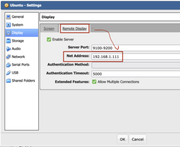
I had the same problem.
You should write an IP-address for connecting to your VM with windows remote desktop.

Image
User avatar
luna0021
Posts: 1
Joined: 02 Oct 2024, 19:49
India

Re: unable to access my VM

Post by luna0021 »

I have checked the network connection and ensured that the VM is powered on, but I still cannot connect. This issue may be due to various reasons, such as a misconfiguration in the settings, firewall restrictions, or a potential outage in the service provider. I would appreciate any guidance on troubleshooting steps or assistance in resolving this matter promptly, as accessing the VM is critical for my ongoing projects.
User avatar
zeleny
Posts: 5
Joined: 30 Sep 2024, 02:56
Russia

Re: unable to access my VM

Post by zeleny »

luna0021 wrote: 02 Oct 2024, 19:56
I have successfully solved the problem of connecting to remote desktop. See the screenshot of my previous post.
In virtual machine settings, make sure that Remote Display is enabled and has a connection port assigned to it.
When you connect with RDP to remote display use IP:Port.
Locked

Return to “Virtual Machines”