BIOS boot order - trying out other OS without dismantle

Discuss, seek assistance, and report issues related to hardware components, such as hardware platforms, memory, network ports, power supplies, UPS systems, and so on.
User avatar
RyanYang
TM Support
Posts: 1141
Joined: 01 Dec 2020, 11:50
China

Re: BIOS boot order - trying out other OS without dismantle

Post by RyanYang »

Here are the steps to adjust the boot order:
1. Connect the mouse, monitor, and your USB boot device. Press the power button on the TNAS to start it, then immediately and repeatedly press the "Esc" key to enter the BIOS setup page. If you do not successfully enter the BIOS, you can restart the TNAS and try again.
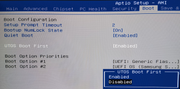
2. Once in the BIOS, switch to the Boot page and set "UTOS Boot First" to "Disabled."
Image
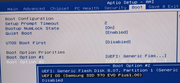
3. At the bottom of the Boot page, find the "Boot Option #1" setting and change it to your USB device. Press the F4 key to save the changes.
Image
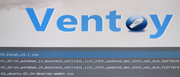
4. Restart the TNAS, and the system will prioritize booting from the USB device you selected.
Image
To contact our team, please send email to following addresses, remember to replace (at) with @
Technical team: support(at)terra-master.com (for technical support)
Service team: service(at)terra-master.com (for purchasing, return, replacement)
User avatar
Gremlin
Gold Member
Posts: 1628
Joined: 02 Dec 2022, 22:31
Great Britain

Re: BIOS boot order - trying out other OS without dismantle

Post by Gremlin »

Intersting, thank you.
Pressing the 'old-fashioned' delete key works for me to enter bios. :)
F5-221 TOS7.0.0777 - 4x4TB (Ironwolf) Traid
F2-424 TOS7.0.0777 - 2x500GB nvme (P3) Traid, 2x6TB HDD (HGST) Traid
F2-221 TOS7.0.0777 - 1x3TB Ext4, 1x4TB Btrfs
F2-425+ TOS7.0.0777 - 2x500GB nvme (P3) Traid, 2x6TB HDD (EXOS) Traid
User avatar
lesliehu
Posts: 14
Joined: 18 Aug 2024, 21:30
Australia

Re: BIOS boot order - trying out other OS without dismantle

Post by lesliehu »

TMRyan wrote: 30 Sep 2024, 15:38 Here are the steps to adjust the boot order:
1. Connect the mouse, monitor, and your USB boot device. Press the power button on the TNAS to start it, then immediately and repeatedly press the "Esc" key to enter the BIOS setup page. If you do not successfully enter the BIOS, you can restart the TNAS and try again.
2. Once in the BIOS, switch to the Boot page and set "UTOS Boot First" to "Disabled."
Image
3. At the bottom of the Boot page, find the "Boot Option #1" setting and change it to your USB device. Press the F4 key to save the changes.
Image
4. Restart the TNAS, and the system will prioritize booting from the USB device you selected.
Image
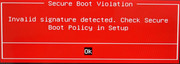
Thank you for the steps. Am I missing something? I can't get pass this message. :(

Image
User avatar
crisisacting
Silver Member
Posts: 500
Joined: 20 Jan 2022, 16:42

Re: BIOS boot order - trying out other OS without dismantle

Post by crisisacting »

lesliehu wrote: 30 Sep 2024, 18:34
If you're using ventoy, that USB isn't setup for UEFI & secure boot (there's been a separate issue with SBAT which hasn't been resolved yet, but there's a workaround for it); you'd need to build a new drive properly or disable secure boot, if that's an option within UEFI on a TerraMaster.
User avatar
Gremlin
Gold Member
Posts: 1628
Joined: 02 Dec 2022, 22:31
Great Britain

Re: BIOS boot order - trying out other OS without dismantle

Post by Gremlin »

crisisacting wrote: 30 Sep 2024, 21:14
The 'Ventoy' posts came from @TM - which, in itself, tells another story :cry:
F5-221 TOS7.0.0777 - 4x4TB (Ironwolf) Traid
F2-424 TOS7.0.0777 - 2x500GB nvme (P3) Traid, 2x6TB HDD (HGST) Traid
F2-221 TOS7.0.0777 - 1x3TB Ext4, 1x4TB Btrfs
F2-425+ TOS7.0.0777 - 2x500GB nvme (P3) Traid, 2x6TB HDD (EXOS) Traid
User avatar
user
Posts: 2
Joined: 01 Oct 2024, 20:19
Korea North

Re: BIOS boot order - trying out other OS without dismantle

Post by user »

Gremlin wrote: 29 Sep 2024, 05:25
lesliehu wrote: 28 Sep 2024, 20:21
Regardless of anything else, if you are planning to use another os, you would probably be wise to remove the internal usb flash drive and preserve it. In which case dismantling may well be required (As in my F2-424; The drive is impossible to remove without some work.)
Can you please share how to remove the drive in F2-424?
User avatar
Lijsterbesje
Posts: 17
Joined: 27 Nov 2024, 18:08
Netherlands

Re: BIOS boot order - trying out other OS without dismantle

Post by Lijsterbesje »

With trying to load Ventoy securboot certificate i lost the original.
Now i can't load TOS 5 or TOS 6 in secureboot.
How can i load the original ones? By loading default i lost the original.
I have a Terramaster F4-424.
F4-424
User avatar
Valnjes
Posts: 58
Joined: 26 Nov 2024, 21:24
Austria

Re: BIOS boot order - trying out other OS without dismantle

Post by Valnjes »

user wrote: 16 Oct 2024, 21:38 Can you please share how to remove the drive in F2-424?
Its very easy. Remove all 6 Screws from the back, remove the plastic side panel, and the back panel with the fan.
After that you remove 4 Screws from the motherboard, and remove the motherboard from the NAS.
Then you can unplug the USB and insert a new USB stick. I recommend SanDisk Ultra Fit, because they fit perfectly,
and are very reliable.

You can look at this review, to get a better feeling what you have to do:
https://www.igorslab.de/en/terramaster- ... im-test/3/
Lijsterbesje wrote: 27 Nov 2024, 18:19 With trying to load Ventoy securboot certificate i lost the original.
Now i can't load TOS 5 or TOS 6 in secureboot.
How can i load the original ones? By loading default i lost the original.
I have a Terramaster F4-424.
How to re-flash the OG USB drive (you have to remove it from the NAS and flash it on your PC)
viewtopic.php?t=6433

Or go with Synology DSM OS:
viewtopic.php?t=6937
User avatar
Lijsterbesje
Posts: 17
Joined: 27 Nov 2024, 18:08
Netherlands

Re: BIOS boot order - trying out other OS without dismantle

Post by Lijsterbesje »

Thank you for your reaction.
The flashdrive is not the problem.
The TerraMaster secureboot certificate is not in the bios.
With secure boot off the system works perfect.
F4-424
User avatar
Valnjes
Posts: 58
Joined: 26 Nov 2024, 21:24
Austria

Re: BIOS boot order - trying out other OS without dismantle

Post by Valnjes »

Im not sure how you manage to delete/disable the certificate.

The only thing you had to do is to disable force boot of the internal USB, and if your USB Boot drive is not Secure UEFI, then you have to disable secure boot.

I have done this many time and never had any issue.

I run Synology DSM with secure boot enabled on my F2-424 and F4-424 (same hardware, just with difference in bay size).
Locked

Return to “Hardware, Power and Accessories”