Remote Access

SMB, NFS, FTP, web file manager and Rsync server.
Locked
User avatar
Badger3981
Posts: 6
Joined: 22 Aug 2024, 03:12
Great Britain

Remote Access

Post by Badger3981 »

Hi i have a f2 423 that i intend to use for work purposes.
I have mounted the nas drive on my local computer to which the nas is attached.
I have the proceeded to make 8 other user accounts for staff and set the relevant folder permissions for them.

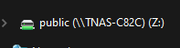
I would like to be able to mount the relevant folders for the staff on there computers which are at there homes on a different network to the nas.
They can access folders through the file manger by logging in on the TNAS windows app but no option to mount a drive.
I would like them to have SMB access to make copying and moving files around.

See attached image as what i want them to have
Image
F2 423
User avatar
TMzethar
TM Support
Posts: 2827
Joined: 27 Oct 2020, 16:43

Re: Remote Access

Post by TMzethar »

When you mention “different network”, do you mean different WAN IP networks or different network segments under the same WAN IP network?

If it is a different network under the same WAN IP network, you can access and map the share by typing \\LAN IP in Windows File explorer.

If it is a different WAN network, since SMB is not convenient for remote access, you can consider using tools such as RAIDrive/WinSCP/Filezilla to map the share via other protocols. (You need to set the port in the router).
You can also setup a VPN server so that when your staff members join the VPN, they can access TNAS via specific IP and map the shares.
viewtopic.php?t=2821
You can also refer to this to setup SMB for each of your staff members, but it is complicated.
viewtopic.php?t=5997
To contact our team, please send email to following addresses, remember to replace (at) with @:
Technical team: support(at)terra-master.com (for technical support)
Service team: service(at)terra-master.com (for purchasing, return, replacement, RMA service)
User avatar
Gremlin
Gold Member
Posts: 1632
Joined: 02 Dec 2022, 22:31
Great Britain

Re: Remote Access

Post by Gremlin »

Badger3981 wrote: 25 Sep 2024, 04:16
Take a look at "Tailscale" (or similar).
F5-221 TOS7.0.0777 - 4x4TB (Ironwolf) Traid
F2-424 TOS7.0.0777 - 2x500GB nvme (P3) Traid, 2x6TB HDD (HGST) Traid
F2-221 TOS7.0.0777 - 1x3TB Ext4, 1x4TB Btrfs
F2-425+ TOS7.0.0777 - 2x500GB nvme (P3) Traid, 2x6TB HDD (EXOS) Traid
User avatar
crisisacting
Silver Member
Posts: 500
Joined: 20 Jan 2022, 16:42

Re: Remote Access

Post by crisisacting »

Badger3981 wrote: 25 Sep 2024, 04:16
ZeroTier can do this & is fairly simple to setup.
User avatar
Badger3981
Posts: 6
Joined: 22 Aug 2024, 03:12
Great Britain

Re: Remote Access

Post by Badger3981 »

If i was to use Raidrive to setup via ftp service what would my ftp:// address be is there a easy way to find out?
F2 423
User avatar
Badger3981
Posts: 6
Joined: 22 Aug 2024, 03:12
Great Britain

Re: Remote Access

Post by Badger3981 »

Is it just a case of enabling ftp in the control panel?
Then choosing a tool such as raidrive to map the shares?
Would i also need to setup a ddns to achieve this?

Completely new to this kind of working so sorry for the silly questions if they appear that way any help would be much appreciated.
F2 423
User avatar
TMzethar
TM Support
Posts: 2827
Joined: 27 Oct 2020, 16:43

Re: Remote Access

Post by TMzethar »

Regardless of which tool and which network file protocol you use, you will need to set up ports and DDNS (optional). These might help you understand more:
viewtopic.php?t=433
To contact our team, please send email to following addresses, remember to replace (at) with @:
Technical team: support(at)terra-master.com (for technical support)
Service team: service(at)terra-master.com (for purchasing, return, replacement, RMA service)
Locked

Return to “File Services”