

This relates to a discussion here: viewtopic.php?p=37649#p37649
So I have (re-)installed TOS6.0.460 on 2 Nvme drives. These are marked in control panel as 'system drives'
I have used a 3rd party app to create an Ext4 partition (no data) on a HDD. Inserted this drive to nas.
Checking the control panel 'Disk > Disk' I can see this drive. (Shows as 'Normal')
I can see a file system sda on this drive (expected)
if I 'lsblk' at cli I can see sda1 on sda listed as partition and disk respectively.
I cannot find a method within TOS GUI to actually mount this drive/partition to make it useful.
When selected in the GUI the 'mount' option remains greyed out.
The referenced discussion implies that this should be possible. Please advise.
Mounting another HDD (TOS6 Beta - 6.0.460 et al) - HOW?
Mounting another HDD (TOS6 Beta - 6.0.460 et al) - HOW?
F5-221 TOS7.0.1278 - 4x4TB (Ironwolf) Traid
F2-424 TOS7.0.1278 - 2x500GB nvme (P3) Traid, 2x6TB HDD (HGST) Traid
F2-221 TOS7.0.1278 - 1x3TB Ext4, 1x4TB Btrfs
F2-425+ TOS7.0.1278 - 2x500GB nvme (P3) Traid, 2x6TB HDD (EXOS) Traid
F2-424 TOS7.0.1278 - 2x500GB nvme (P3) Traid, 2x6TB HDD (HGST) Traid
F2-221 TOS7.0.1278 - 1x3TB Ext4, 1x4TB Btrfs
F2-425+ TOS7.0.1278 - 2x500GB nvme (P3) Traid, 2x6TB HDD (EXOS) Traid

Re: Mounting another HDD (TOS6 Beta - 6.0.460 et al) - HOW?
Do you not have any volumes yet?
On TOS 6.0.460 you need at least 1 volume from another disk as a mount directory, when any volume exists you should be able to mount it.
On TOS 6.0.460 you need at least 1 volume from another disk as a mount directory, when any volume exists you should be able to mount it.
To contact our team, please send email to following addresses, remember to replace (at) with @:
Technical team: support(at)terra-master.com (for technical support)
Service team: service(at)terra-master.com (for purchasing, return, replacement, RMA service)
Technical team: support(at)terra-master.com (for technical support)
Service team: service(at)terra-master.com (for purchasing, return, replacement, RMA service)
Re: Mounting another HDD (TOS6 Beta - 6.0.460 et al) - HOW?
Yes, there is an existing Volume (Volume1) and Storage Pool on the nvme drives.
F5-221 TOS7.0.1278 - 4x4TB (Ironwolf) Traid
F2-424 TOS7.0.1278 - 2x500GB nvme (P3) Traid, 2x6TB HDD (HGST) Traid
F2-221 TOS7.0.1278 - 1x3TB Ext4, 1x4TB Btrfs
F2-425+ TOS7.0.1278 - 2x500GB nvme (P3) Traid, 2x6TB HDD (EXOS) Traid
F2-424 TOS7.0.1278 - 2x500GB nvme (P3) Traid, 2x6TB HDD (HGST) Traid
F2-221 TOS7.0.1278 - 1x3TB Ext4, 1x4TB Btrfs
F2-425+ TOS7.0.1278 - 2x500GB nvme (P3) Traid, 2x6TB HDD (EXOS) Traid
Re: Mounting another HDD (TOS6 Beta - 6.0.460 et al) - HOW?
Would you mind contacting the technical support e-mail and we can arrange for an engineer to check it remotely?
To contact our team, please send email to following addresses, remember to replace (at) with @:
Technical team: support(at)terra-master.com (for technical support)
Service team: service(at)terra-master.com (for purchasing, return, replacement, RMA service)
Technical team: support(at)terra-master.com (for technical support)
Service team: service(at)terra-master.com (for purchasing, return, replacement, RMA service)
Re: Mounting another HDD (TOS6 Beta - 6.0.460 et al) - HOW?
Unfortunately the things that you seem to require for remote intervention are not things I use. (Team viewer, remote access, port forwarding, vpn) I don't mind pointing out issues, but I don't need them fixed on this device. As you might see in anotheer thread I have already changed the configuration. (But this specific action is still lacking)
 Does the drive to be mounted require data on it in order to be mounted
Does the drive to be mounted require data on it in order to be mounted F5-221 TOS7.0.1278 - 4x4TB (Ironwolf) Traid
F2-424 TOS7.0.1278 - 2x500GB nvme (P3) Traid, 2x6TB HDD (HGST) Traid
F2-221 TOS7.0.1278 - 1x3TB Ext4, 1x4TB Btrfs
F2-425+ TOS7.0.1278 - 2x500GB nvme (P3) Traid, 2x6TB HDD (EXOS) Traid
F2-424 TOS7.0.1278 - 2x500GB nvme (P3) Traid, 2x6TB HDD (HGST) Traid
F2-221 TOS7.0.1278 - 1x3TB Ext4, 1x4TB Btrfs
F2-425+ TOS7.0.1278 - 2x500GB nvme (P3) Traid, 2x6TB HDD (EXOS) Traid
Re: Mounting another HDD (TOS6 Beta - 6.0.460 et al) - HOW?
UPDATE:
Formatted drive as NTFS with data (On a Windows system)
Installed drive on nas
Select drive in Control panel (Disk > Disk)
This shows Mount function as enabled -> Mounted drive.
Except
No files visible in file manager
Boot does not appear to have happened
?It is possible the Ext4 partition previously formatted using 3rd party software in windows was not valid for some reason, thus not permitting 'Mount'?
Formatted drive as NTFS with data (On a Windows system)
Installed drive on nas
Select drive in Control panel (Disk > Disk)
This shows Mount function as enabled -> Mounted drive.
Except
No files visible in file manager
Boot does not appear to have happened
Code: Select all
xxxxxxxxxx@NAS-T:~# mount
/dev/md9 on / type ext4 (rw,noatime,nodiratime,data=ordered)
proc on /proc type proc (rw,nosuid,nodev,noexec,relatime)
sysfs on /sys type sysfs (rw,nosuid,nodev,noexec,relatime)
devtmpfs on /dev type devtmpfs (rw,nosuid,size=4096k,nr_inodes=131072,mode=755)
tmpfs on /dev/shm type tmpfs (rw,size=51200k)
devpts on /dev/pts type devpts (rw,nosuid,noexec,relatime,gid=5,mode=620,ptmxmode=000)
tmpfs on /run type tmpfs (rw,nosuid,nodev,size=1574392k,nr_inodes=819200,mode=755)
tmpfs on /run/lock type tmpfs (rw,nosuid,nodev,noexec,relatime,size=5120k)
cgroup2 on /sys/fs/cgroup type cgroup2 (rw,nosuid,nodev,noexec,relatime,nsdelegate,memory_recursiveprot)
efivarfs on /sys/firmware/efi/efivars type efivarfs (rw,nosuid,nodev,noexec,relatime)
bpf on /sys/fs/bpf type bpf (rw,nosuid,nodev,noexec,relatime,mode=700)
systemd-1 on /proc/sys/fs/binfmt_misc type autofs (rw,relatime,fd=30,pgrp=1,timeout=0,minproto=5,maxproto=5,direct)
hugetlbfs on /dev/hugepages type hugetlbfs (rw,relatime,pagesize=2M)
mqueue on /dev/mqueue type mqueue (rw,nosuid,nodev,noexec,relatime)
debugfs on /sys/kernel/debug type debugfs (rw,nosuid,nodev,noexec,relatime)
tracefs on /sys/kernel/tracing type tracefs (rw,nosuid,nodev,noexec,relatime)
tmpfs on /tmp type tmpfs (rw,relatime,size=524288k)
fusectl on /sys/fs/fuse/connections type fusectl (rw,nosuid,nodev,noexec,relatime)
ramfs on /run/credentials/systemd-sysusers.service type ramfs (ro,nosuid,nodev,noexec,relatime,mode=700)
binfmt_misc on /proc/sys/fs/binfmt_misc type binfmt_misc (rw,nosuid,nodev,noexec,relatime)
/dev/mapper/vg0-lv0 on /Volume1 type btrfs (rw,relatime,nodatasum,nodatacow,nobarrier,ssd,space_cache=v2,subvolid=5,subvol=/)
/dev/mapper/vg0-lv0 on /home type btrfs (rw,relatime,nodatasum,nodatacow,nobarrier,ssd,space_cache=v2,subvolid=257,subvol=/homes)
xxxxxxxxx@NAS-T:~#F5-221 TOS7.0.1278 - 4x4TB (Ironwolf) Traid
F2-424 TOS7.0.1278 - 2x500GB nvme (P3) Traid, 2x6TB HDD (HGST) Traid
F2-221 TOS7.0.1278 - 1x3TB Ext4, 1x4TB Btrfs
F2-425+ TOS7.0.1278 - 2x500GB nvme (P3) Traid, 2x6TB HDD (EXOS) Traid
F2-424 TOS7.0.1278 - 2x500GB nvme (P3) Traid, 2x6TB HDD (HGST) Traid
F2-221 TOS7.0.1278 - 1x3TB Ext4, 1x4TB Btrfs
F2-425+ TOS7.0.1278 - 2x500GB nvme (P3) Traid, 2x6TB HDD (EXOS) Traid
Re: Mounting another HDD (TOS6 Beta - 6.0.460 et al) - HOW?
UPDATE:
I can manually mount ntfs partition on an empty shared folder and then files become available in File Manager.
I can unmount ntfs partition via the GUI, but still cannot make the mount function work.
I can manually mount ntfs partition on an empty shared folder and then files become available in File Manager.
I can unmount ntfs partition via the GUI, but still cannot make the mount function work.
F5-221 TOS7.0.1278 - 4x4TB (Ironwolf) Traid
F2-424 TOS7.0.1278 - 2x500GB nvme (P3) Traid, 2x6TB HDD (HGST) Traid
F2-221 TOS7.0.1278 - 1x3TB Ext4, 1x4TB Btrfs
F2-425+ TOS7.0.1278 - 2x500GB nvme (P3) Traid, 2x6TB HDD (EXOS) Traid
F2-424 TOS7.0.1278 - 2x500GB nvme (P3) Traid, 2x6TB HDD (HGST) Traid
F2-221 TOS7.0.1278 - 1x3TB Ext4, 1x4TB Btrfs
F2-425+ TOS7.0.1278 - 2x500GB nvme (P3) Traid, 2x6TB HDD (EXOS) Traid
Re: Mounting another HDD (TOS6 Beta - 6.0.460 et al) - HOW?
Strangness:
Upon system reboot, ntfs partition (magically) mounted itself as:
and was readable from File Manager under 'Disk' as 'ExternalDrive_sdb1' (and not under the created shared folder - which still exists).
Upon system reboot, ntfs partition (magically) mounted itself as:
Code: Select all
/dev/sdb1 on /Volume1/@disk/Externaldrive_sdb1 type fuseblk (rw,noatime,user_id=0,group_id=0,allow_other,blksize=4096)
F5-221 TOS7.0.1278 - 4x4TB (Ironwolf) Traid
F2-424 TOS7.0.1278 - 2x500GB nvme (P3) Traid, 2x6TB HDD (HGST) Traid
F2-221 TOS7.0.1278 - 1x3TB Ext4, 1x4TB Btrfs
F2-425+ TOS7.0.1278 - 2x500GB nvme (P3) Traid, 2x6TB HDD (EXOS) Traid
F2-424 TOS7.0.1278 - 2x500GB nvme (P3) Traid, 2x6TB HDD (HGST) Traid
F2-221 TOS7.0.1278 - 1x3TB Ext4, 1x4TB Btrfs
F2-425+ TOS7.0.1278 - 2x500GB nvme (P3) Traid, 2x6TB HDD (EXOS) Traid
Re: Mounting another HDD (TOS6 Beta - 6.0.460 et al) - HOW?
And More:
Attempted MANUAL (via cli) mount of Ext4 drive in same manner as before and this:
Why on earth is mount checking for NTFS signature? Is this because an ntfs drive was previously mounted on this shared folder? Is that reasonable?
Probably not - mount fails in similar fashion on new, empty shared folder. And, with a little help from Google:
Attempted MANUAL (via cli) mount of Ext4 drive in same manner as before and this:
Code: Select all
xxxxxxxxx@NAS-T:~# mount /dev/sda1 /Volume1/folder2
[color=#BF0000][b]NTFS signature is missing.[/b][/color]
Failed to mount '/dev/sda1': Invalid argument
The device '/dev/sda1' doesn't seem to have a valid NTFS.
Maybe the wrong device is used? Or the whole disk instead of a
partition (e.g. /dev/sda, not /dev/sda1)? Or the other way around?
xxxxxxxxx@NAS-T:~#
Probably not - mount fails in similar fashion on new, empty shared folder. And, with a little help from Google:
Code: Select all
*********@NAS-T:~# mount -t ext4 /dev/sda1 /Volume1/folder3
mount: /Volume1/folder3: wrong fs type, bad option, bad superblock on /dev/sda1, missing codepage or helper program, or other error.
*********@NAS-T:~#
F5-221 TOS7.0.1278 - 4x4TB (Ironwolf) Traid
F2-424 TOS7.0.1278 - 2x500GB nvme (P3) Traid, 2x6TB HDD (HGST) Traid
F2-221 TOS7.0.1278 - 1x3TB Ext4, 1x4TB Btrfs
F2-425+ TOS7.0.1278 - 2x500GB nvme (P3) Traid, 2x6TB HDD (EXOS) Traid
F2-424 TOS7.0.1278 - 2x500GB nvme (P3) Traid, 2x6TB HDD (HGST) Traid
F2-221 TOS7.0.1278 - 1x3TB Ext4, 1x4TB Btrfs
F2-425+ TOS7.0.1278 - 2x500GB nvme (P3) Traid, 2x6TB HDD (EXOS) Traid
Re: Mounting another HDD (TOS6 Beta - 6.0.460 et al) - HOW?
After a bit more head scratching, found this worked:
{remove hdd (sda) and reformat with exfat partition}
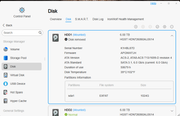
Install hdd (sda) into nas
Open GUI > Control Panel > Didk > Disk
Select drive HDD1
Select Partition sda1 (click down arrow top right corner to expose)
Select 'Mount' (... More > Mount )
 REBOOT SYSTEM
File system will be mounted on reboot.
There appears to be a 'disconnect' between ordering 'mount' in GUI and physical mounting of the filesystem.
{NOTE: The drive still shows as 'removed' from previous operations}
{remove hdd (sda) and reformat with exfat partition}
Install hdd (sda) into nas
Open GUI > Control Panel > Didk > Disk
Select drive HDD1
Select Partition sda1 (click down arrow top right corner to expose)
Select 'Mount' (... More > Mount )
REBOOT SYSTEM File system will be mounted on reboot.
There appears to be a 'disconnect' between ordering 'mount' in GUI and physical mounting of the filesystem.
{NOTE: The drive still shows as 'removed' from previous operations}
F5-221 TOS7.0.1278 - 4x4TB (Ironwolf) Traid
F2-424 TOS7.0.1278 - 2x500GB nvme (P3) Traid, 2x6TB HDD (HGST) Traid
F2-221 TOS7.0.1278 - 1x3TB Ext4, 1x4TB Btrfs
F2-425+ TOS7.0.1278 - 2x500GB nvme (P3) Traid, 2x6TB HDD (EXOS) Traid
F2-424 TOS7.0.1278 - 2x500GB nvme (P3) Traid, 2x6TB HDD (HGST) Traid
F2-221 TOS7.0.1278 - 1x3TB Ext4, 1x4TB Btrfs
F2-425+ TOS7.0.1278 - 2x500GB nvme (P3) Traid, 2x6TB HDD (EXOS) Traid