

ok i was having problems with user and getting excess to files so i used the reset configuration on the control panel /settings
it restarted and i was then presented with the Initialise page the only proble i cant get passed it
i get the message password contains illegal charaters which it does not
i just can get it to carry on and get into the os
i am using caps and lower case longer than 8 with a number
any ideas please of how to fix
how to get past Initialise page please


Re: how to get past Initialise page please
To contact our team, please send email to following addresses, remember to replace (at) with @:
Support team: support(at)terra-master.com (for technical support only)
Service team: service(at)terra-master.com (for purchasing, return, replacement, RMA service)
Support team: support(at)terra-master.com (for technical support only)
Service team: service(at)terra-master.com (for purchasing, return, replacement, RMA service)
Re: how to get past Initialise page please
thanks for your reply
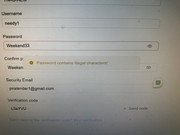
I have attached a screenshot as you can see all I keep getting is illegal charters no matter what I enter as a password
I have also tried starting with no disks in and get a screen to insert a disk and then it tries to create a new pool so I stopped
Re: how to get past Initialise page please
I'm not sure how to help you at this moment. Your password seems to be fine, and I don't know what's happening. I haven't encountered this situation in the past. Could you please tell me what device model you are using? You could try removing all hard drives and reinstalling the system.
To contact our team, please send email to following addresses, remember to replace (at) with @:
Support team: support(at)terra-master.com (for technical support only)
Service team: service(at)terra-master.com (for purchasing, return, replacement, RMA service)
Support team: support(at)terra-master.com (for technical support only)
Service team: service(at)terra-master.com (for purchasing, return, replacement, RMA service)
Re: how to get past Initialise page please
TMroy wrote: ↑08 Aug 2024, 22:47I'm not sure how to help you at this moment. Your password seems to be fine, and I don't know what's happening. I haven't encountered this situation in the past. Could you please tell me what device model you are using? You could try removing all hard drives and reinstalling the system.
ok I am using t9-423
I have tried removing the hard drives so it would reinstall the operating system but the problem is it goes to the install page and asks me to insert a hard drive so it can install but as soon as I place one of the hard drives in it says that the data will be wiped on the drive and do I wish to continue at this point I stopped because I am unsure if this is normal ??? and would I lose my storage pool ??
looking forward to your reply thankyou

Re: how to get past Initialise page please
Please refrain from continuing with the operation. You can schedule a remote session with an engineer through our online customer service on the official website.
To contact our team, please send email to following addresses, remember to replace (at) with @:
Technical team: support(at)terra-master.com(for technical support)
Service team: service(at)terra-master.com(for purchasing, return, replacement, RMA service)
Technical team: support(at)terra-master.com(for technical support)
Service team: service(at)terra-master.com(for purchasing, return, replacement, RMA service)
Re: how to get past Initialise page please
You can make an appointment with the engineer for remote service through the online customer service on the official website. You need to download TeamViewer on your computer and tell them the verification code and password.
To contact our team, please send email to following addresses, remember to replace (at) with @:
Technical team: support(at)terra-master.com(for technical support)
Service team: service(at)terra-master.com(for purchasing, return, replacement, RMA service)
Technical team: support(at)terra-master.com(for technical support)
Service team: service(at)terra-master.com(for purchasing, return, replacement, RMA service)
Re: how to get past Initialise page please
many thanks i managed to get an engineer to connect via anydesk this morning my time in the UK at 8.30am the man was a digital god and a legend he not only got an operating system installed he got all my files back the poor chap took around 4 hours of coding and giving me instructions of disks to pull and then to replace
thankyou so much what a wonderful team I was so impressed I have just ordered a new TERRAMASTER T9-450 9Bay with 5 hard drives god bless you all