

I have just tried updating my F4-424 from to 6.0.436 from 6.0.420. Having managed to somehow think that the warning about the system configuration being reset didn't apply to me, and was only for people upgrading from version 5, I proceeded with undue confidence.
After updating and two reboots, I was presented with a screen to recreate the super user. This is where that sinking feeling started.
This failed to complete, it would not send any kind of verification code, and would not let me skip the user. At one point it also complained about a session timeout (i've no idea why, it was while i was using it)! I was still stuck in the screen asking for the super user, but then it suggested the user already exists so I tried "superuser2" with exactly the same results. I see other people have complain about this.
I then rebooted again out of desparation, and now can see the login page. But none of the details I used work. So I can no longer access anything, and am terrified I have lost everything. I cannot SSH to it either.
I have 2 X 4TB HDD using TRAID, and 2 X 1TB NVME . I don't really care about whats on the NVME drives, and am happy to set everything up again, but the data on the HDDs is important to me. This should be safe right? Or what would be the point of having multiple disks.
When initially installing the version 5 to 6 upgrade some months ago, it was fairly smooth. With just a little hiccup on the first boot (empty web page). After a third reboot, it fixed itself, and everything was intact. This time, a point release between two versions 6, terrible things have happened. It's quite unexpected.
TOS 6.0.420 Beta Is Available for Testing
-
UncleJohnsBand
- Posts: 19
- Joined: 15 Apr 2020, 08:15

Re: TOS 6.0.420 Beta Is Available for Testing
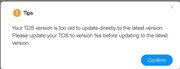
I am getting prompted to update to the 6.0.436 version but when I do it then tells me my version is too old for direct update?


Re: TOS 6.0.420 Beta Is Available for Testing
Anybody can share USB image for TOS 5? I try fully reinstall system. Erase system disk and install new system
F4-423


Re: TOS 6.0.420 Beta Is Available for Testing
Please fix qbittorrent, it makes the system unstable.


Re: TOS 6.0.420 Beta Is Available for Testing
So you setup your mail notification on your mobile phone? please try again with your computer.
To contact our team, please send email to following addresses, remember to replace (at) with @:
Support team: support(at)terra-master.com (for technical support only)
Service team: service(at)terra-master.com (for purchasing, return, replacement, RMA service)
Support team: support(at)terra-master.com (for technical support only)
Service team: service(at)terra-master.com (for purchasing, return, replacement, RMA service)
-
thierrys73

- Posts: 36
- Joined: 23 Jul 2022, 19:57

Re: TOS 6.0.420 Beta Is Available for Testing
Hello
It is ok via AOL manual smtp parameters on my pc .
but not in local smtp server.
Thanks a lot for your help !!!!

Tnas T6-423
Tnas F2-221
Tnas F2-221


Re: TOS 6.0.420 Beta Is Available for Testing
SOLVED
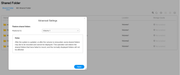
Did some more checking and found that the "Shared Folder - Advance Settings" (...) "Restore Shared Folders" fixed my problem. I do not know what is exactly does, but my Shares now appear in FileZilla as they should.fcs001fcs wrote: ↑08 Aug 2024, 03:46 I updated to TOS 6.0.436 yesterday and since then I have some problems with SFTP displaying the Shares.
When I use FileZilla with the same setup I had in the TOS 6.0.420 prior version, it does not display all the shares as it should. I am using the "SuperUser" login, so all shares should be visible as they were on TOS 6.0.420.
It seems that older Shares created with TOS 6.0.420 are displayed but new Shares created today under TOS 6.0.436 are not displayed.
I have checked and re-check all Users, Groups, and Applications (SFTP) permissions and all are OK.
I have 4 Shares, 3 were created under .420 and 1 under .436. When in FileZilla, logged in as a SuperUser, the 3 older ones are displayed but the .436 created Share is not displayed.
When in FileZilla, logged in as a SuperUser, I manually enter the Share name that is missing (in "Remote site:" input box), it correctly displays the sub-folder hierarchy and files of that non-displayed Share.
Question for TM: Is this a bug in TOS 6.0.436 for SFTP and is there a workaround I could use to fix the issue until the next version?
F4-423 - 2 x12TB & 1x14TB & 1x16TB - BTRFS TRAID
-
OneOfaKindDPC

- Posts: 1
- Joined: 03 Aug 2024, 07:39
Re: TOS 6.0.420 Beta Is Available for Testing
I'm still very stuff and in much need of assistance, I cannot access root for some reason, tried a factory reset with no success.OneOfaKindDPC wrote: ↑03 Aug 2024, 07:50 I'm not sure what happened sadly, I updated my f4-423 to .420 from the previous 6.0 beta. My storage pool took quite a while to sync (which is pretty normal) and now says normal, but my volume says it's corrupt and I can't access anything.
I tried following the steps here: viewtopic.php?f=79&t=2575
but have been unsuccessful so far, any help would be greatly appreciated. Thank you in advance
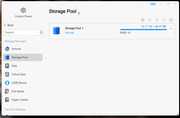
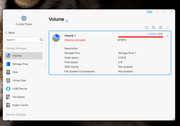
when I try to fix the volume per the instructions in the link, I'm left stuck at the point in the image.
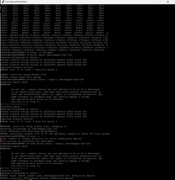
Thank you again in advance

Re: TOS 6.0.420 Beta Is Available for Testing
Once you update to 6.0.420, the whole root file system changes so I cannot see that trying fixes related to any earlier versions of TOS will help. Probably makes things worse .......
F5-221 TOS7.0.1278 - 4x4TB (Ironwolf) Traid
F2-424 TOS7.0.1278 - 2x500GB nvme (P3) Traid, 2x6TB HDD (HGST) Traid
F2-221 TOS7.0.1278 - 1x3TB Ext4, 1x4TB Btrfs
F2-425+ TOS7.0.1278 - 2x500GB nvme (P3) Traid, 2x6TB HDD (EXOS) Traid
F2-424 TOS7.0.1278 - 2x500GB nvme (P3) Traid, 2x6TB HDD (HGST) Traid
F2-221 TOS7.0.1278 - 1x3TB Ext4, 1x4TB Btrfs
F2-425+ TOS7.0.1278 - 2x500GB nvme (P3) Traid, 2x6TB HDD (EXOS) Traid
-
OneOfaKindDPC
- Posts: 1
- Joined: 03 Aug 2024, 07:39
Re: TOS 6.0.420 Beta Is Available for Testing
That's fair.. But you're also the first reply since I posted my problem, I had to try something.