

Fan in auto mode now increases or decreases speed depending on CPU temperature, thanks
CPU overheat
Re: CPU overheat
F4-424 Pro


Re: CPU overheat
The cooling in this model is OK, but the problem with this CPU is always in turbo mode. This mode increases the CPU's power from 13-15W to 35W for a short amount of time when more power is needed. In the bios, we can tweak this mode (limit power) or disable it. I changed the CPU power limit (TDP) turbo mode from 35W to 30W, and now in high peak, I get 85-90 degrees instead of 95-98 degrees.
In BIOS Advanced CPU Configuration, search for Power configuration and Config TDP Configurations:
My config:
Custom settings nominal (change only this section):
Power limit 1: 13 000 (13W it is the low value for cpu in idle)
Power limit 2: 30 000 (30W turbo mode instead 35W)
Power limit 1 time window: 20 (more value means more turbo activation)
In BIOS Advanced CPU Configuration, search for Power configuration and Config TDP Configurations:
My config:
Custom settings nominal (change only this section):
Power limit 1: 13 000 (13W it is the low value for cpu in idle)
Power limit 2: 30 000 (30W turbo mode instead 35W)
Power limit 1 time window: 20 (more value means more turbo activation)


Re: CPU overheat
I just experienced some 100% load, 'system is sluggish', >80-degC CPU temp, 76C HDD temp, can't kill docker container, can't complete an OS reboot or shutdown, can't even log back in to TOS via web interface, TNAS app for Android or PuTTY/SSH weirdness this weekend with my recently purchssed F2-424. My TNAS is running TOS6 running off a NVMe and my media files on a WD Red Plus in Bay#1.
The other day, I installed the photo app 'immich' to the NVMe via Docker/Portainer and I think there was a configuration issue as I soon noticed over 450,000 thumbnails had been created that day (on the HDD) and were now appearing on the most recent day in my image timeline (which I don't think is correct)... and then, I think, it found all these new images and triggered new thumbnails to be created for each of those new images, a horrible loop that apparently put the CPU at 100% load. As I said in the opening sentence, it wouldn't complete shutdown via TOS and eventually got so sluggish I couldn't even complete a log in via PuTTY/SSH from my PC.
Having manually powering off the TNAS via the button on the back of the device, I waited for it to finish booting to TOS and then logged in and saw it immediately at 100%. Could not even complete the simple task of going App Center>Installed->Portainer->Open, or ...Installed->Docker Manager->Open. Logging in via PuTTY/SSH I ran a docker kill command, which resulted in an error message or hang, and did not kill all the immich containers.
What could I do?
I had an idea: if I manually powered off via the button (which is not ideal as the drive was busy being written to), I could then remove the Bay#1 caddy, power back on, and hopefully with the drive no longer accessible, my 'immich' docker container couldn't run its routine so the CPU load should be far lower and perhaps I could at last manually stop the container. Yes, that actually worked. I stopped the container, and made some changes to my immich docker compose/.env settings and then put the drive back in and rebooted. SUCCESS!
But it is a very worrying situation when you see the CPU and HDD temps soaring and find the TNAS OS almost 100% unresponsive, and actually unable to even complete a successful login attempt so you can try to do something about it remotely. I think mine ran for 10 hours at 100% load and high temps....
The other day, I installed the photo app 'immich' to the NVMe via Docker/Portainer and I think there was a configuration issue as I soon noticed over 450,000 thumbnails had been created that day (on the HDD) and were now appearing on the most recent day in my image timeline (which I don't think is correct)... and then, I think, it found all these new images and triggered new thumbnails to be created for each of those new images, a horrible loop that apparently put the CPU at 100% load. As I said in the opening sentence, it wouldn't complete shutdown via TOS and eventually got so sluggish I couldn't even complete a log in via PuTTY/SSH from my PC.
Having manually powering off the TNAS via the button on the back of the device, I waited for it to finish booting to TOS and then logged in and saw it immediately at 100%. Could not even complete the simple task of going App Center>Installed->Portainer->Open, or ...Installed->Docker Manager->Open. Logging in via PuTTY/SSH I ran a docker kill command, which resulted in an error message or hang, and did not kill all the immich containers.
What could I do?
I had an idea: if I manually powered off via the button (which is not ideal as the drive was busy being written to), I could then remove the Bay#1 caddy, power back on, and hopefully with the drive no longer accessible, my 'immich' docker container couldn't run its routine so the CPU load should be far lower and perhaps I could at last manually stop the container. Yes, that actually worked. I stopped the container, and made some changes to my immich docker compose/.env settings and then put the drive back in and rebooted. SUCCESS!
But it is a very worrying situation when you see the CPU and HDD temps soaring and find the TNAS OS almost 100% unresponsive, and actually unable to even complete a successful login attempt so you can try to do something about it remotely. I think mine ran for 10 hours at 100% load and high temps....
F2-424 w 1x 250GB WD SN580 Blue NVMe (TOS6.0.519) + 2x 4TB WD Red Plus 3.5"HDDs


Re: CPU overheat
I'm not familiar with Immich, but it's apparent that this application is consuming all system resources, causing the system to be unresponsive to your other operations. You should limit its usage of system resources, specifically CPU and memory, when enabling the container. When the CPU is fully loaded for a long time, a CPU temperature of 80 degrees Celsius is still within the normal range; the maximum operating temperature for this CPU can reach up to 105 degrees Celsius. However, a hard disk temperature of 76 degrees Celsius is clearly too high, indicating that the automatic fan adjustment function is not working properly (this may be related to system operation blockage). Could you please tell me which version of the system you are using? What mode is the fan operating in? And what is the environment temperature?
To contact our team, please send email to following addresses, remember to replace (at) with @:
Support team: support(at)terra-master.com (for technical support only)
Service team: service(at)terra-master.com (for purchasing, return, replacement, RMA service)
Support team: support(at)terra-master.com (for technical support only)
Service team: service(at)terra-master.com (for purchasing, return, replacement, RMA service)
Re: CPU overheat
My F2-424 is running TOS v6.0.229-00147, fan mode is/was in Automatic, and the Device Temperature was, if I remember correctly 39C when the CPU was >80C and the HDD was in the high 70-Cs.TMroy wrote: ↑09 Sep 2024, 16:02[...] However, a hard disk temperature of 76 degrees Celsius is clearly too high, indicating that the automatic fan adjustment function is not working properly (this may be related to system operation blockage). Could you please tell me which version of the system you are using? What mode is the fan operating in? And what is the environment temperature?
F2-424 w 1x 250GB WD SN580 Blue NVMe (TOS6.0.519) + 2x 4TB WD Red Plus 3.5"HDDs


Re: CPU overheat
Was the fan actually running? Speed?
F5-221 TOS7.0.1278 - 4x4TB (Ironwolf) Traid
F2-424 TOS7.0.1278 - 2x500GB nvme (P3) Traid, 2x6TB HDD (HGST) Traid
F2-221 TOS7.0.1278 - 1x3TB Ext4, 1x4TB Btrfs
F2-425+ TOS7.0.1278 - 2x500GB nvme (P3) Traid, 2x6TB HDD (EXOS) Traid
F2-424 TOS7.0.1278 - 2x500GB nvme (P3) Traid, 2x6TB HDD (HGST) Traid
F2-221 TOS7.0.1278 - 1x3TB Ext4, 1x4TB Btrfs
F2-425+ TOS7.0.1278 - 2x500GB nvme (P3) Traid, 2x6TB HDD (EXOS) Traid
Re: CPU overheat
Yes it was. I remember seeing between 1150-1350rpm when the CPU was at 100% load. When it's at <1% CPU load, on automatic mode, fan seems to run at 895rpm, on low around 1025, medium is around 1675rpm and full speed is around 2175rpm.
F2-424 w 1x 250GB WD SN580 Blue NVMe (TOS6.0.519) + 2x 4TB WD Red Plus 3.5"HDDs
-
CodeTheFuture

- Posts: 45
- Joined: 11 Dec 2024, 10:08

Re: CPU overheat
Yep. I'm getting the same type of response in - viewtopic.php?t=7149DigitalAnalog wrote: ↑10 May 2024, 10:13It's so frustrating when the TM rep's first recourse is to challenge the experience of their customers. You say it's impossible, they said it happened. So who's lying?TMroy wrote: ↑08 May 2024, 01:16 How can the CPU temperature reach 90℃ when the CPU load is only 14%? The heat dissipation design of this model has been rigorously verified, and we have never encountered such a situation in the laboratory. It is also logically unreasonable. We need to verify it again.
Same issue. In this thread im talking about the CPU thermal alerting thresholds. My cores are all sitting between 5-15% most of the time and the CPU 70-95. Running docker containers and a virtual machine but nothing CPU heavy.
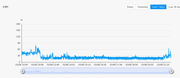

Last edited by CodeTheFuture on 08 Jan 2025, 20:16, edited 1 time in total.
Re: CPU overheat
One thing you can do is get away from the Beta release 6.0.229. imo all those betas were a bit flakey when it came to fan control. The latest releases >6.0.555 seem to be better.
F5-221 TOS7.0.1278 - 4x4TB (Ironwolf) Traid
F2-424 TOS7.0.1278 - 2x500GB nvme (P3) Traid, 2x6TB HDD (HGST) Traid
F2-221 TOS7.0.1278 - 1x3TB Ext4, 1x4TB Btrfs
F2-425+ TOS7.0.1278 - 2x500GB nvme (P3) Traid, 2x6TB HDD (EXOS) Traid
F2-424 TOS7.0.1278 - 2x500GB nvme (P3) Traid, 2x6TB HDD (HGST) Traid
F2-221 TOS7.0.1278 - 1x3TB Ext4, 1x4TB Btrfs
F2-425+ TOS7.0.1278 - 2x500GB nvme (P3) Traid, 2x6TB HDD (EXOS) Traid