I have a problem creating libraries in Plex Media Server (1.40.3.8555), or rather adding media to a new library. After installing Plex Media Server on the NAS, I accessed the Plex Server web console and added a new library:
Create Library procedure
1. Go to "settings->Manage->Libraries", then "Add Library"
2. Select type: "Music", name: "Music"
3. "Browse For Media Folder" -> find NAS folder "/Volume1/NASMusic", and "Add"
4. "Add Library"
The new "Music" library appears in the Plex left-hand column, but If I click on the library link I get the message:
"Music" is empty, Expecting more? Visit the Manage Libraries page to add folders and scan library files.
If I go back to the manage library page and click the "Scan Library Files" button on the top right, nothing happens. If I click the ellipsis (...) to the right of the library name, and also select "Scan Library Files", I get an error dialog:
"An internet connection is required to scan library files. "
The NAS does have an Internet connection, but on only one of its two interfaces.
Check folder permissions
I have given the NAS user group "media' recursive access to the shared folder where the media lives ("NASMusic")
1. Edit Shared Folder -> check "Replace the permissions of all subdirectories with the permission of the folder"
2. Set permission of User Group "media" to Read/Write (I also set the "admin" and "allusers" groups to the same R/W permission)
3. In NAS control panel "Applications" - set permission for "Plex Media Server" for User Groups to "Allow" for all groups
4. I also added my other user accounts to the "media" user group because it is unclear which NAS account is being used by Plex Media Server.
With all of this the Plex Media Server *should* have access to the NASMusic shared folder....but the Plex library fails to index any of the media files.
Other Observations
I deleted the Plex Media Server and reinstalled it. It showed version 1.40.2.8395 in the NAS App Center.
The Plex UI stated that an update was available, so I downloaded and installed the update (v. 1.40.3.8555) . However in the NAS App Center still shows the old version (1.40.2.8395) even after stopping and restarting the Plex Media Server.
There also appears to be a hidden "plex" user that does not appear as a NAS user, but is the owner of the "Plex" folder that is created on the NAS when Plex Media Server is installed. It's not clear how this "plex" user is used, but it presumably is a hidden member of the user group "media"?
To summarize, Plex Media Server can not index media files stored on the NAS, even when given access to the shared folder.
Can you suggest any obvious problems with the procedure I have followed?
Thanks!
Plex library is empty, but has access to NAS media!
-
johngwheeler

- Posts: 9
- Joined: 03 Jun 2024, 15:38


Re: Plex library is empty, but has access to NAS media!
You mentioned that the TNAS model is F4-424.What version of TOS are you using?
Regarding the App Center Plex version number, it will only show the highest version that App Center has released.
You can try deleting the plex library file. Or try deleting the Plex shared folder and let the Plex app automatically generate a new Plex folder again.
We cannot rule out the possibility of a file system error, you can try to fix the possible error.
viewtopic.php?t=2575
If the problem still persists, please contact our technical support email address or the customer window on our website and we can arrange for an engineer to check the problem remotely for you.
Regarding the App Center Plex version number, it will only show the highest version that App Center has released.
You can try deleting the plex library file. Or try deleting the Plex shared folder and let the Plex app automatically generate a new Plex folder again.
We cannot rule out the possibility of a file system error, you can try to fix the possible error.
viewtopic.php?t=2575
If the problem still persists, please contact our technical support email address or the customer window on our website and we can arrange for an engineer to check the problem remotely for you.
To contact our team, please send email to following addresses, remember to replace (at) with @:
Technical team: support(at)terra-master.com (for technical support)
Service team: service(at)terra-master.com (for purchasing, return, replacement, RMA service)
Technical team: support(at)terra-master.com (for technical support)
Service team: service(at)terra-master.com (for purchasing, return, replacement, RMA service)
-
johngwheeler
- Posts: 9
- Joined: 03 Jun 2024, 15:38
Re: Plex library is empty, but has access to NAS media!
@TMzethar, thank you for the reply.
Could there be some incompatibility with the latest Plex version (1.40.3.8555) and the latest TOS App Center (1.40.2.8395)? I am using TOS 5.1.131
Should I perhaps revert to the previous version?
In any case, I will try deleting the Plex shared folder and repeating the installation.
Thanks for your help.
Could there be some incompatibility with the latest Plex version (1.40.3.8555) and the latest TOS App Center (1.40.2.8395)? I am using TOS 5.1.131
Should I perhaps revert to the previous version?
In any case, I will try deleting the Plex shared folder and repeating the installation.
Thanks for your help.
-
johngwheeler
- Posts: 9
- Joined: 03 Jun 2024, 15:38
[FIXED] Re: Plex library is empty, but has access to NAS media!
Resolution
I have found a resolution to my problem involving multiple changes, so I'm not 100% sure which of these was the "fix" for the problem, but for reference, this is what I did:
(0) Accessed the the NAS console via its second IP address. My NAS has two network interfaces, one of which is connected to a 2.5Gb switch on a separate subnet (without Internet access), and the other which is connected to a 1Gb subnet. The original installation was done via a computer connected to the NAS on the 2.5Gb subnet...which is a notable difference.
(1) Uninstalled Plex Media Server from the NAS App Center. This suggests that all data will be deleted, but this is not actually the case (see step 2)
(2) After deinstallation, there is still a "Plex" shared folder that contains transcoding temporary files and Library files (not the media, just the metadata). I deleted this because I suspect it interfered with the reinstallation step.
(3) Reinstalled the latest version of Plex Media Server available from the NAS App Center. This is 1.40.2.8595, even though there is a more recent version available from Plex. I had updated to this latest version (1.40.3.8555) manually (via the App Center manual installation method), but it may not have been supported, so I decided to stick to the default available via the NAS App Center.
I started the Plex Media Server console and created a new library, pointing it to the NAS shared folder containing my media. This worked, and started its media indexing process.
Possible causes of the original error
It's not exactly clear what went wrong before, but possible option include:
(a) The NAS installation works differently is started from a client on the "internet-connected" subnet. This seems to be a stretch because the NAS itself should be able to access both subnets and so should have internet access. That said, I had seen an error when attempted to Scan Library Files that claimed there was no Internet connection...so it's certainly a possibility that the installation needs to launched from an specific client IP address range
(b) The NAS simply doesn't support the latest version of Plex Media Server even if this appears to install without error (in Plex it shows the new version although the old version is still shown in the NAS App Center - apparently TOS can only display the version numbers in the Terramaster App Center. So it seems to be cleaner to just stick with the default Plex version unless there is some urgent feature missing.
(c) Not deleting the Plex shared folder before reinstalling may have left original files that somehow corrupted the installation
I made no changes to the permission of the actual NAS media folder before this fix, so I don't think this had anything to do with it.
I have found a resolution to my problem involving multiple changes, so I'm not 100% sure which of these was the "fix" for the problem, but for reference, this is what I did:
(0) Accessed the the NAS console via its second IP address. My NAS has two network interfaces, one of which is connected to a 2.5Gb switch on a separate subnet (without Internet access), and the other which is connected to a 1Gb subnet. The original installation was done via a computer connected to the NAS on the 2.5Gb subnet...which is a notable difference.
(1) Uninstalled Plex Media Server from the NAS App Center. This suggests that all data will be deleted, but this is not actually the case (see step 2)
(2) After deinstallation, there is still a "Plex" shared folder that contains transcoding temporary files and Library files (not the media, just the metadata). I deleted this because I suspect it interfered with the reinstallation step.
(3) Reinstalled the latest version of Plex Media Server available from the NAS App Center. This is 1.40.2.8595, even though there is a more recent version available from Plex. I had updated to this latest version (1.40.3.8555) manually (via the App Center manual installation method), but it may not have been supported, so I decided to stick to the default available via the NAS App Center.
I started the Plex Media Server console and created a new library, pointing it to the NAS shared folder containing my media. This worked, and started its media indexing process.
Possible causes of the original error
It's not exactly clear what went wrong before, but possible option include:
(a) The NAS installation works differently is started from a client on the "internet-connected" subnet. This seems to be a stretch because the NAS itself should be able to access both subnets and so should have internet access. That said, I had seen an error when attempted to Scan Library Files that claimed there was no Internet connection...so it's certainly a possibility that the installation needs to launched from an specific client IP address range
(b) The NAS simply doesn't support the latest version of Plex Media Server even if this appears to install without error (in Plex it shows the new version although the old version is still shown in the NAS App Center - apparently TOS can only display the version numbers in the Terramaster App Center. So it seems to be cleaner to just stick with the default Plex version unless there is some urgent feature missing.
(c) Not deleting the Plex shared folder before reinstalling may have left original files that somehow corrupted the installation
I made no changes to the permission of the actual NAS media folder before this fix, so I don't think this had anything to do with it.


Re: Plex library is empty, but has access to NAS media!
Interesting. Thanks for posting.
F5-221 TOS7.0.1278 - 4x4TB (Ironwolf) Traid
F2-424 TOS7.0.1278 - 2x500GB nvme (P3) Traid, 2x6TB HDD (HGST) Traid
F2-221 TOS7.0.1278 - 1x3TB Ext4, 1x4TB Btrfs
F2-425+ TOS7.0.1278 - 2x500GB nvme (P3) Traid, 2x6TB HDD (EXOS) Traid
F2-424 TOS7.0.1278 - 2x500GB nvme (P3) Traid, 2x6TB HDD (HGST) Traid
F2-221 TOS7.0.1278 - 1x3TB Ext4, 1x4TB Btrfs
F2-425+ TOS7.0.1278 - 2x500GB nvme (P3) Traid, 2x6TB HDD (EXOS) Traid

Re: Plex library is empty, but has access to NAS media!
Hi all, I go tthe same issue as John, having followed all of his steps (must have spent like 10 hours trying to get plex working) and finally got it to see a folder with media files inside. The problem I got now is that once this has been found, the plex server app seems to keep saying 'Films is empty'.
I know these all work as I have an existing Plex server running with the same files but wanted to move everything over to the Terramaster unit.
Does anyone have any pointers they can give as I can really use some help on this?
Many thanks
I know these all work as I have an existing Plex server running with the same files but wanted to move everything over to the Terramaster unit.
Does anyone have any pointers they can give as I can really use some help on this?
Many thanks
Re: Plex library is empty, but has access to NAS media!
I see from your other posts that you are using TOS6.
There is no official Plex app for TOS6 yet. Please use the Plex app provided by APP Center.
To contact our team, please send email to following addresses, remember to replace (at) with @:
Technical team: support(at)terra-master.com (for technical support)
Service team: service(at)terra-master.com (for purchasing, return, replacement, RMA service)
Technical team: support(at)terra-master.com (for technical support)
Service team: service(at)terra-master.com (for purchasing, return, replacement, RMA service)


Re: Plex library is empty, but has access to NAS media!
I have the same problem on my F2-426 TOS 6.0.507.
It appears that the Plex application user account (plex) cannot browse or transverse the sub-folders below the TNAS share.
Where is the Plex application user account (plex)? I do not see it in Users. I only see it when assigning shared folder permissions for application users.
My Plex Media Server.log file has access errors
Oct 12, 2024 09:32:42.033 [139686843248384] DEBUG - * Scanning /Volume1/_Movies-Archive/_Verify
Oct 12, 2024 09:32:42.033 [139686843248384] ERROR - Failed to create iterator to "/Volume1/_Movies-Archive/_Verify": Permission denied
Oct 12, 2024 09:32:42.033 [139686843248384] DEBUG - * Marking media not available in /Volume1/_Movies-Archive/_Verify
However, I have assigned application user (plex) read/write permission on the share /Volume1/_Movies-Archive
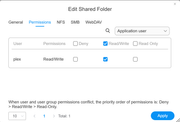
I can not browse to sub folders below /Volume1/_Movies-Archive
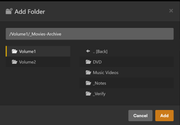
First image shows folder share /Volume1/_Movies-Archive. It shows sub-folders in right pane.
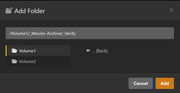
Second image shows one level deep sub folder share /Volume1/_Movies-Archive/Verify. Notice that Plex shows NO sub-folders in right pane. There should be several sub-folders.
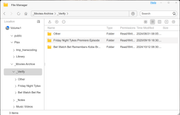
In the third final image totice that Plex shows NO sub-folders in right pane. There are several sub-folders. It appears application user (plex) can not transverse folder below first folder share /Volume1/_Movies-Archive
It appears that the Plex application user account (plex) cannot browse or transverse the sub-folders below the TNAS share.
Where is the Plex application user account (plex)? I do not see it in Users. I only see it when assigning shared folder permissions for application users.
My Plex Media Server.log file has access errors
Oct 12, 2024 09:32:42.033 [139686843248384] DEBUG - * Scanning /Volume1/_Movies-Archive/_Verify
Oct 12, 2024 09:32:42.033 [139686843248384] ERROR - Failed to create iterator to "/Volume1/_Movies-Archive/_Verify": Permission denied
Oct 12, 2024 09:32:42.033 [139686843248384] DEBUG - * Marking media not available in /Volume1/_Movies-Archive/_Verify
However, I have assigned application user (plex) read/write permission on the share /Volume1/_Movies-Archive
I can not browse to sub folders below /Volume1/_Movies-Archive
First image shows folder share /Volume1/_Movies-Archive. It shows sub-folders in right pane.
Second image shows one level deep sub folder share /Volume1/_Movies-Archive/Verify. Notice that Plex shows NO sub-folders in right pane. There should be several sub-folders.
In the third final image totice that Plex shows NO sub-folders in right pane. There are several sub-folders. It appears application user (plex) can not transverse folder below first folder share /Volume1/_Movies-Archive
Re: Plex library is empty, but has access to NAS media!
I have the F2-424 TOS 6.0.507 NAS hardware


Re: Plex library is empty, but has access to NAS media!
I have a TerraMaster F4-424 Pro NAS with TOS version 5.1 145-00320 (the latest download on the download site) and have experienced similar issues to those above.
I download the Plex app (v. 4.133.0) via the TOSS App Centre and installed it. I created a shared folder "Multimedia" and set permissions to allow the user group "media" to access the share (and its contents) with read/write permissions. In the Multimedia folder, I have subfolders for Movies and TV. As part of the Plex installation, I created a library for Movies and selected the Multimedia > Movies folder and then a library for TV and selected the Multimedia > TV folder.
I finished the installation and on the panel on the left side of the Plex media server screen there is a triangle with an ! in it beside icon for Movies with TNAS-B62D (the default name for the NAS) beneath it, TV Shows with TNAS-B62D beneath it and, when I click on More, beside the references to Terramaster NAS and TNAS-B62D. When I click on any one of the icons or the Terramaster NAS or TNAS-B62D, the main screen says:
Terramaster NAS is currently unavailable.
Verify you have a network connection and that the server is online, or see our troubleshooting tips for further assistance.
Retry connection.
The message makes no sense since the server is on the NAS and I have an internet connection. Both the Plex application and the Multimedia folders are on the same volume. I tried installing the application files on the SSD NVMe disk, but experienced the same issue.
Also, in the panel on the left side of the Plex media server screen, there is a second icon for both Movies and TV, with TNAS-B62D beneath them, and when you click on either of them, the main screen says " "Movies" is empty" or " "TV Shows" is empty"
I tried deleting Plex (several times) and and manually deleted the folders that it left behind on the NAS. It did not solve the problem.
At a loss as to what to try next.
I have an old Drobo network NAS (which the F4-424 is replacing) and Plex worked on it without any issues.
I download the Plex app (v. 4.133.0) via the TOSS App Centre and installed it. I created a shared folder "Multimedia" and set permissions to allow the user group "media" to access the share (and its contents) with read/write permissions. In the Multimedia folder, I have subfolders for Movies and TV. As part of the Plex installation, I created a library for Movies and selected the Multimedia > Movies folder and then a library for TV and selected the Multimedia > TV folder.
I finished the installation and on the panel on the left side of the Plex media server screen there is a triangle with an ! in it beside icon for Movies with TNAS-B62D (the default name for the NAS) beneath it, TV Shows with TNAS-B62D beneath it and, when I click on More, beside the references to Terramaster NAS and TNAS-B62D. When I click on any one of the icons or the Terramaster NAS or TNAS-B62D, the main screen says:
Terramaster NAS is currently unavailable.
Verify you have a network connection and that the server is online, or see our troubleshooting tips for further assistance.
Retry connection.
The message makes no sense since the server is on the NAS and I have an internet connection. Both the Plex application and the Multimedia folders are on the same volume. I tried installing the application files on the SSD NVMe disk, but experienced the same issue.
Also, in the panel on the left side of the Plex media server screen, there is a second icon for both Movies and TV, with TNAS-B62D beneath them, and when you click on either of them, the main screen says " "Movies" is empty" or " "TV Shows" is empty"
I tried deleting Plex (several times) and and manually deleted the folders that it left behind on the NAS. It did not solve the problem.
At a loss as to what to try next.
I have an old Drobo network NAS (which the F4-424 is replacing) and Plex worked on it without any issues.