

ps: If you go back several pages in this thread, you will see
m471a1k43cb1-ctd 8gb ddr4 2666mhz
mentioned as not working, but that was, I believe, before TM policy change on 3rd party RAM. You may just have to try it and see.
How to add RAM module to TerraMaster NAS
Re: How to add RAM module to TerraMaster NAS
F5-221 TOS7.0.1278 - 4x4TB (Ironwolf) Traid
F2-424 TOS7.0.1278 - 2x500GB nvme (P3) Traid, 2x6TB HDD (HGST) Traid
F2-221 TOS7.0.1278 - 1x3TB Ext4, 1x4TB Btrfs
F2-425+ TOS7.0.1278 - 2x500GB nvme (P3) Traid, 2x6TB HDD (EXOS) Traid
F2-424 TOS7.0.1278 - 2x500GB nvme (P3) Traid, 2x6TB HDD (HGST) Traid
F2-221 TOS7.0.1278 - 1x3TB Ext4, 1x4TB Btrfs
F2-425+ TOS7.0.1278 - 2x500GB nvme (P3) Traid, 2x6TB HDD (EXOS) Traid

Re: How to add RAM module to TerraMaster NAS
If it is still of any interest here, I can confirm that
Sk hynix 4 GB DDR4-3200 is running without any problems in my F4-423 !
Sk hynix 4 GB DDR4-3200 is running without any problems in my F4-423 !


Re: How to add RAM module to TerraMaster NAS
Is it possible to add to an F5-422? Also is there a slot to add an M.2 drive?
Re: How to add RAM module to TerraMaster NAS
99% certain the memory can be upgraded (within limits). 99% certain there is no M2 slot.
F5-221 TOS7.0.1278 - 4x4TB (Ironwolf) Traid
F2-424 TOS7.0.1278 - 2x500GB nvme (P3) Traid, 2x6TB HDD (HGST) Traid
F2-221 TOS7.0.1278 - 1x3TB Ext4, 1x4TB Btrfs
F2-425+ TOS7.0.1278 - 2x500GB nvme (P3) Traid, 2x6TB HDD (EXOS) Traid
F2-424 TOS7.0.1278 - 2x500GB nvme (P3) Traid, 2x6TB HDD (HGST) Traid
F2-221 TOS7.0.1278 - 1x3TB Ext4, 1x4TB Btrfs
F2-425+ TOS7.0.1278 - 2x500GB nvme (P3) Traid, 2x6TB HDD (EXOS) Traid
-
000joshua000

- Posts: 9
- Joined: 21 Sep 2024, 13:49

Re: How to add RAM module to TerraMaster NAS
Hello,
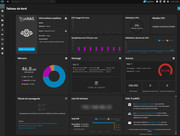
For those who have The TerraMaster F8 SSD Plus, it is indicated in the documentation that this NAS has a maximum memory capacity of 32Gb (1x 32Gb). However, in my MinisForum MS-01, it was specified that the maximum capacity was 64Gb (2x32Gb) and I installed 96Gb (2x48Gb) without problem. So I decided to test a 48Gb stick on the TerraMaster F8, and it works perfectly!!!
For those who have The TerraMaster F8 SSD Plus, it is indicated in the documentation that this NAS has a maximum memory capacity of 32Gb (1x 32Gb). However, in my MinisForum MS-01, it was specified that the maximum capacity was 64Gb (2x32Gb) and I installed 96Gb (2x48Gb) without problem. So I decided to test a 48Gb stick on the TerraMaster F8, and it works perfectly!!!
-
HarrisBockoven

- Posts: 5
- Joined: 20 Apr 2024, 05:58

Re: How to add RAM module to TerraMaster NAS
This is an old topic, but I just purchased a F2-424 Max. Does that have issues with 3rd party ram or is the problem resolved? 3rd party is cheaper.
Thank you.
Thank you.

Re: How to add RAM module to TerraMaster NAS
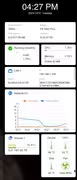
I have a Terramaster F8 SSD Plus and I have successfully upgraded to 48GB RAM with Crucial RAM 48GB DDR5 5600MHz (or 5200MHz or 4800MHz) Laptop Memory CT48G56C46S5000joshua000 wrote: ↑25 Nov 2024, 09:44 Hello,
For those who have The TerraMaster F8 SSD Plus, it is indicated in the documentation that this NAS has a maximum memory capacity of 32Gb (1x 32Gb). However, in my MinisForum MS-01, it was specified that the maximum capacity was 64Gb (2x32Gb) and I installed 96Gb (2x48Gb) without problem. So I decided to test a 48Gb stick on the TerraMaster F8, and it works perfectly!!!


Re: How to add RAM module to TerraMaster NAS
Hi gosciak,gosciak wrote: ↑01 Jan 2025, 05:32I have a Terramaster F8 SSD Plus and I have successfully upgraded to 48GB RAM with Crucial RAM 48GB DDR5 5600MHz (or 5200MHz or 4800MHz) Laptop Memory CT48G56C46S5000joshua000 wrote: ↑25 Nov 2024, 09:44 Hello,
For those who have The TerraMaster F8 SSD Plus, it is indicated in the documentation that this NAS has a maximum memory capacity of 32Gb (1x 32Gb). However, in my MinisForum MS-01, it was specified that the maximum capacity was 64Gb (2x32Gb) and I installed 96Gb (2x48Gb) without problem. So I decided to test a 48Gb stick on the TerraMaster F8, and it works perfectly!!!
Would you check what firmware version of your F8 SSD Plus machine? I have no luck to install 48GB RAM to my F8 SSD Plus.
Tim
Re: How to add RAM module to TerraMaster NAS
Hi gosciak,gosciak wrote: ↑01 Jan 2025, 05:32I have a Terramaster F8 SSD Plus and I have successfully upgraded to 48GB RAM with Crucial RAM 48GB DDR5 5600MHz (or 5200MHz or 4800MHz) Laptop Memory CT48G56C46S5000joshua000 wrote: ↑25 Nov 2024, 09:44 Hello,
For those who have The TerraMaster F8 SSD Plus, it is indicated in the documentation that this NAS has a maximum memory capacity of 32Gb (1x 32Gb). However, in my MinisForum MS-01, it was specified that the maximum capacity was 64Gb (2x32Gb) and I installed 96Gb (2x48Gb) without problem. So I decided to test a 48Gb stick on the TerraMaster F8, and it works perfectly!!!
Would you check what firmware version of your F8 SSD Plus machine? I have no luck to install 48GB RAM to my F8 SSD Plus.
Tim